

Impersonation Scams: How to Spot and Stop Them

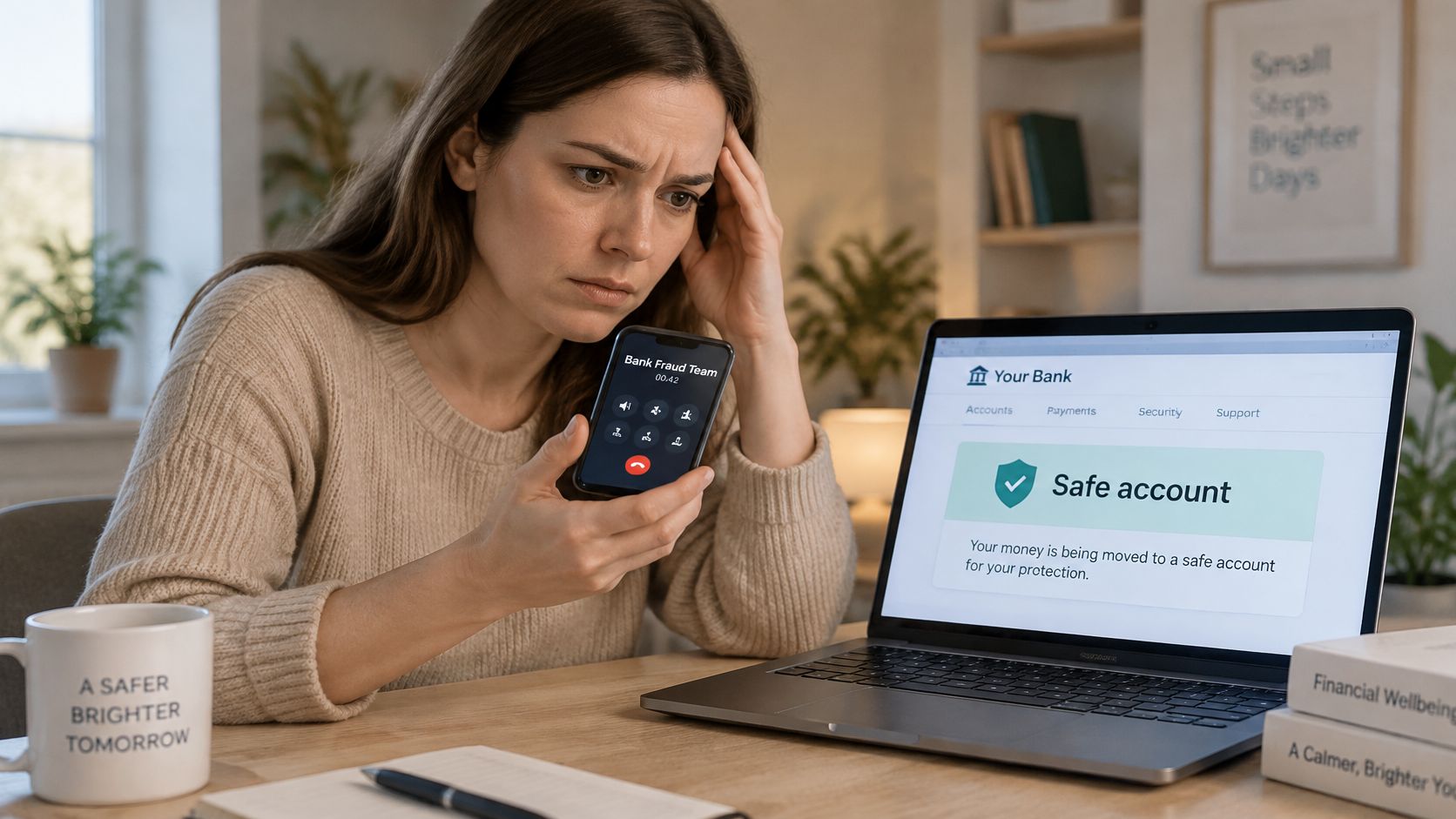
Your phone rings while you're making dinner. The caller says they're from your bank's fraud team, they've spotted a suspicious payment, and you need to move your money to a safe account right now. The voice sounds calm and professional. The number on your screen looks familiar. You're scared, and that fear is exactly what impersonation scams are built on. This guide builds your defense step by step, in plain language, so you can spot the pattern, pause the pressure, and verify before money or information leaves your hands.
How Impersonation Scams Work and Why They Succeed
Say the caller above stays on the line while you open your banking app. They tell you not to hang up, because the fraudsters are watching your account. They give you a new account number and stay patient, almost helpful, until you press send.
An impersonation scam is fraud where a criminal pretends to be a person or organization you already trust, so the request feels legitimate before you've checked anything. Think of a forged ID badge. A guard lets someone through because the badge looks official, not because anyone checked it against a register. The badge is the disguise. The unchecked door is the actual weakness.
The Two Stage Pattern
Most attacks follow the same order. First, the criminal establishes authority with a believable identity, a bank, a government agency, your boss, your child. Second, they manufacture urgency so you skip checking. A warrant, a frozen account, a deal that closes in an hour. Urgency isn't decoration. It's the tool that stops you from making one independent phone call.
The fake gets your attention. The rushed decision is what costs you money.
That second stage is getting stronger. AI tools can now copy a familiar voice from a short clip and generate a face on a video call, so your ear and your eye aren't reliable identity checks anymore. A convincing disguise used to take effort. Now it's cheap, which means the defense has to move from recognizing the person to verifying the request.
How Big the Problem Is
The scale confirms this isn't a handful of nuisance calls. The FTC imposter scams spotlight recorded more than 330,000 reports of business-impersonation scams and nearly 160,000 reports of government-impersonation scams in 2023, with reported consumer losses from the two categories exceeding $1.1 billion. Those losses had been $310 million in 2020, so victims lost more than three times as much in three years. Bank transfers represented approximately 40% of reported losses in 2023, while cryptocurrency represented 21%, and both are hard to reverse once sent.
Those numbers only count reports to one U.S. agency, so the true total is higher. If you want the business version of this trick explained in more depth, Gini Help walks through how brand impersonation works when criminals copy a company rather than a person.
Keep one idea in mind for everything that follows. The fraud succeeds when a trusted identity pushes you past your normal checking process. So you'll learn both halves of the defense, the signals that should make you pause and the verification steps that protect you even when the disguise is flawless.
Types of Impersonation Scams Side by Side
Use this table as a matching tool when an unexpected message arrives. Find the row that fits who is claimed, how it reached you, and what it wants you to do.
Common impersonation types and what they ask for
| Impersonation type | Identity claimed | Typical channel | Usual request |
|---|---|---|---|
| Government official | Tax agency, police or federal regulator | Phone call, text or voice message | Pay a fine or fee, or move funds to protect them |
| Bank or payment provider | Fraud team of your bank | Phone call, text or email | Read out a one-time code or transfer funds to a safe account |
| Business executive (CEO fraud) | Your CEO or a senior manager | Email, voice call or video call | Urgent wire transfer or gift card purchase |
| Family member in distress | Child, grandchild or relative | Phone call with a cloned voice | Immediate payment for bail, an accident or a ransom |
| Tech support | Major software or device company | Pop-up warning or phone call | Remote access to the device and payment for a repair |
| Trusted retailer or delivery service | Marketplace, courier or well-known brand | Text message or email with a link | Small fee or card details to release a parcel |
Reading the Rows
Notice how the same script changes costume. A government impersonator wants payment to settle a fine or stop an arrest. A bank impersonator wants a one-time code or a transfer that supposedly protects your money. A CEO impersonator wants an urgent wire, often with secrecy until a deal closes. A family impersonator wants bail or hospital money in the next few minutes.
The tech support version asks for something slightly different, remote access to your computer, then a repair fee. The retailer or courier version starts small, a tiny redelivery fee, because a small request feels harmless and hands over your card details. Small first steps are a feature, not a reassurance.
These impersonation scams overlap heavily with phishing, since both borrow a trusted identity to extract credentials or payment. Small businesses face the same patterns through email and text, and IT Cloud Global explains how to prevent phishing attacks at your SMB with staff habits and technical controls. For the broader manipulation techniques behind all of these rows, our guide to social engineering attacks and how they manipulate trust breaks down the psychology.
What a Match Does and Doesn't Mean
The table covers common patterns, not every variant. Criminals invent new combinations constantly, so judge anything unfamiliar by the same three questions. Who is supposedly contacting you? Did it arrive through a channel you'd expect? What does it want done right now?
A match isn't a verdict. It's a reason to pause and verify. A mismatch proves nothing either, because a new variant won't appear in any table yet. What the match gives you is practical direction. Once you know which identity is being claimed, you know which independent number, app, or person to check with, and that's where the scam usually falls apart.
Real Cases That Show the Pattern
The three cases below are composites. Each one illustrates a typical attack pattern rather than a named victim, so you can focus on the decision points instead of the people.
Case One The Courier at the Door
A retiree gets a call from someone claiming to be a federal agent. The caller says a warrant has been issued in her name and her bank account is tied to a crime. She can avoid arrest, he explains, by withdrawing cash and handing it to a courier who will keep it safe during the investigation. She's told to stay on the phone at the bank and say the withdrawal is for home repairs if staff ask.
She could have stopped at several points. A real agency doesn't collect cash through couriers, the instruction to lie to bank staff was a secrecy demand, and one call to the agency's published number would have ended it. The lesson is that the payment method itself was the loudest alarm.
Case Two The Video Call From the Chief Executive
A finance clerk receives an email about a confidential acquisition, then joins a video call. The person on screen looks and sounds like the chief executive. He asks for an urgent transfer to a new supplier and stresses that nobody else can know until the deal closes. The clerk skips the usual second approval because the boss appears to be asking in person.
The stop points were the new payee, the skipped approval, and the secrecy. A call to the executive's known number, or a walk down the corridor, would have broken the spell. The lesson is that a convincing face on screen replaced a process that existed for exactly this situation.
Case Three The Call Every Parent Fears
A parent answers a call and hears his daughter's voice, crying. She says she's been in an accident and needs bail money now. A second voice, supposedly a lawyer, gives payment instructions and warns him not to tell anyone or call her phone, because it's been confiscated. He sends the money within the hour.
He could have stopped by calling his daughter's real number, texting another family member, or asking a question only she could answer. The instruction not to contact her directly was designed to block the one check that worked. The lesson is that panic plus isolation is the attacker's whole strategy.
The Shared Shape
Look at what all three have in common. Each request arrived wearing a trusted identity. Each one steered the victim away from the normal verification path, through urgency, secrecy, or both. Nobody in these cases lacked intelligence. They lacked a pause.
That's the encouraging part. You don't need to outsmart the disguise. You need to notice when someone is rushing you past a check, and insist on the check anyway.
Warning Signs in Requests, Voices and Video
Start with the signals that need no technology at all. They're visible in almost every attack, and they appear before any money moves.
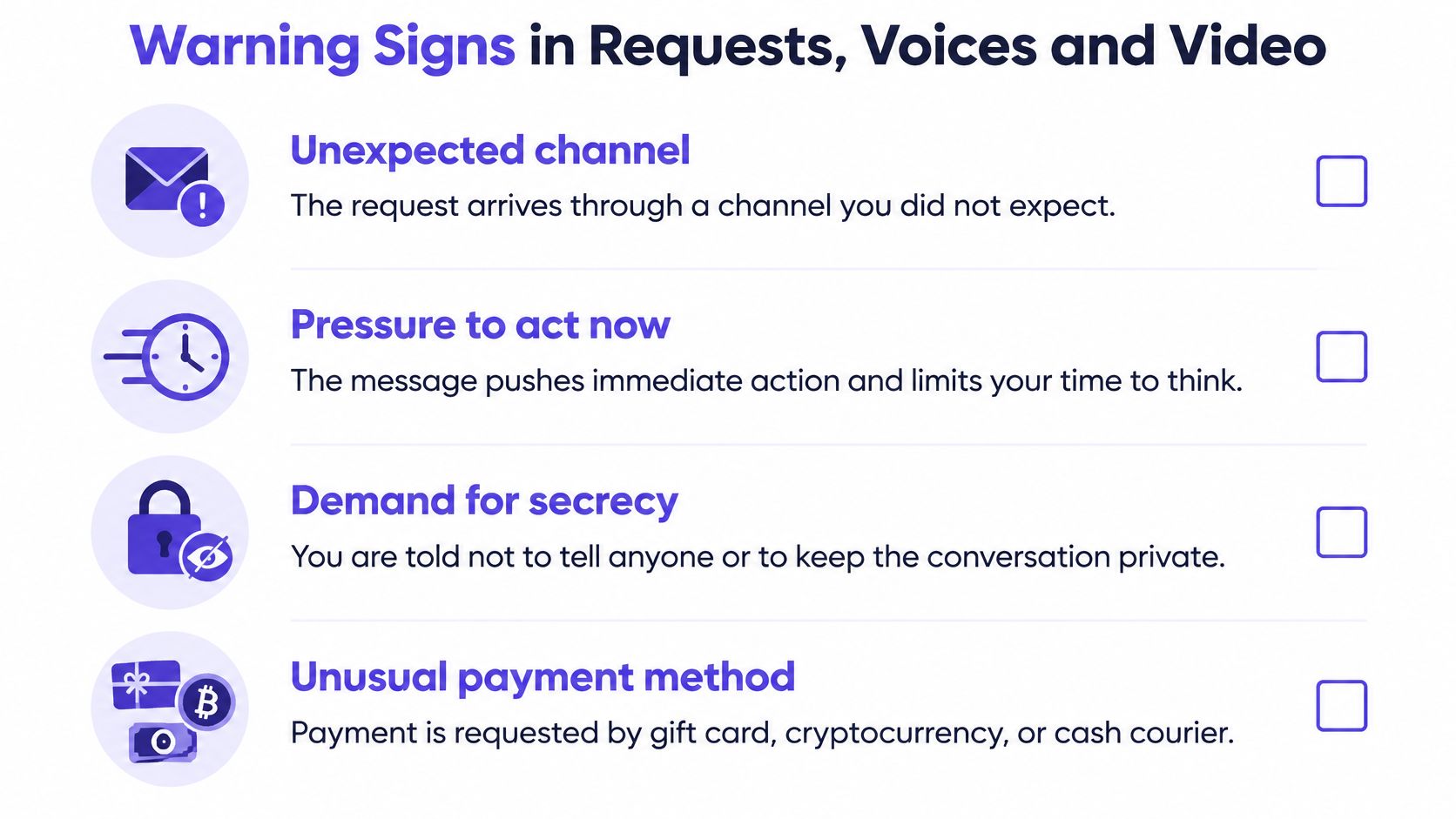
- Unexpected channel. Your bank texts from a new number, or your boss emails from an address you've never seen.
- Pressure to act now. Every minute of delay supposedly makes things worse.
- Demand for secrecy. You're told not to tell family, colleagues, or bank staff.
- Unusual payment method. Gift cards, cryptocurrency, or cash handed to a courier.
- Skipped approval. The request asks you to bypass a step that normally applies.
Any one of these justifies a pause. Two together should stop the transaction until you've verified independently.
Signals Inside the Media Itself
On voice and video calls, look for lip movement that drifts from the speech, flat or metallic audio, unnatural blinking, flicker around the edges of the face, and abrupt jumps between frames. In submitted video files, missing or mismatched metadata and signs of repeated re-encoding add to the picture. The FBI has warned that attackers use AI-generated text and voice messages while posing as senior U.S. officials, in reporting covered by The Register on the FBI deepfake voice warning, and it cautions that synthetic content may be difficult to identify by listening alone.
Treat every media signal as a risk signal, not proof. Compression, low resolution, and re-encoding can create the same artifacts in genuine footage, and a clean-looking clip can still be fake. Layered analysis beats any single check, which is the same logic behind our overview of AI scams and synthetic media fraud. Dedicated tools such as AI Video Detector form one layer for suspicious clips, since its listed use cases include viral misinformation, impersonation deepfakes, travel scams, dating safety, fake listings and identity fraud.
This short video walks through how these warning signs appear in practice.
Detection signals and their limits
| Signal | What to look for | Limit |
|---|---|---|
| Facial and lip movement | Lip motion out of sync with speech, unnatural blinking, flicker at face edges | Compression and low resolution can create the same artifacts in real footage |
| Audio | Flat or metallic tone, odd breathing pauses, unusual spectral patterns | Noisy calls and poor connections can hide or mimic these traits |
| Motion and temporal consistency | Sudden jumps between frames, lighting or objects that shift abruptly | Re-encoding and short clips can trigger false flags |
| Metadata and encoding | Missing or mismatched creation data, repeated re-encoding | Platforms often strip metadata, so its absence proves little |
| Context and behavior | Unexpected channel, unusual request, pressure to keep secrecy | Strongest signal, and it needs no media analysis at all |
The last row matters most. A strong media signal should lead you to verification, not to a confident verdict either way.
Verification Steps to Run Before Any Payment
These steps work even when the voice is perfect and the video is flawless, because none of them depend on spotting the fake. The stakes justify the friction. The FTC release on rising impersonation losses among older adults reports that, from 2020 to 2024, reports from adults aged 60 and older who lost at least $10,000 to impersonation scams increased more than fourfold, and reported losses exceeding $100,000 rose from $55 million to $445 million.
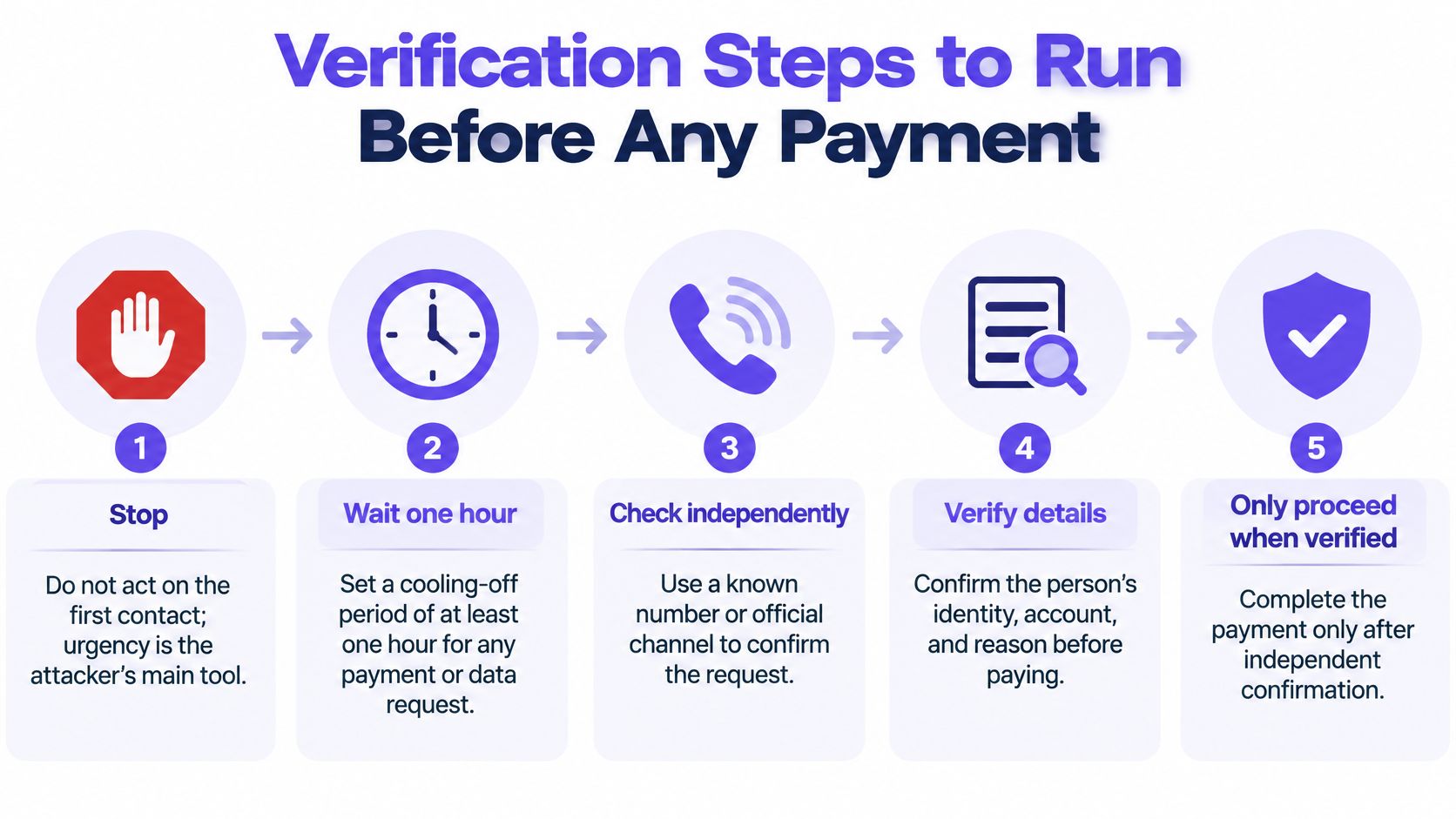
Stop and don't act on the first contact. Urgency is the attacker's main tool, and doing nothing for a few minutes costs you nothing. A legitimate problem will still exist after you've checked.
Set a cooling-off period of at least one hour for any payment or data request, longer for large sums. Time dissolves manufactured panic and gives the legitimate person a chance to surface. Remember that moving money to "protect it" is the scam, not the solution.
Hang up and call back on a number you found yourself. Use the number on your bank card, a statement, or the official website, never the number the caller supplied or the one on your caller ID. This single step defeats most impersonation scams, because the criminal controls their channel, not the genuine one.
Confirm through a second channel you control. Text your child's known number. Message your boss on the platform you normally use. Ask a relative in person. Two channels are far harder to fake simultaneously than one.
Practical rule: Verify through contact details you obtained independently, never through details the request itself provided.
Check the payment method. Legitimate agencies and banks don't demand gift cards, cryptocurrency, or cash handed to couriers. An unusual payment method isn't a detail to accommodate. It's evidence about who's really asking.
Ask something only that person could answer. Better still, agree on a family code phrase in advance, a word you'd use in a genuine emergency. A voice clone can copy sound, but it can't know a secret that was never recorded or posted.
Involve a trusted person before paying. Describe the request out loud to a spouse, friend, or colleague. A second opinion breaks the pressure, because the spell depends on isolation.
Why Each Step Works
Each step removes one advantage the scammer relies on. The pause removes the rushed timeline. The callback removes the fake contact details. The second channel and the code phrase remove the borrowed identity. The trusted person removes the secrecy. Strip away those advantages and the attacker is just a stranger asking for money.
Treat the outcome as decisive. If any step fails, if the bank knows nothing about the problem, if your daughter answers her phone perfectly calm, the transaction ends. Don't negotiate with the original caller about why verification failed. A genuine caller welcomes checks. Only a scammer argues against them.
Protecting Your Organization From Executive Impersonation
A payment request arrives in an executive's name, supported by a convincing voice or video call. Staff may recognize the face and voice, yet those cues alone cannot confirm who sent the request. Deepfake audio and video incidents are increasingly common, so organizations need controls that stop unauthorized payments even when a fake looks convincing.
Build those controls into the payment process:
- Use an internal callback number. Staff should verify payment requests using contact details held by the organization, not a number included in the request.
- Require two approvals. Have two people approve payments and changes to supplier bank details. An executive title should not bypass the process.
- Separate requesting and releasing payments. The person who requests a payment should not be the person who sends it.
- Set transfer limits. Caps on individual transactions can limit the amount one deceived employee can authorize.
- Add a waiting period. Unusual requests, new payees, and changed bank details should wait for a defined period before payment.
Authenticating the Whole Interaction
In a video meeting, an unscripted action or a regularly rotated, pre-agreed phrase can add a check beyond appearance and voice. Pair that check with device and account checks your IT team already uses. No single test is foolproof, so treat these steps as layers rather than proof on their own.
Training should include simulated calls and a clear process for reporting suspected attempts. Many people are unsure where to report a scam, so make the reporting route easy to find. Keep the culture blame-free: anyone should be able to pause a payment, and staff should be thanked for checking a request. For broader defenses against deceptive messages, see these phishing protection insights from Finchum Fixes IT.
For executive-specific procedures, see this guide to CEO fraud prevention for finance teams. A process that blocks an unverified payment can protect an organization even when the impersonation is difficult to detect.
Report and Recover After an Impersonation Attempt
A caller claiming to be a relative asks for an urgent transfer, or a video message from an executive requests payment. Once you suspect impersonation, act quickly and preserve a clear record of what happened.
Contact your bank or payment provider immediately. Ask whether it can stop, freeze, or recall the transaction. If money was sent, make this your first call.
Preserve evidence before deleting anything. Save messages, emails, call logs, payment receipts, and any suspicious video or recording. Keep the original files where possible, since details such as timestamps may help explain what happened.
Secure any compromised accounts. Change affected passwords, turn on multi-factor authentication, and sign out of other sessions. If you shared a security code or granted remote access, treat the account as exposed until you have secured it.
Notify the impersonated organization. Use contact details from its official website, not the suspicious message. The organization may be able to warn others or address a fake account, number, or page.
Report the incident to your national fraud authority or the FTC in the United States. Contact local police if money was lost or threats were made. A report creates a record of the incident and may help authorities connect it with related activity.
There is no single reporting route for every case. Contact the financial provider involved, the impersonated organization, and the appropriate fraud-reporting authority. Each can respond to a different part of the problem.
If a suspicious video is part of the evidence, AI Video Detector can analyze it for signs such as inconsistent facial micro-expressions, synthetic audio spectral patterns, and temporal flickering. Treat a detector result as one piece of evidence, not proof of who made the video or what happened. Preserve the original and avoid making further payments until you have checked the request through a trusted channel.
Once the immediate response is underway, keep a record of whom you contacted and what they advised. Save confirmation numbers and copies of reports with the evidence. If the attempt involved an account, review its recent activity and watch for follow-up messages that refer to the incident.
For future emergencies, agree on a family code phrase and save your bank's official number somewhere easy to find. If someone you trust appears in a video asking for money or credentials, pause and verify the request independently before acting.