

Social Engineering Attacks: Types, Signs and Defenses

You're clearing your inbox when a senior colleague asks you to approve something urgent. The message mentions a real project, the sender sounds familiar, and a meeting is about to start. Checking feels like the slow option.
That's the moment social engineering attacks exploit. The useful question isn't just whether a message looks suspicious. It's whether the person has the authority to make the request, whether the request makes sense, and whether you can confirm both independently.
Social Engineering Attack Types Compared
An accounts clerk receives a call from someone claiming to be the CFO. The caller knows a supplier's name and asks for a payment to a replacement bank account before the finance team leaves. Nothing needs to be downloaded for the attack to succeed.
Social engineering means manipulating a person into taking an action that benefits an attacker, rather than relying on breaking into a system. That action might be sharing a password, opening a file, admitting a visitor, or approving a transfer.
Social engineering attack types at a glance
These labels describe different approaches, not separate boxes that attackers stay inside.
| Attack type | How it works | Typical hook | First signal to check |
|---|---|---|---|
| Phishing | Mass message posing as a trusted brand or service | Password reset or overdue invoice | Link domain doesn't match the sender's organization |
| Spear phishing | Targeted message built from the victim's role or contacts | Project file or colleague request | Sender address is a near-match lookalike |
| Business email compromise | Impersonates an executive, vendor, or lawyer to redirect payments | Urgent wire change requested in secrecy | Payment details changed without a prior call |
| Pretexting | Invented scenario used to obtain information or access | Caller claims to be IT, an auditor, or police | Unsolicited request for credentials or account details |
| Baiting | Lure such as a free download or a found USB drive | Free software, prize, or leaked file | Installer or media arriving from an unknown source |
| Quid pro quo | Offers help or a service in exchange for access | Fake technical support call | Support help offered by someone who called you first |
| Vishing and deepfake video calls | Voice or video impersonates a known person in real time | Executive asks for an urgent transfer | Request can't be confirmed through a known number |
Phishing describes the delivery tactic. Pretexting describes the story. Business email compromise, often shortened to BEC, describes a business-focused fraud that may use either tactic.
A phishing email might introduce a fake account problem, followed by a pretexting call from supposed support. A baiting USB drive might install credential-stealing software, giving an attacker access to an inbox used for later payment fraud. Vishing means voice phishing; synthetic video can add another impersonation layer to the same conversation.
Use the label to choose the check
Don't spend precious time deciding whether a suspicious interaction qualifies as spear phishing or BEC. Identify what the sender wants you to do and which trusted process should authorize that action.
For a small organization building those processes, Nutmeg Technologies' email security roadmap for small businesses provides useful context for organizing email defenses alongside staff responsibilities.
Match the interaction to the closest row, then inspect the requested action. A genuine-looking message isn't permission to bypass a payment, access, or information-release procedure.
Why Social Engineering Works on Careful People
A visitor doesn't need to pick a lock if someone politely lets them through the door. Social engineering works the same way: the attacker tries to make cooperation feel reasonable.
The doorstep version makes that mechanism easy to recognize.
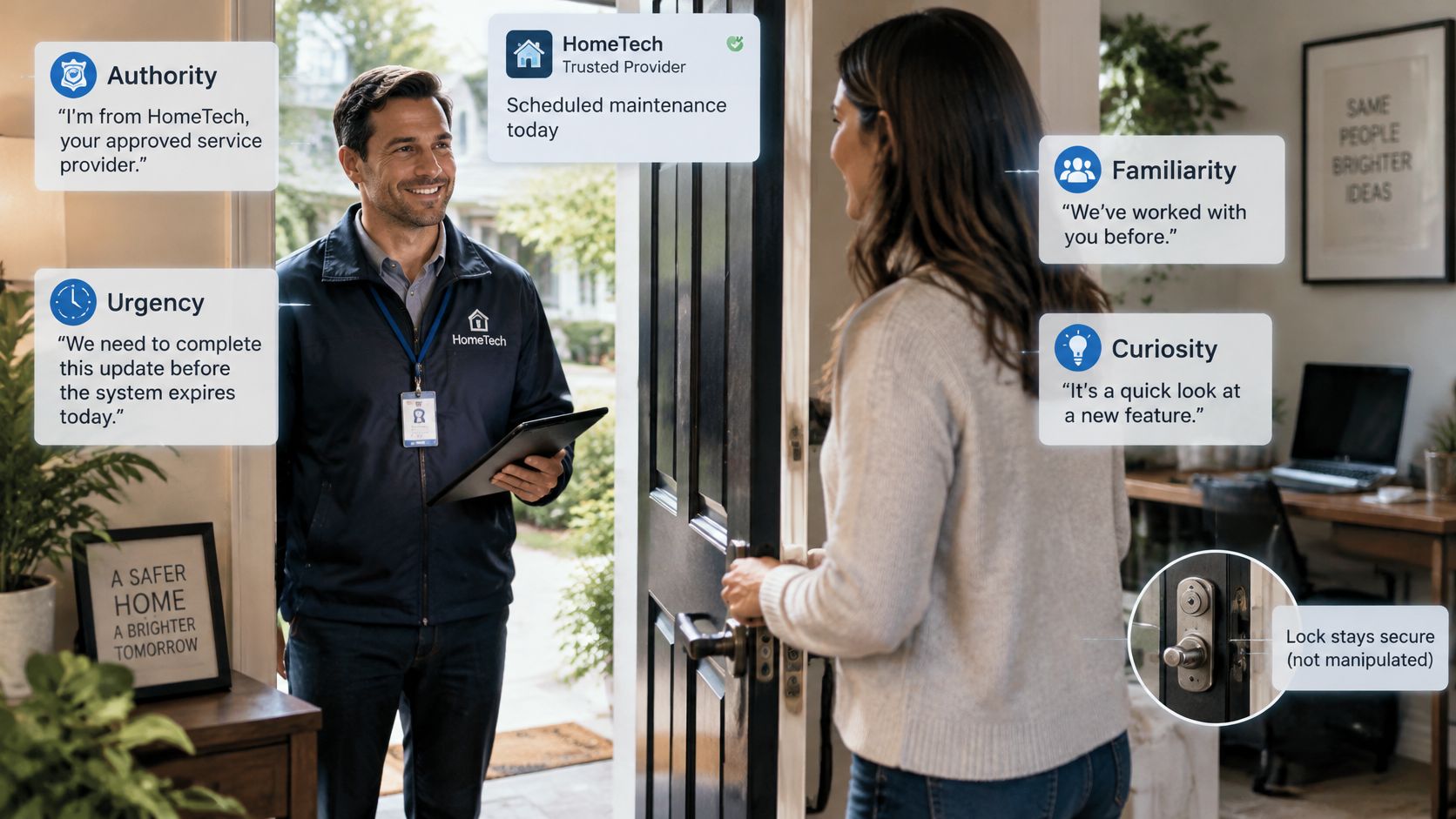
How a believable request becomes pressure
Say a finance employee receives a friendly message referencing a supplier discussion. That uses familiarity: knowledge of ordinary work makes the sender seem connected. The attacker doesn't need a complete biography, just enough context to make the conversation feel expected.
Next comes a call from the supposed finance director. That introduces authority, making disagreement feel like insubordination rather than routine checking. The caller explains that a confidential acquisition requires immediate payment before an external deadline, adding urgency and discouraging consultation.
Finally, the caller asks the employee to help avoid an embarrassing delay. That uses helpfulness. The employee may believe they're protecting the organization, not taking a security risk.
The dangerous turn happens when these social pressures replace the normal basis for approval. A person who would reject an unexplained transfer may accept the same transfer when wrapped in a plausible business story.
This video provides another way to examine the interaction.
When repetition wears down judgment
MFA prompt bombing applies pressure through repeated login approval notifications. In social-engineering incidents, Verizon's 2025 Data Breach Investigations Report recorded MFA prompt bombing in 14% of incidents, compared with 4% for other highlighted MFA-bypass techniques, including adversary-in-the-middle attacks, password dumping, and SIM-swapping-related hijacking.
A tired user may approve a request just to stop the interruptions. If a fake support caller then claims the notifications are part of a repair, the attacker combines repetition with authority and a helpful-sounding explanation.
This doesn't require the victim to be careless. It requires the attacker to make the wrong action feel like the quickest way to resolve a legitimate problem.
Practical rule: A request combining authority, urgency, and secrecy is a verification event, not a judgment about the requester's honesty.
Red Flags to Check Before You Act
A red flag tells you where to investigate. It doesn't establish that someone is a criminal, and its absence doesn't establish that a request is safe.
Group the clues into channel signals, content signals, and pressure signals. That keeps you focused on observable details rather than whether the sender seems friendly or convincing.
Channel and content signals
Channel signals concern where the interaction came from and where the sender wants it to go. Content signals concern what they want changed, disclosed, or approved.
| Cue | Single check |
|---|---|
| Unexpected contact from a senior person or new vendor | Call back on a number already held in your directory |
| Pressure to act before anyone can check | Set a verification deadline and don't act before the check is complete |
| Request for secrecy | Confirm with a second approver through the documented channel |
| Change to payment or bank details | Confirm the change by callback before updating any record |
| Channel switch, such as email moved to a messaging app | Continue on the original documented channel |
| Link or attachment whose domain doesn't match the sender | Type the known service address yourself instead of clicking |
| Request to read out a one-time code or approve a login prompt | Refuse to share authentication codes or approve a login you didn't initiate |
| Video lip movement lagging the audio, unnatural blinking, or a shifting background | Hang up and call back, treating the signal as triage rather than proof |
| Request from a supplier, contractor, or cloud provider | Verify against the vendor's known contact before acting |
A matching email domain isn't enough by itself. An attacker may control a genuine mailbox, so the decisive check for a bank-account change concerns the transaction, not just the sender address.
Likewise, video lag can come from an ordinary connection problem. An odd blink or shifting background should prompt an independent check, not an accusation.
Pressure signals and outside relationships
These warning signs belong in a team's everyday approval checklist.
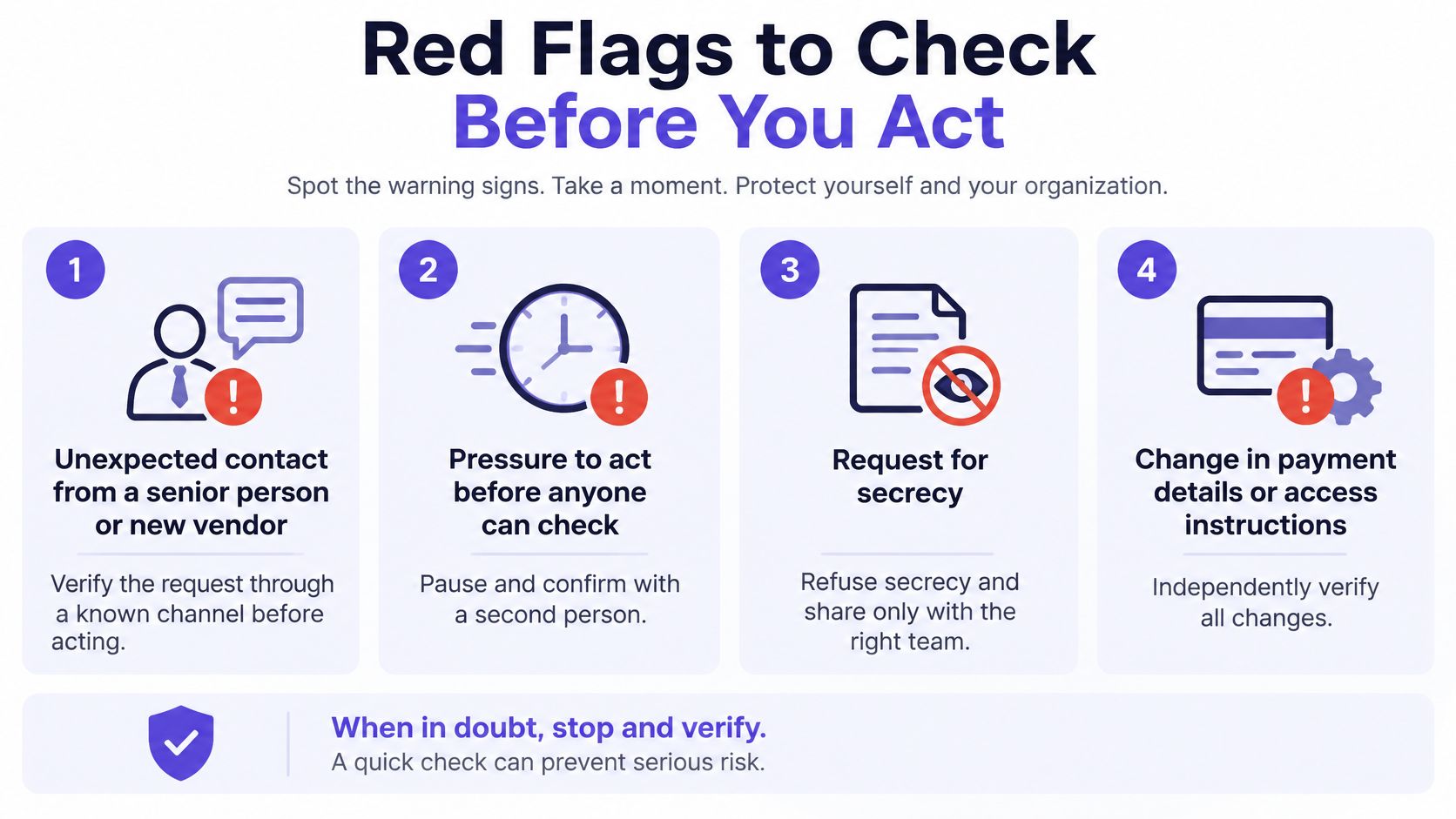
Confidentiality and secrecy aren't identical. A legitimate confidential matter can still go through designated finance, legal, or security reviewers. A demand to exclude every authorized checker is a reason to stop.
External contacts deserve the same scrutiny as internal leaders. Verizon's 2025 DBIR executive summary reports that third-party involvement in breaches doubled from 15% to 30%, demonstrating why suppliers, contractors, and service providers belong inside verification procedures.
For email-specific practice, CloudOrbis Inc.’s guide to employee training to spot phishing emails can help teams rehearse sender and link checks. Pair recognition exercises with an explicit action, such as reporting the message or opening the service through a saved bookmark.
One cue alone isn't proof. Several independent cues justify stopping, but don't turn that into a scoring game: an unsolicited login approval or unverified bank-detail change warrants a pause on its own.
The Scale of Social Engineering Losses
Reported scale of social engineering and impersonation fraud
The figures below measure different things. Complaint totals, exposed losses, and breach shares shouldn't be added together or treated as interchangeable estimates.
| Measure | Figure | Period | Source |
|---|---|---|---|
| All IC3 complaints | 859,532 complaints, $16.6 billion reported losses | 2024 | FBI IC3 annual report |
| IC3 complaints with actual loss | 256,256 complaints, average reported loss $19,372 | 2024 | FBI IC3 |
| Business email compromise complaints | 21,442 complaints, about $2.77 billion reported losses | 2024 | FBI IC3 BEC figures |
| Business email compromise since 2013 | 305,033 incidents, $55.5 billion exposed losses | October 2013 to December 2023 | FBI IC3 |
| Breaches involving the human element | About 60% of breaches | 2025 report | Verizon DBIR |
| Social engineering attacks targeting privileged accounts | 66% of attacks in the incident-response dataset | 2025 incident-response data | Palo Alto Networks Unit 42 |
| Third-party involvement in breaches | Rose from 15% to 30% | 2025 report | Verizon DBIR |
IC3 figures reflect complaints received by U.S. authorities, not total losses worldwide. Its all-category totals include crimes beyond social engineering, and exposed losses in the historical BEC measure aren't the same measure as confirmed money lost.
The breach reports also have different scopes. Human involvement doesn't mean every affected person fell for a phishing email, and an incident-response dataset isn't a census of every attack. Read these figures as evidence of substantial exposure, not as a prediction of your organization's odds.
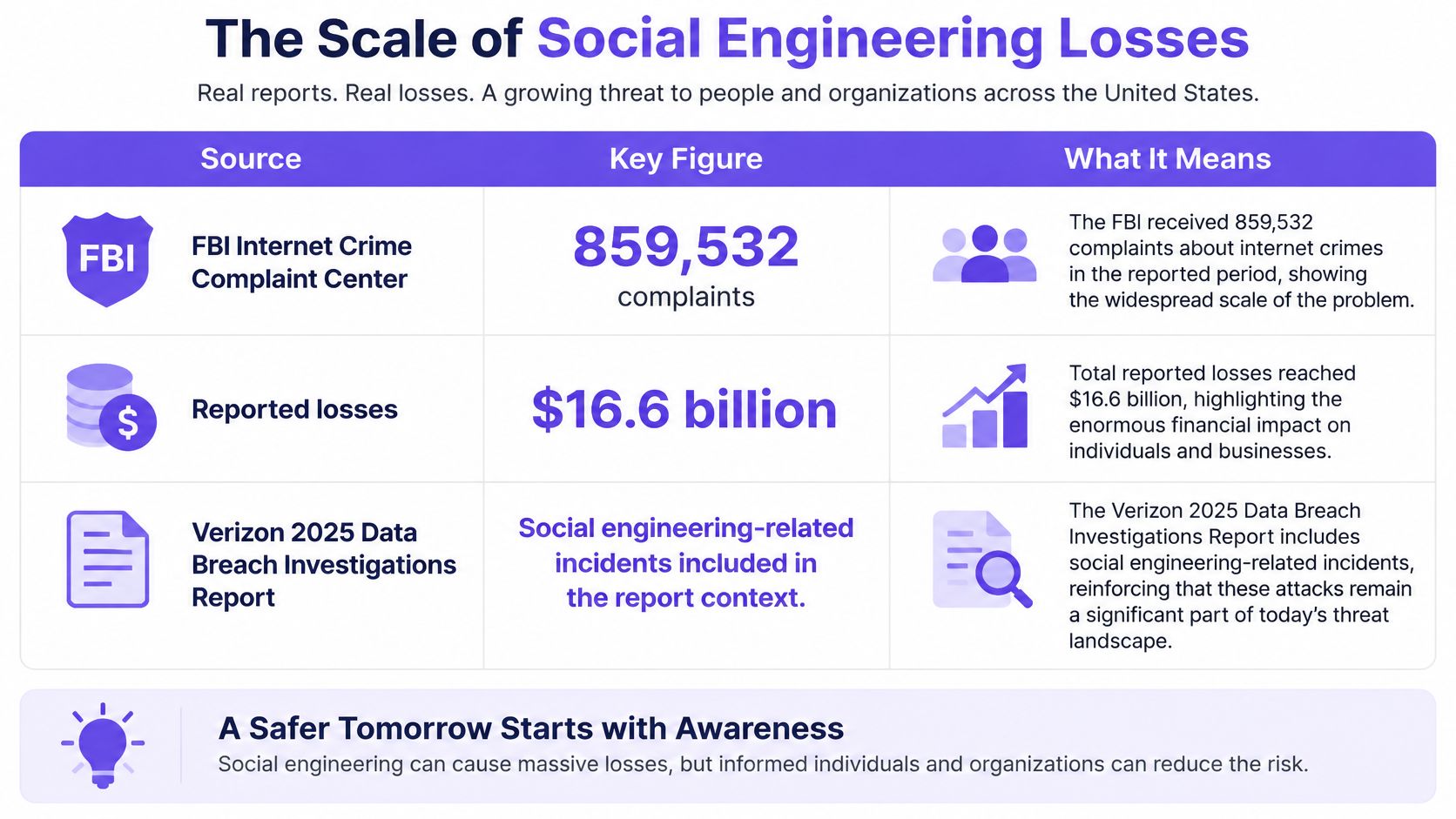
Why payment controls matter
BEC deserves particular attention because a fraudulent instruction doesn't need malicious code. A message containing only text and a bank account may contain nothing for a malware scanner to detect.
Consider a supplier-payment scenario. The attacker sends a plausible explanation for a bank change, the employee updates the supplier record, and an otherwise legitimate invoice is paid to the wrong destination. The failure isn't necessarily in the invoice or payment software. It's in accepting an unverified instruction.
That changes where an organization should invest effort:
- Vendor records: Separate bank-detail maintenance from invoice processing.
- Payment approval: Make the approver inspect the destination, not just the amount.
- Exceptions: Require an accountable reviewer when someone requests a departure from normal procedure.
- Audit records: Preserve the evidence used to authorize a change.
Synthetic media can make the instruction more persuasive without changing the underlying control problem. Our guide to deepfake fraud examines that impersonation context.
Treat impersonation fraud as a payment-control problem, not merely an employee-awareness problem.
Training helps a clerk notice uncertainty. A well-designed approval process ensures that uncertainty doesn't become an irreversible transfer just because the clerk is busy, intimidated, or mistaken.
How to Verify a High-Stakes Request
Use a defined routine whenever someone requests a payment, sensitive data release, or access change. Apply it to the people who can authorize those actions, not just the employees who receive suspicious emails.
In Palo Alto Networks Unit 42's 2025 incident-response data, 66% of social engineering attacks targeted privileged accounts. That makes payment, administration, and data-release authority sensible places to concentrate verification controls.
A routine that separates contact from authorization
Pause the requested action. Don't approve it inside the conversation that introduced it, because the attacker may control that entire interaction. Explain that urgent requests still follow the documented verification process.
Call through a trusted route. Hang up and use a number already held in your approved directory, not one supplied in the message or displayed by caller ID. For unusually sensitive matters, add another established route or in-person confirmation rather than relying on a familiar voice.
Confirm the actual transaction. Ask the requester to state the amount, destination account, purpose, and relevant invoice or case reference through the independent channel. A vague confirmation that they sent a message doesn't confirm what you're being asked to authorize.
Require independent approval. Set an internal threshold for payments needing a second approver, and require that approval for every bank-detail change. Give the reviewer the supporting records so they can evaluate the request rather than repeat the first person's decision.
Compare the request with the documented workflow. Check who normally initiates the action, which system records it, and what evidence is required. If the request introduces an unfamiliar exception, route it to the process owner instead of improvising permission.
Protect login approvals from fatigue. Have IT enable number matching where supported, rate limits, denial alerts, and temporary lockouts after repeated unsolicited prompts. These controls make repeated requests harder to use as pressure and give defenders a signal to investigate.
Record the verification. Log who confirmed which details, when they did so, and which channel they used. Attach that record to the payment, access ticket, or release authorization so a later reviewer can reconstruct the decision.
The routine should remain visible wherever approvals happen.
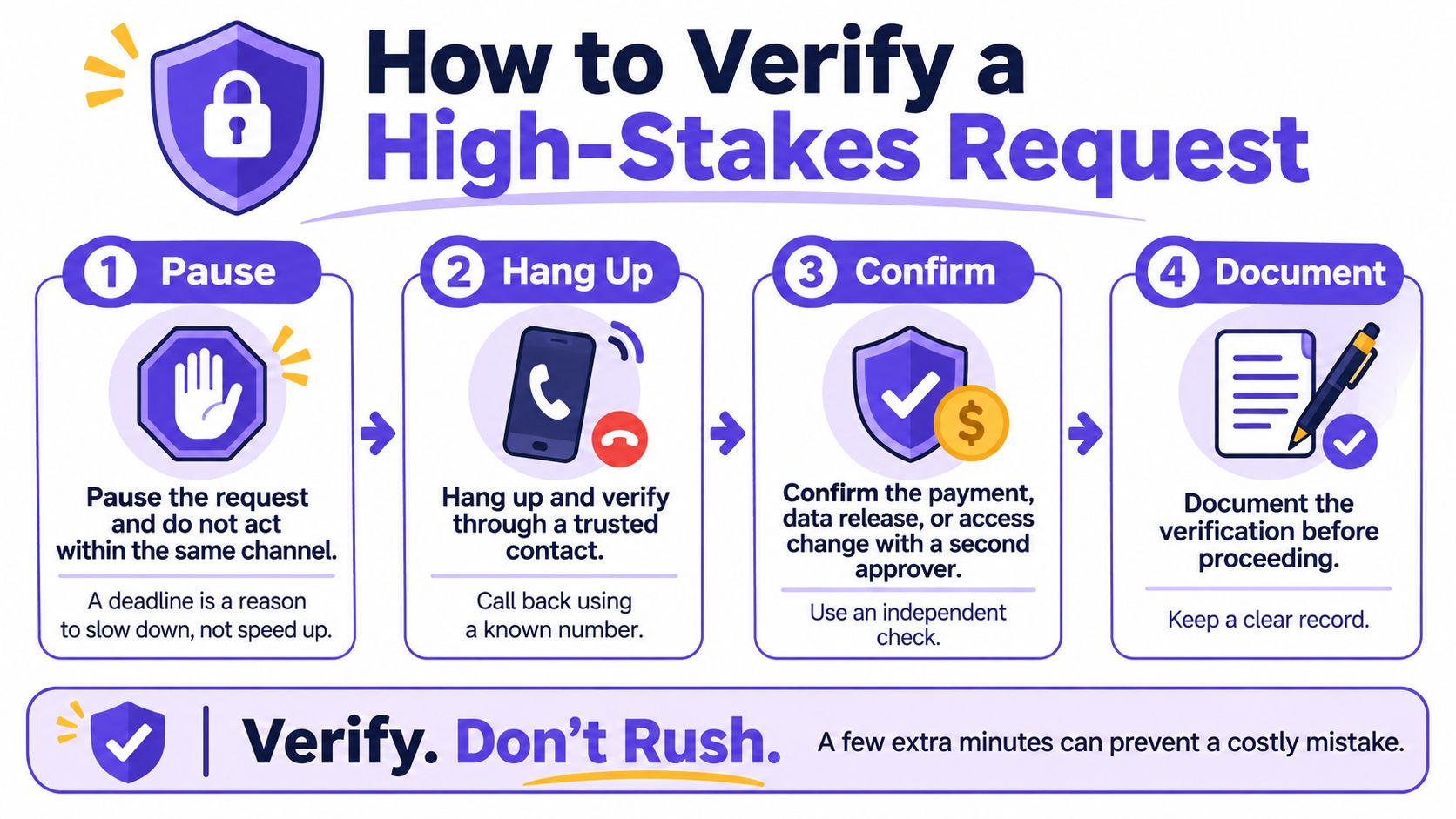
Make exceptions harder to exploit
A genuine executive may be impatient. Give employees an escalation route that reaches an authorized backup rather than forcing them to choose between ignoring the executive and abandoning the process.
A second approver should also be independent of the suspicious conversation. Adding another person to an attacker-arranged call doesn't create an independent check.
For leadership-related payment scenarios, use our CEO fraud prevention guidance to inform the approval procedure. Write the procedure around authority and transaction details, not around whether someone recognizes a face.
No single communication should directly authorize an irreversible action. If media analysis returns a high-confidence score, a human reviewer still needs to establish what that score means and whether the request has been independently authorized.
Verifying Suspicious Video and Audio Evidence
A detection result isn't proof of identity, context, or truth. An unmanipulated clip can still be staged, old, selectively edited, or attributed to the wrong event.
Authenticity assessment therefore needs provenance, meaning where the file came from, and chain of custody, meaning the documented history of who acquired and handled it. It also needs source verification and corroborating evidence for the claim being made.
First actions and evidence by role
Treat these sign-off roles as a starting template to adapt to your institution's actual responsibilities.
| Role | First action | Evidence to preserve | Sign-off before acting |
|---|---|---|---|
| Newsroom | Contact the purported source through a known channel | Original file, hash values, upload path, and timestamps | Standards editor before publishing |
| Legal team | Log chain of custody before any analysis | Original container file, acquisition record, and hash values | Lead counsel before filing |
| Platform moderator | Hold the clip rather than delete it | Original upload, account history, and report log | Trust and safety lead |
| Finance team | Call back on a pre-registered number | Request email or call log and payment details | Second approver before release |
| Educator or school | Verify the instructor through the institution's own channel | Source file and distribution record | Department head |
Preserve evidence within your lawful authority and retention rules. A moderation hold may mean restricting distribution while authorized staff retain the evidence, not leaving potentially harmful footage publicly accessible.
Preserve before analyzing
Keep the original file unaltered and create a separate working copy. Record its acquisition time, source, upload path, and available timestamps, noting time zones where known.
Calculate a SHA-256 hash, a file fingerprint that helps reveal whether the file changes after acquisition. A matching hash demonstrates consistency between copies, not that the original recording was truthful.
Avoid re-encoding the preservation copy. Compression, screenshots, and screen recordings can remove metadata or introduce artifacts that complicate later analysis.
- Compare tracks: Inspect whether audio and visible speech remain aligned throughout.
- Inspect context: Check dates, locations, surrounding footage, and the source's explanation.
- Document limitations: Record missing originals, uncertain timestamps, or unavailable corroboration.
Use detection as triage
Our AI Video Detector can provide a triage layer by returning confidence scores and examining frame, audio, temporal, and metadata irregularities. It identifies signals such as inconsistent facial micro-expressions, synthetic audio spectral patterns, and temporal flickering, but those findings don't establish the speaker's identity or validate their claim.
A low-confidence or inconclusive result should trigger preservation and human review, not automatic deletion. Report the output as analysis, including its limitations; our terms prohibit users from misrepresenting the results provided by the site.
For live interactions, the practices in our video call security guide help place media checks inside an identity-verification workflow.
Publish or act only when the relevant provenance and authorization requirements are satisfied. When a clip can't be independently verified, say that plainly rather than converting uncertainty into a real-or-fake verdict.
What to Do If a Request Was Already Acted On
If money has moved, contact the bank before drafting a lengthy internal explanation. Recovery may depend on prompt action, and a recall request isn't a guarantee that funds can be recovered.
Contain the harm and keep the record
Contact the bank immediately. Report suspected fraud and request a wire recall or the appropriate recovery action for the payment method, because the recipient may move the funds onward. Use the bank's established fraud contact.
Stop related transactions and releases. Suspend pending payments linked to the same instruction and ask the bank whether an account restriction or freeze is appropriate. Notify the data or access owner if the action involved information or permissions rather than money.
Preserve original evidence. Retain messages, full email headers, call logs, payment records, and recordings without editing them. Use a restricted incident repository rather than broadly forwarding sensitive material.
Secure affected accounts. Have IT reset credentials, revoke active sessions, and investigate newly enrolled authentication devices or mailbox forwarding rules. A password change alone may leave another access route intact.
Check the account's reach. Review administrative permissions, shared mailboxes, payment systems, and accessible records to identify further exposure. Prioritize accounts capable of changing other users' access or releasing sensitive data.
Notify the responsible people and authorities. Involve legal counsel, senior leadership, and the incident-response owner, then report to the FBI's Internet Crime Complaint Center and local police as appropriate. Counsel should assess applicable notification duties without assuming every incident has the same requirements.
Brief the team on the specific pretext. Share enough detail for colleagues to recognize related attempts without redistributing confidential evidence. Keep the tone factual so people aren't discouraged from reporting mistakes.
Assign ownership immediately
Log every action with a timestamp and named owner. Keep bank case references, recovery correspondence, and the incident timeline together so they can support investigation, recovery efforts, and any insurance filing.
Don't postpone reporting while trying to establish exactly how the impersonation worked. Containment and technical investigation can proceed in parallel.
Confirm Your Verification Routine This Week
Set a seven-day implementation deadline as an internal work plan. Assign an accountable owner to each task and require something demonstrable, not just confirmation that someone read a policy.
Give each owner a concrete deliverable
Finance lead, map approval gaps. List the processes that move money, change bank details, or release sensitive data. Mark where someone can approve alone, then identify which gaps need independent review.
Operations lead, complete the callback directory by day three. Work with finance to verify contact numbers for executives, key vendors, and partners. Store the directory outside ordinary email, restrict changes, and name the person who maintains it.
IT lead, test authentication safeguards. Enable number matching where available and alerts for denied prompts, then check rate limiting and repeated-prompt handling. Test the actual user experience so staff know how to reject and report an unsolicited request.
Security lead, run an authorized tabletop exercise. Present a simulated urgent payment request and time the verification process, including how staff reach a backup approver. Evaluate whether the process worked, not whether someone looked foolish.
Editorial or legal lead, rehearse media handling. Take an approved sample clip through acquisition logging, hashing, source contact, analysis, and sign-off. Record where staff lack access, authority, or a clear retention procedure.
Test the inconvenient cases
A routine that works only when everyone is at their desk won't handle an executive traveling, a supplier changing staff, or an approver being unavailable. Ask each owner to identify the authorized fallback and test that contact route before the deadline.
Include a scenario in which the message looks polished and the video appears ordinary. Staff should be able to verify a high-risk request without first finding a visible defect.
At the end of the week, review the completed artifacts together: the process map, directory, authentication settings, exercise record, and media-handling log. Resolve missing ownership before declaring the work complete.
Book that review today and assign the owners before the meeting invitation goes out. If your team handles suspicious footage, use our analysis as supporting evidence within the media workflow; our listed use cases include viral misinformation, impersonation deepfakes, travel scams, dating safety, fake listings, and identity fraud. The detector is a triage step, and the independent callback informs the authorization decision, together with the required transaction checks and approval.