

Metadata Date in Video Files: How to Read and Verify

A user-submitted video arrives in a newsroom just before publication. One tool reports a creation date that appears to place the file on the day of the event. Another reports a different date, several days later. The footage looks plausible, but the timestamps don't agree. Is the clip authentic, edited, or processed during upload?
A metadata date rarely answers “when was this video recorded?” by itself. A single file can preserve dates from the camera, the video container, an editing application, the operating system, and an online service. The reliable approach is to classify each date, compare the dates in context, and corroborate them with independent evidence. A timestamp is a clue, not a verdict.
Why One Video Can Carry Five Different Dates
A video file is less like a photograph with one label and more like a parcel that has passed through several hands. The camera may record when it captured a scene. An editing program may create a new container during export. A computer may record when the file was copied, while a platform may log when someone uploaded it.
Those events can all produce dates associated with the same video. They don't describe the same moment.
The confusion grows because digital video doesn't have one universal metadata system equivalent to EXIF for still images. The Society of American Crime Laboratory Directors' Digital Evidence Working Group guidance also notes that metadata can be altered without changing how a file plays. A normal-looking clip can therefore carry a changed date, while a conflicting date can also result from ordinary copying, conversion, or clock settings.
A newsroom example
Suppose a reporter receives a MOV file through a messaging service. A metadata reader shows a container creation date from the day the reporter downloaded it. Another field appears older and aligns more closely with the claimed recording time. The first date may describe the creation of the current file wrapper, while the second may belong to an earlier track or media stream.
Neither field should immediately be called “the recording date.”
The same problem appears in investigations. A filesystem modification date may reflect the last time a computer saved the file, not the time a camera captured the event. An upload date can establish when a platform received a copy, but it can't establish when the scene occurred.
Practical rule: Before asking whether a date is correct, ask what action created that date.
A useful working model separates five possible events:
- Capture time, when a device may have recorded the scene.
- Container creation time, when the current MP4 or MOV structure was created.
- Export or modification time, when software changed or rendered the file.
- Filesystem time, when an operating system created or modified its local copy.
- Upload time, when a service received the file.
The rest of the analysis depends on keeping those categories separate. A disagreement is an invitation to reconstruct the file's history, not permission to declare tampering.
Understanding the Different Metadata Date Fields
Think of a video as a letter. The author may write it on one day, place it in an envelope later, and have a postal clerk stamp the envelope after that. A filing cabinet may then record when someone stored the letter. Those dates are all real, but each belongs to a different event.
QuickTime-based MP4 and MOV files can expose movie-level, track-level, and media-level timestamps. Common field names include CreateDate, ModifyDate, TrackCreateDate, and MediaCreateDate. A separate CreationDate field may include a time-zone offset. ExifTool's QuickTime tag documentation explains these fields and confirms that QuickTime date values can be read and written, so interpretation matters as much as extraction.
Read the field, then name the event
CreateDate usually describes the internal creation time of the current movie container. An illustrative value such as 2025-03-08 14:20:00 can tell you when that container says it was created. It doesn't necessarily tell you when a camera captured the world scene.
ModifyDate describes a reported modification event. It may be associated with an application rewriting metadata or saving a changed container. It doesn't prove that the picture content changed, and it doesn't identify every operation that may have occurred.
TrackCreateDate belongs to a video or audio track inside the container. It can preserve a date that differs from the movie-level date because the track may have originated earlier or passed through a separate processing step. It doesn't automatically establish the start of filming.
MediaCreateDate belongs more specifically to the media stream. It can provide another point in the file's processing history. It doesn't become ground truth merely because it is older than the container date.
CreationDate may carry a local date and time with an offset. The offset matters because 14:20 +00:00 and 14:20 -05:00 refer to different moments. It doesn't resolve whether the event was captured, exported, or merely labelled at that time.
Filesystem creation and modification times come from the operating system or storage system holding the copy. They can help establish when that copy appeared or changed in a particular location. They don't necessarily travel with the video and don't prove when the original device recorded it.
| Date Field | Event It Records | What It Does Not Tell You |
|---|---|---|
| CreateDate | Internal creation of the current container | The exact scene capture time |
| ModifyDate | A reported modification or save event | Whether the visible content was deliberately altered |
| TrackCreateDate | Creation of an internal video or audio track | The complete history of the recording |
| MediaCreateDate | Creation or origin time associated with a media stream | That the camera captured the scene at that moment |
| CreationDate | A separately stored date, sometimes with a time-zone offset | Which application or device assigned the value |
| Filesystem creation date | Appearance of a copy in a storage system | The date embedded in the original video |
| Filesystem modification date | Last recorded change to that local copy | The time of filming or export elsewhere |
Record the field name, metadata group, raw value, timezone, and precision. “Created on Saturday” is not enough for forensic work. A second-level timestamp with an explicit offset carries different interpretive detail from a date with no time or timezone.
How to Surface Metadata Dates From Any Video File
Start by protecting the original. Make a forensic working copy, keep the submitted file unchanged, and record how and when you received it. Inspecting metadata with a read-only operation normally differs from opening and resaving a file in an editor, but a disciplined workflow prevents accidental overwriting and preserves the original filesystem context.
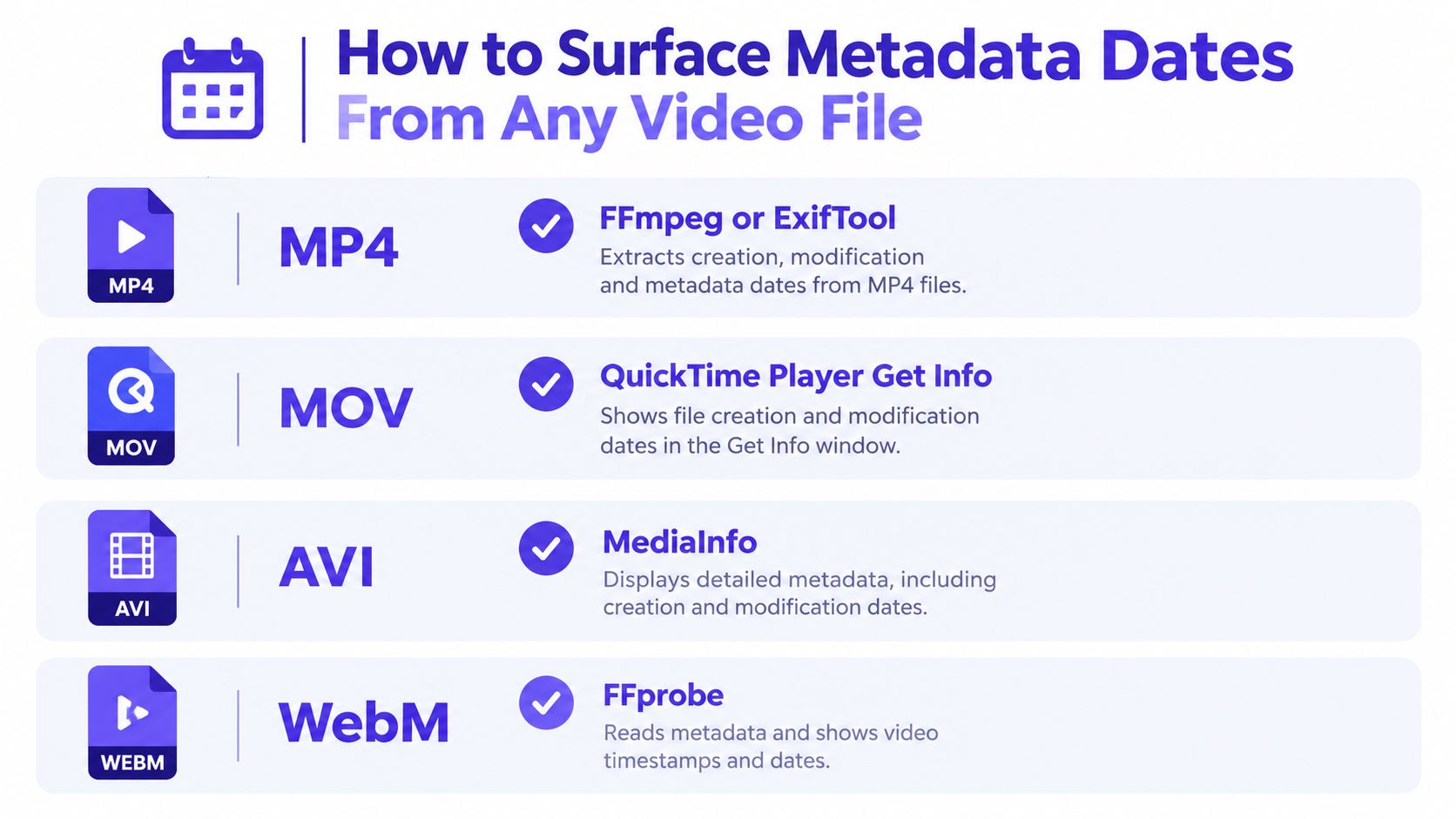
Extract broadly, not selectively
For MP4 and MOV files, ExifTool is useful because it can expose QuickTime date tags and their metadata groups. MediaInfo can provide container and stream details, while FFprobe can help inspect streams and encoding-related information. For AVI and WebM files, use a format-aware reader rather than assuming that a field shown for MOV will exist under the same name.
A practical sequence looks like this:
- Preserve the source. Create a working copy and retain the original filename, file size, hash or equivalent integrity record, and acquisition context.
- Run more than one reader. Compare ExifTool with a media inspection utility so that you can distinguish a missing field from a field a particular interface doesn't display.
- Capture complete output. Save the report rather than copying only the date that supports the initial story.
- Record provenance. Mark each value as container-originated, track-originated, media-originated, filesystem-originated, device-originated, or upload-originated.
- Normalize carefully. Preserve the raw timestamp first, then create a separate normalized version with the timezone and format documented.
For a browser-based workflow, a metadata testing tool for video files can help surface file-level clues, but its output still needs interpretation. A reader that displays CreateDate has shown you a field. It hasn't established the event behind that field.
A simple extraction record should contain:
- Exact field name, including capitalization.
- Metadata group or container, such as movie, track, media, or filesystem.
- Raw value, copied without reformatting.
- Timezone and offset, if available.
- Precision, such as date-only, minute-level, or second-level.
- Tool and version, so another examiner can reproduce the reading.
- File identity, tied to the preserved original or working copy.
The following demonstration provides a visual reference for inspecting common video formats.
Don't treat a blank result as proof that no date exists. Some containers omit dates, some tools expose different fields, and some platforms strip metadata during processing. “Not found” means only that the field wasn't available through that file and method.
Interpreting Conflicting and Inconsistent Timestamps
Conflicting dates become easier to read when you treat them as provenance clues. A container-originated date belongs to the current file wrapper. A track-originated date belongs to an internal stream. A media-originated date belongs to the stream's media data. Filesystem and device dates come from outside or alongside the container and should be labelled separately.
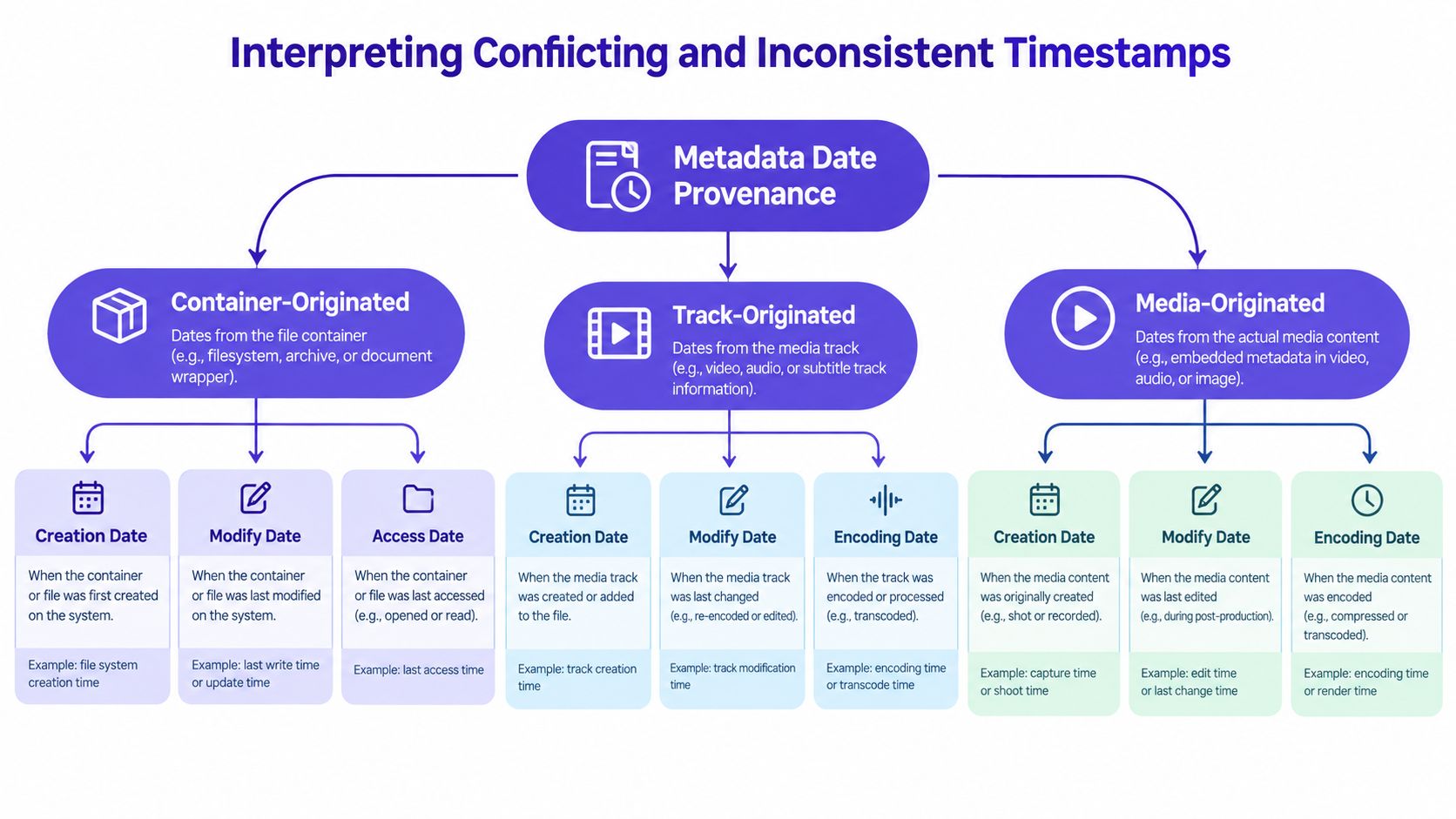
Consider a file whose current container date is newer than its track and media dates. That pattern is consistent with a later export or remuxing step. It may show that software created a new wrapper around older streams. It isn't, by itself, proof that someone manipulated the scene.
Normalize before judging
A comparison can fail before the forensic reasoning begins. One device may store local time, another may use UTC, and a camera clock may be wrong. Convert values into a documented comparison zone while preserving every original value and offset. If the source location is known, compare the stated offset with the claimed location, but do not replace an unknown timezone with an assumption without documentation.
Clock drift also matters. A small difference can arise from unsynchronized devices, recording delays, or encoding behaviour. Guidance from the digital evidence community describes timing inconsistencies in CCTV linked to system desynchronization, variable-bitrate compression, and hardware recording delays, without evidence of deliberate frame tampering. That means a mismatch deserves explanation, not an automatic accusation.
Build a timeline with columns for:
- Timestamp value
- Provenance
- Timezone
- File or stream relationship
- Likely action
- Confidence and limitations
The phrase “likely action” keeps the conclusion proportional. “New container date beside older media dates” supports a processing-history interpretation. “Filesystem modification after upload” may describe a local copy. Only after these benign explanations are tested should an examiner examine whether other evidence contradicts them.
A timestamp discrepancy tells you that two records differ. It doesn't tell you why they differ.
Spotting Tampering and Time-Shifting Red Flags
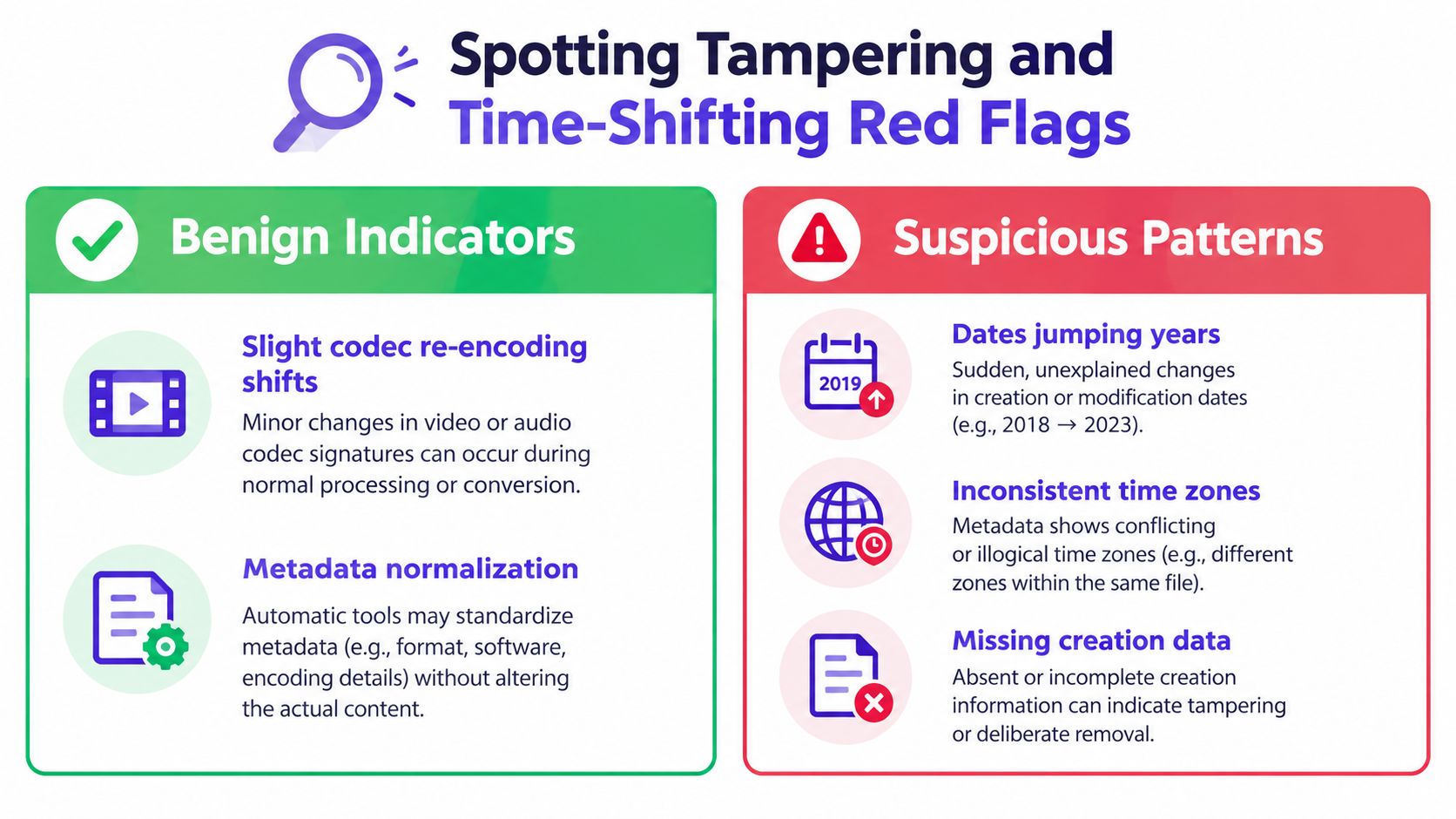
Some patterns deserve closer scrutiny because they don't fit the claimed chain of custody or the expected structure of the file. A date that appears to have been rewritten across unrelated fields, a timezone inconsistent with the stated location, or a timeline that places the file before the relevant device or event can raise legitimate questions.
Those questions still require corroboration. Date tags are editable, and a person can rewrite them without changing playback. Conversely, a legitimate application can normalize metadata or create a new container in ways that look unusual to someone who expects every field to match.
Separate concern from conclusion
Start with the least dramatic explanation. A re-encoded file may acquire a new container date. A platform may remove or rewrite fields. A camera clock may be set incorrectly. A missing creation value may reflect the container's design or a later export rather than an attempt to hide evidence.
More concerning patterns include:
- Uniform rewriting: Movie, track, media, and related fields all receive an identical value even though they normally describe different layers.
- Impossible chronology: A claimed capture date conflicts with the known existence or acquisition context of the device, file, or event.
- Unexplained timezone conflict: The stored offset disagrees with the claimed location and no travel, remote upload, or conversion explanation accounts for it.
- Unmatched processing history: Dates change, but there is no corresponding explanation in the encoder, container structure, filesystem record, or chain of custody.
- Selective evidence: One date supports the narrative while other available fields are omitted from the report.
These patterns are red flags for further examination, not verdicts. A transparent investigator states what the metadata supports and what it cannot support. The guide to checking video metadata can help readers understand the inspection stage, but the final assessment should include more than date tags.
Bring in other signals
Compare dates with frame timing, audio continuity, codec and encoder information, visible lighting or weather, device logs, and upload records. Look for continuity within the scene. Does the audio align with visible actions? Do motion transitions behave consistently? Does the encoding history fit a normal export?
An AI video detector may combine metadata inspection with frame-level analysis, audio forensics, and temporal consistency checks. That kind of multi-signal design is more appropriate for authenticity assessment than a rule such as “different dates equal fake.” Metadata can guide the investigation toward useful questions, while content and provenance evidence determine whether those questions gain support.
How Date Standards Shape What Your Tools Report
A reporter receives a video labelled 03/08/2025. One application calls it March 8, another calls it August 3, and a third shows a converted UTC value. The file may be unchanged. The disagreement can begin in the parser, display settings, or reporting convention rather than in the footage itself.
The character order matters. 2025-03-08 places the year first, followed by the month and day. That structure follows the ISO 8601 date standard, which provides a shared basis for representing dates and times. RFC 3339 uses a related format for timestamp exchange. A standard can make the characters easier to compare, but it cannot establish which real-world event produced them.
Locale creates a separate trap. 03/08/2025 can mean March 8 in the United States or August 3 in many other countries. A tool that displays only the numbers may hide the convention it used. Add an unknown timezone, daylight-saving adjustment, or a computer set to the wrong region, and two reports can appear inconsistent while starting from the same stored value.
Preserve what the file actually contains
A forensic report should retain the raw string and the tool's interpreted value as separate records. Note the field name, timezone offset, precision, and whether the value contains a time or only a calendar date. Record the application and settings used for parsing when they affect the result. Never replace an ambiguous value with a preferred interpretation and discard the original.
Standards vocabulary can also prevent misleading labels. Dublin Core uses date as a descriptive element, while its wider terms provide more specific names for date-related properties. The Dublin Core metadata terms documentation helps analysts describe what a field claims without treating the label date as a complete explanation.
A timestamp is a clue, not a verdict. The same value may be displayed with different precision, converted into another timezone, or rounded by a reporting tool. These changes affect readability and comparison, not necessarily the underlying file.
Report the interpretation, not just the label
When applications use different labels, compare their schemas and output rules. State both the stored representation and the meaning assigned during analysis. A clear report might distinguish:
- Container date, the value associated with the current file structure.
- Track or media date, a value attached to an internal stream.
- Filesystem date, a record of local file activity.
- Upload date, a service's receipt or processing record.
Those labels describe evidence categories, not authenticity. Content credentials and related provenance systems may add context about a file's history. The guide to content credentials and media provenance explains that context, which belongs alongside other evidence rather than replacing it. When documenting results, show the raw value, the conversion applied, and the uncertainty that remains.
A Verification Workflow You Can Trust
A video arrives with a claimed recording time, but its metadata shows a later date. Before calling it altered, establish what each field records. A trustworthy workflow produces a qualified conclusion, helping journalists assess a publishable timeline, legal teams define what the file can establish, and moderators apply a repeatable process.
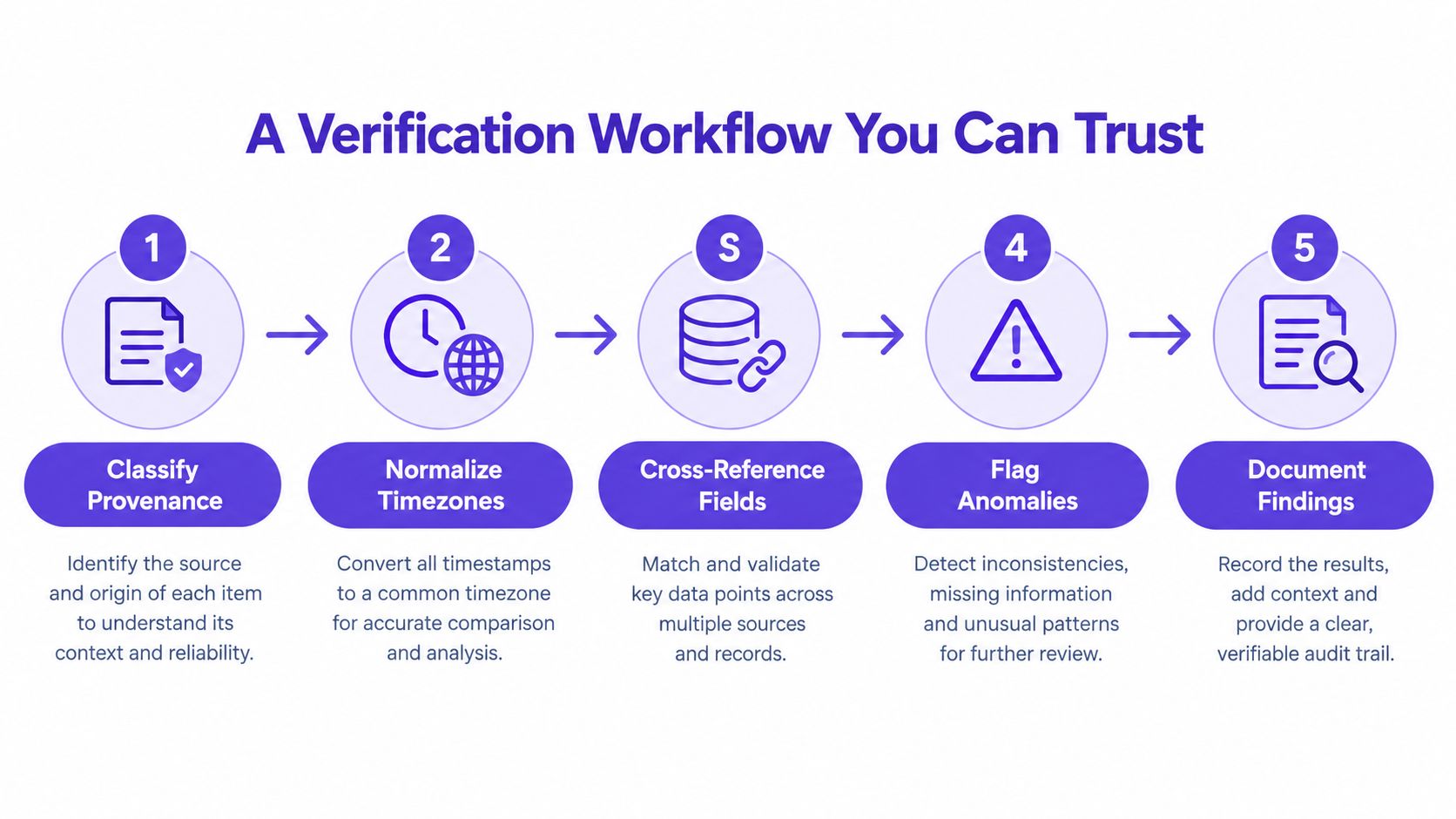
Apply the five checks
Classify provenance. List every available date and record whether it came from the device, container, track, media stream, filesystem, or upload system. Preserve each exact field name and raw value. This is like labeling evidence bags before comparing their contents.
Normalize timezones. Keep the original offset, then convert values into one comparison zone. Record unknown offsets and possible clock drift rather than concealing them.
Cross-reference fields. Compare movie-level, track-level, media-level, filesystem, and device records. A newer container date alongside older stream dates may reflect ordinary export or post-capture processing.
Flag anomalies. Mark impossible chronology, unexplained timezone differences, uniform rewriting, or processing records that conflict with the claimed chain of custody. Each anomaly is a question for further testing, not proof of tampering.
Document findings. State what the evidence supports, identify missing records, and separate observation from inference. Save extraction reports and identify the examined file.
A transparent result might read:
Metadata date: 2024-05-10. Likely interpretation: export or container date. Limitation: not sufficient to establish the scene capture time.
This wording identifies the observation, the plausible interpretation, and the limit of what the field can prove.
Corroborate independently
A metadata date gains weight when it agrees with device logs, upload records, encoding history, frame content, audio, and temporal consistency. Compare the event represented by each record rather than treating matching numbers as automatic confirmation. The Dublin Core metadata terms provide broader terminology for describing date-related events, but the file still requires evidence from its own history.
Do not report “the video was recorded on” unless the evidence supports capture time. Prefer “the container reports” or “the device metadata indicates,” followed by the relevant limitation. Precise wording protects the integrity of a newsroom report, investigation, or platform decision.
A metadata date can help reconstruct a file's path. It may expose a processing step, reveal a timezone issue, or point investigators toward a missing record. It can corroborate a conclusion, but it can't convict a video on its own. Preserve the original clip, extract every field, compare timestamps by provenance, and submit the file to a multi-signal video authenticity review before publishing or relying on it as evidence.
For a user-submitted clip, preserve the original and record its source and acquisition context first. Inspect metadata with a read-only workflow, document every date field, and compare the results with frame, audio, temporal, device, and upload evidence before deciding.


