

Video Call AI: How to Spot a Fake Call Before You Act

It's late on a Friday when a video call arrives from a name you know. The face is right. The voice is right. The background is the same office you've seen a dozen times. Then comes the ask: an urgent payment, a password, a file from a folder you don't usually touch, and please don't mention it to anyone until Monday.
Nothing in that scene is unusual any more. What's unusual is the way most of us judge it. We decide whether a call is real by looking at it, and looking is precisely the skill that AI has made unreliable.
So this guide takes the opposite starting position. Treat the video feed as untrustworthy by default and put the procedure in the centre: what to check, in what order, and who else has to say yes. You'll get the signals worth noticing, the ones that prove nothing on their own, and a set of checks you can run without any technical tooling.
How AI Video Calls Are Built and Why They Look Real
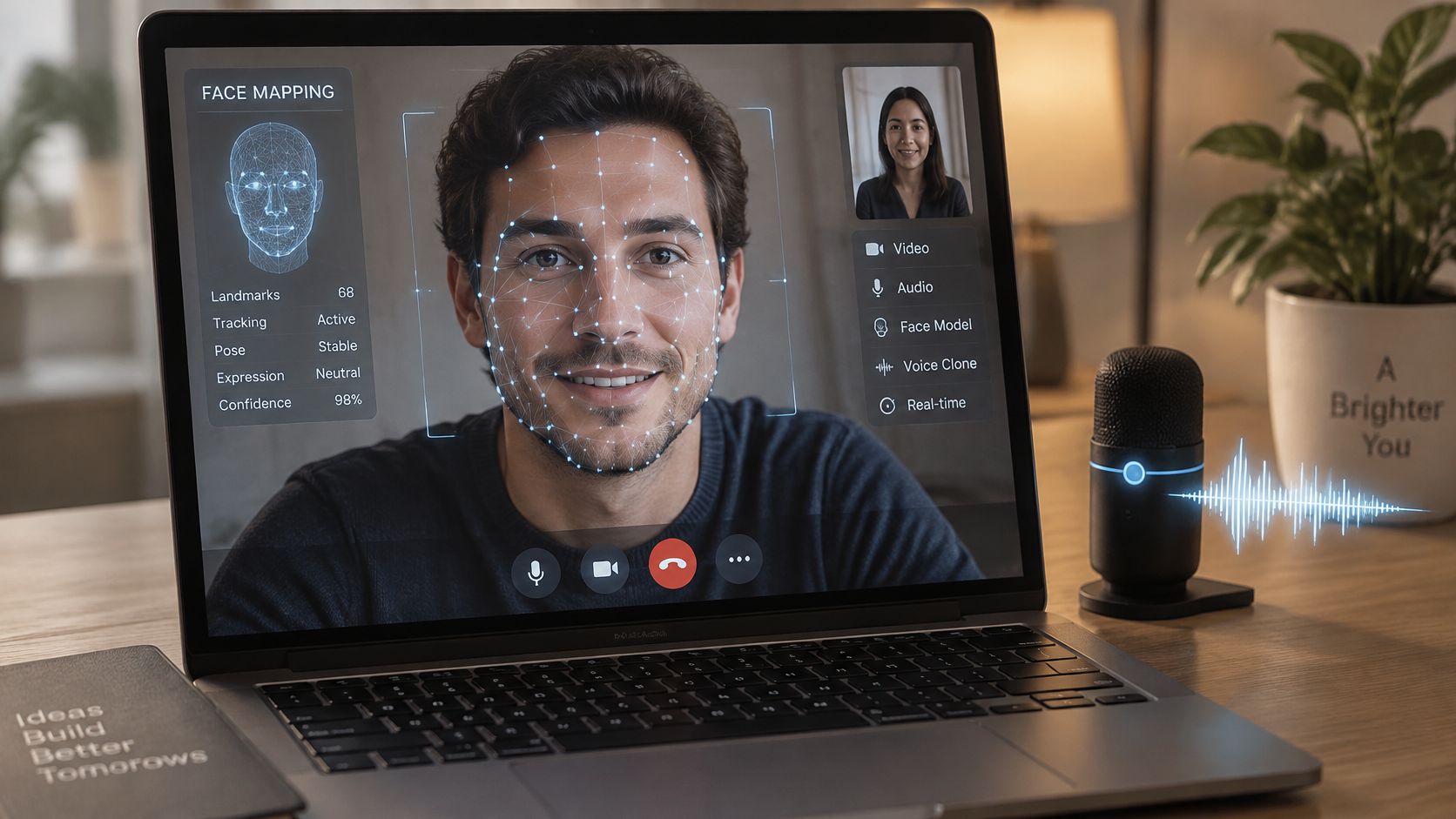
Think of a real-time AI video call as a mask worn by a live actor. Someone is sitting somewhere, hearing you, answering you, reacting to what you say. The face on your screen is a digital layer mapped onto that person, frame after frame, fast enough that your eyes accept it as a colleague.
This sits on mainstream infrastructure, not in a lab. Microsoft Teams reported 320 million monthly active users in October 2023, up from 300 million six months earlier, and the video-conferencing market was valued at about $37.29 billion in 2025, with a projection of $65.72 billion by 2034, according to a video-conferencing statistics roundup from QuickBlox. The same roundup reports that AI use in meetings rose 17-fold between January and August 2024, with a 19-fold increase among small companies and 13-fold among large organisations.
The three layers you'll actually meet
Face swapping maps a target person's face onto whoever is really speaking. The model tracks the speaker's facial landmarks and renders the target's features over them with roughly matching motion. Frame by frame the forgery is obvious; at the size of a video window, at normal frame rates, watched by someone who expects to see their finance director, it works. The pipeline is well documented enough to be taught, which you can see in any walkthrough of how a deepfake video maker works.
Voice cloning handles the audio side. A short sample of recorded speech (a conference keynote, a podcast, a voicemail greeting) is enough to model someone's vocal identity, and the model will say whatever it's given to say. It's the same capability a growing number of service operations use to keep a consistent brand voice, as this explanation of AI voice cloning in contact centers sets out. Familiar tone stopped being evidence of identity the moment that became cheap.
AI presenters and meeting assistants are the benign layer, and they're where confusion creeps in. Transcription, summaries, action items, translation and noise suppression are now ordinary features. An avatar reading a policy update is normal. An unfamiliar AI panel in your call window is normal. Neither is a fraud signal, and treating every AI feature as suspicious trains you to ignore the thing that matters.
Why a fake looks like ordinary video
Manipulated video arrives through the same window as everything else. Your call is already compressed, resized, denoised and re-encoded before it reaches your screen, and that pipeline erases exactly the fine detail a careful viewer would hunt for. A benchmark of mainstream AI video-call applications measured average AI response delays of more than 2.8 seconds across every system tested, from 2.85 to 4.44 seconds, with uplink traffic around 0.8 to 0.9 Mbps against downlink of 27 to 164 Kbps. Heavy upload, light download, seconds of lag: that's a pipeline built for continuous video in and small responses out, and a manipulated call travels through the same one.
So a laggy AI assistant isn't proof of a deepfake, and a crisp picture isn't proof of a person.
A video call proves who appeared on screen. It doesn't prove who is actually there.
Red Flags That Separate a Real Call From a Fake
Start with observations, then decide what to do with them. Here's the comparison worth keeping next to your desk.
| Signal | Genuine call | Suspicious sign | Quick check |
|---|---|---|---|
| Lip movement | Matches speech, including p, b and m sounds | Lag, blur or mismatch on consonants | Ask the speaker to repeat a short phrase |
| Facial expression | Changes with the topic and follows speech | Smiles or frowns late, or stays frozen | Ask an unexpected question and watch the reaction |
| Lighting and shadows | Stays consistent with the room light | Shadows or skin tone shift as the head moves | Ask the speaker to turn slowly to one side |
| Audio sync | Voice and lips line up | Delay, flat tone or echo that doesn't fit the room | Speak over them briefly and see whether the voice responds |
| Edges of the face | Hair, ears and glasses look stable | Flicker or smearing around hair, ears and glasses | Ask them to hold an object in front of their face |
| The request | Fits a known routine and a known channel | Urgent payment, secrecy or a new account | Confirm through a number you already hold |
Reading the table row by row
The visual rows are the ones people fixate on, and they're the weakest. Consonants like p, b and m force the lips together; if the audio lands while the mouth is still open, the sync has slipped. Expressions that arrive a beat after the sentence, or a smile that stays pinned while the topic turns serious, suggest the face is being driven by something other than the conversation.
Lighting is more reliable than it sounds. Real faces fall into shadow consistently as they move. A rendered face often doesn't, because the model is lighting the face rather than the room. And the edges are where compression and generation collide: hair, ears and the arms of glasses are where smearing and flicker show up first, partly because that's exactly the detail a video codec discards.
Why the request outranks the picture
No visual signal survives compression reliably, and generation quality improves faster than human perception does. The request is different. It's behaviour, and behaviour is governed by the attacker's goal, not their renderer. A payment to a new account, a request for a one-time code, a file pulled from an unusual folder, a demand to keep the conversation off the record: each of those sits outside a routine and outside a channel you already trust.
Four checks worth running
- Ask for a slow head turn. Profile angles are harder to render than front-facing ones, and lighting errors show up quickly.
- Ask them to hold something near their face. A hand, a badge, a mug. Occlusion is where face swaps get messy.
- Speak over them for a second. Natural conversation overlaps. A scripted or synthesised response often waits, then restarts.
- Ask an unscripted question about something recent. Not a security question with a stored answer, just a shared detail. Watch how long the reply takes.
One mismatch means nothing. Bandwidth is bad, webcams are cheap, and people blink oddly when they're tired. Two or more together is enough to stop the conversation and move to verification.
How Real-Time Impersonation Scams Unfold
A payments clerk joins a scheduled call with a company finance director. The face and voice are familiar, and the first minutes sound routine. The caller then requests a confidential supplier payment before a deal is announced.
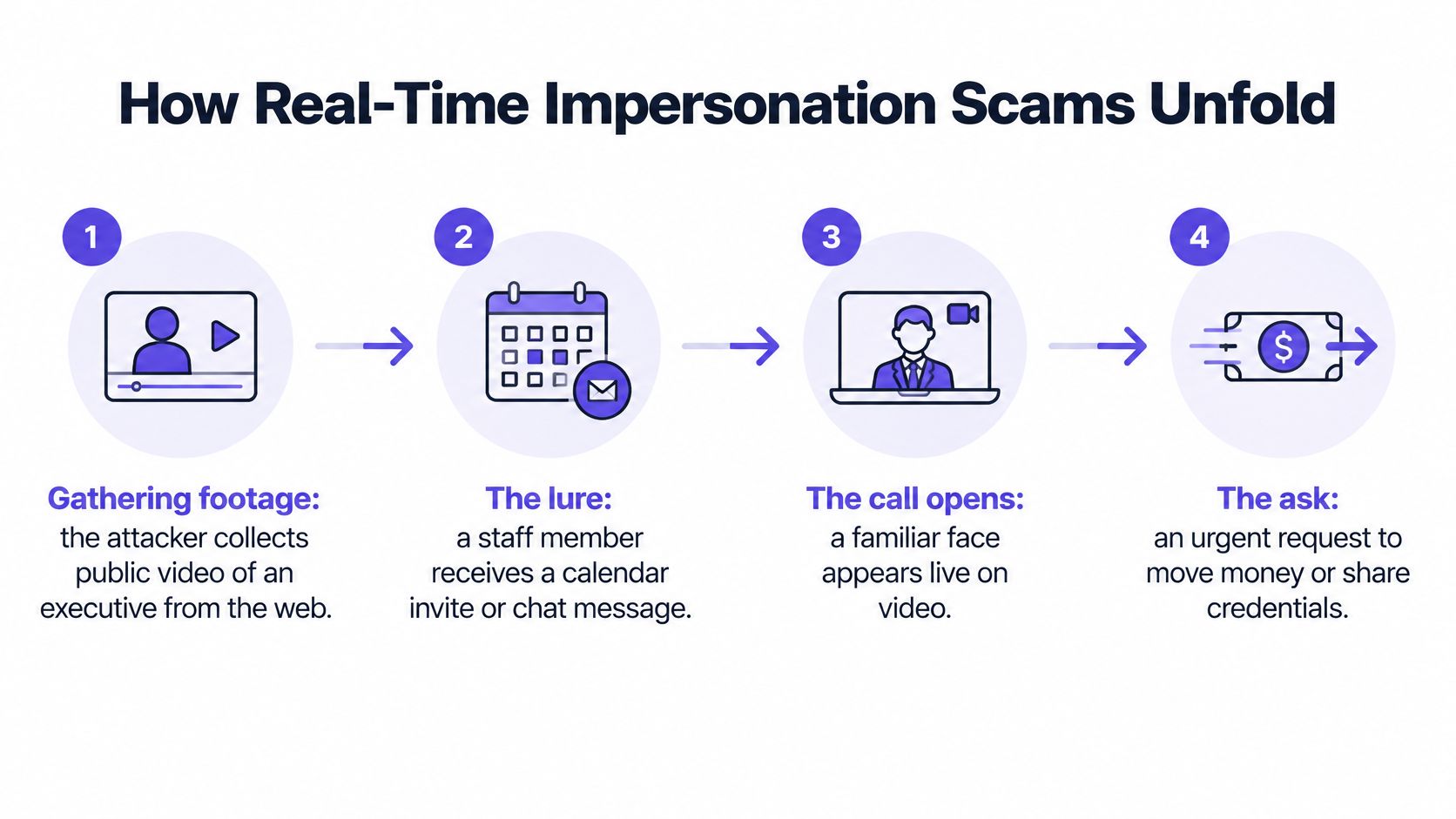
That sequence can turn a convincing video feed into pressure to act. Treat the feed as untrusted evidence, not proof of identity. The request, its urgency and whether it follows an approved process deserve at least as much scrutiny as the person on screen.
A Hong Kong government statement from June 2024 reported that police had identified or received reports on 21 online deepfake video clips impersonating government officials or celebrities by 31 May 2024. 20 were identified between November 2023 and January 2024, shortly after authorities began tracking the problem on 1 November 2023. The statement also describes a 2024 incident in which an employee transferred about $25.6 million after a manipulated video conference.
A small share of cases, a large share of the money
Real-time deepfakes used in video calls are a small share of reported fraud, but can be costly per case. The Hong Kong incident shows why: a convincing call can lend apparent authority to a large transfer request.
The pattern to remember is authority, secrecy and a deadline. When they arrive together, pause the transaction. Contact the supposed requester through a number or channel already on file, then follow the organization's approval rules. A familiar face on a screen should never replace those checks.
Read more about impersonation scams that begin with a video call.
What a Detector Score Can and Cannot Tell You
A detector score is a probability, not a verdict. That single sentence would prevent a lot of bad decisions.
Detection tools work the way you'd expect. They analyse a clip frame by frame for traces of AI generation and return a confidence number. A high score is a reason to escalate. A low score is not proof of authenticity, and it never was, because the tool is answering a narrower question than the one you're asking.
The uncertainty is structural, not a temporary engineering gap. A Canadian government research agenda on provenance and detection notes that provenance systems have mixed results, that interoperability across formats and platforms remains difficult, and that probabilistic detection outputs are hard to interpret without plain-language explanations. WITNESS makes a related point: proving content is fake is generally easier than proving it is real across its whole distribution history. The same source warns that even a 0.001 false-positive rate can cause serious harm at platform scale.
What the score is actually measuring
Compression shrinks the evidence before the tool ever sees it. A controlled video-streaming benchmark found that cutting bitrate from 827.9 Kbps to 426.4 Kbps reduced bandwidth use by 48.5% but dropped multimodal model accuracy from 0.73 to 0.33. A recording that has been through a call, a screen recorder and a messaging app has already lost detail no analysis can recover. Keep the original file, and expect less certainty from anything that has travelled.
Rules that wrap any score
Three rules do more work than any model upgrade:
- Fix thresholds in advance. Decide, in writing and before an incident, what score triggers escalation and who receives it. A number chosen mid-crisis gets argued down.
- Require corroboration. A second, independent source: another recording angle, a second witness, a document from a separate system.
- Escalate to a human for anything high-stakes. Money, credentials, legal evidence and publication decisions get a person, not a percentage.
One option worth knowing is AI Video Detector, which runs an explainer on what deepfake detection actually measures and applies the same logic to an uploaded clip: frame-by-frame analysis estimating whether the file was created or altered using AI, returning a confidence score, and flagging inconsistent facial micro-expressions, synthetic audio spectral patterns and temporal flickering. Use it to inform a decision, never to replace one.
The most defensible response to a suspicious call is often procedural redundancy, not sharper visual inspection.
Protecting Privacy When Checking Sensitive Calls
Here's the scenario almost nobody plans for. A reporter receives a tip with a two-minute clip of a named official saying something damaging. She uploads it to three free detectors to see whether they agree. In doing so, she has sent a person's face, voice, home background and private conversation to three companies in three jurisdictions, none of which she has a contract with.
That's a data-protection event, and it happened during an act of verification.
The UK Information Commissioner's Office report on synthetic media and its identification is direct about this: automated synthetic-media detection can process personal information and must therefore comply with data-protection law, and privacy-by-design is recommended for systems that analyse, watermark, certify or distribute media. There's a second wrinkle. Provenance data can itself reveal who created or handled a piece of content, and metadata, watermarks and media files may lose both integrity and privacy protection as they move between platforms.
A checklist before you upload
- Send the minimum. A twenty-second clip around the disputed sentence, not the full hour-long meeting.
- Strip what isn't relevant. Other participants, whiteboards, screen shares and family members in the background aren't evidence about the speaker.
- Check retention before you upload. Look for a stated no-retention policy and where processing happens. If the answer isn't on the page, assume the file is kept.
- Confirm your legal basis. Analysing employees, customers or sources usually needs consent, a contractual basis or a documented public-interest justification.
- Keep the original untouched. Evidence value lives in the raw file and its metadata, so copy before you trim.
- Decide when not to upload at all. Sometimes the right answer is a call-back and a written note, not a forensic analysis of someone's living room.
The operative question isn't only "is this call fake?" It's "can this be checked without exposing the people and the evidence involved?"
How to Verify a Suspicious Call and Decide What to Do
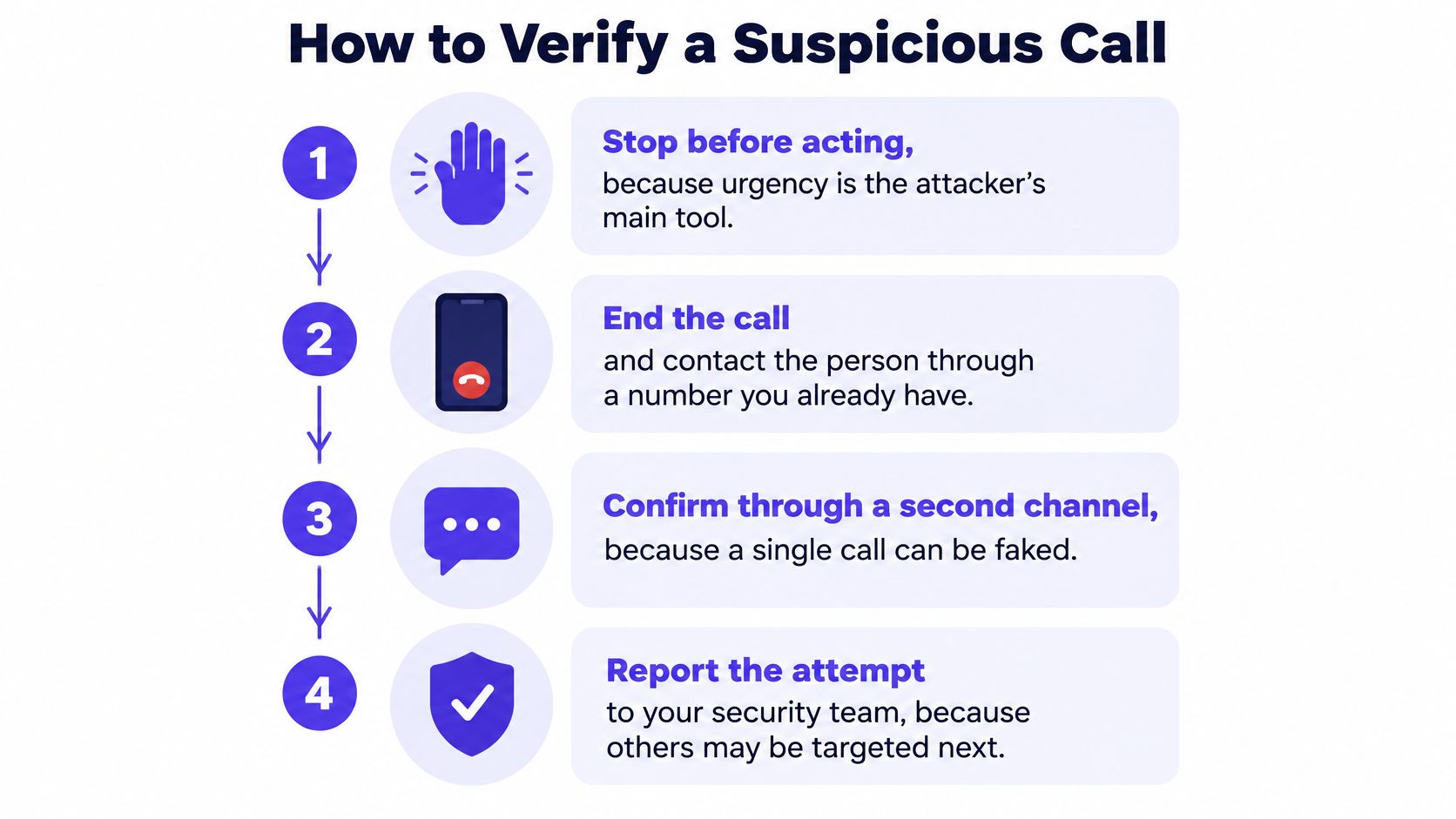
Verification is a sequence, not a feeling. Run it in this order and the outcome is defensible even if you get it wrong.
The order of operations
1. Stop before acting. Urgency is the attacker's main tool, so the first move is to remove the clock. Say you'll come back within fifteen minutes and mean it.
2. End the call and dial out yourself. Use a number you already hold: the staff directory, an old contract, the mobile number saved in your phone. Never use a number, link or email address supplied during the call, because the attacker may control it. If an unknown number is part of the story, check whether it's a known spam number before you dial it.
3. Ask something only the person would know. A recent meeting, a shared joke, a detail from a project you both worked on. Judge the hesitation, not just the answer, since a good script can supply facts but rarely supplies rhythm.
4. Request an unscripted physical action. A slow head turn, a hand raised beside the face, an ID document held up. You're not looking for perfection; you're looking for lag, warping or a suddenly frozen frame.
5. Check the request against policy. Any payment, credential change or data transfer needs a second approval through a separate channel. If policy has no such rule for this type of request, treat the gap as the finding.
6. Preserve everything before you clean up. Save the recording, the invite, the chat log and the timestamps. Deleting the meeting "to be safe" destroys the evidence your security and legal teams need.
7. Report it before anyone sends money. Security, legal and finance all need to know, because the next call in the campaign may go to a colleague who is less suspicious than you.
Here's the same logic walked through on screen.
The mistake almost everyone makes
Calling back the number shown in the suspicious invite. It feels like verification and it isn't, because the attacker set up the invite. The same applies to replying in the same chat thread, or emailing the address that appeared on the meeting card. Verification only counts when the channel is one the attacker never touched.
The three-outcome rule
- Proceed when the call came through a known channel, the person verified through an independent route, and the request is routine. Normal approvals still apply.
- Pause and verify when one or two signals looked off but nothing irreplaceable is at stake. Use a known number, bring in a second person, and give yourself a day if the request can wait.
- Stop and escalate when money, credentials or confidential data are involved and anything at all feels wrong. Freeze, report, and let someone with authority decide.
Verify first, then trust. The order isn't negotiable, and it's much easier to follow when it's written down before the call happens.
Write the policy before you need it
Teams that handle these attempts well share a small set of habits. They keep a named contact list for high-value approvals, updated quarterly, so nobody has to search for a number under pressure. They agree code words or challenge questions with executives for payment instructions. They require two people on any transfer above a set limit. And they tell staff, explicitly, that refusing to verify will never be held against them.
None of that depends on spotting a deepfake. It depends on making a single convincing conversation insufficient to move money. That's the whole design principle: assume the feed could be manufactured, and build a process where that assumption costs you nothing when the call turns out to be genuine.
If a call has left you uneasy, don't resolve it from memory. Save the recording, run it through AI Video Detector for a frame-by-frame read and a confidence score, then complete the call-back before anyone authorises anything. Basic detection scores are free and uploads aren't stored, so checking a clip doesn't create a new privacy problem while you're handling the first one. If you're writing a verification policy for a whole team, call 8042559431 and we'll talk through where the approval gaps usually sit.