

Digital Forensics Analysis: A Practical Explainer for 2026

A suspicious clip often reaches you before any formal investigation does. A reporter gets it from a tipster. An in-house counsel sees it in a litigation hold folder. A security team finds it in a fraud escalation queue after someone claims the CEO appeared on a video call and approved a transfer.
The clip is short, convincing, and urgent. That combination is what makes people trust their instincts at exactly the wrong moment.
A good digital forensics analysis workflow starts from the opposite assumption. Instead of asking, “Does this look real?” it asks, “What can I verify, preserve, and defend?” That shift matters whether you're trying to stop a false story, authenticate evidence, or contain a scam.
When a Viral Video Lands in Your Inbox
A journalist receives a 14-second clip a few hours before a company's scheduled announcement. In the video, a CEO appears to confirm layoffs. The lighting looks normal. The voice sounds right. The message matches the rumor already moving through chat groups.
That's the kind of moment where intuition fails.
Synthetic media doesn't need to be perfect to be damaging. It only needs to be plausible long enough for someone to publish it, trade on it, or repeat it. For a newsroom, the risk is reputational and legal. For a public company, the risk includes market confusion. For a legal team, the risk is presenting or relying on altered evidence.

The first four questions
When a file arrives, an investigator usually starts with four plain questions:
- Provenance. Where did this file come from, and through what path did it reach you?
- Integrity. Has the file changed since you received it?
- Authenticity. Does it represent what it claims to show?
- Chain of custody. Can you document who handled it and what they did?
Those questions sound legalistic, but they're practical. If you can't answer the first one, the rest become harder. A clip downloaded from a social platform is already a transformed object. It may have been recompressed, stripped of metadata, or screen-recorded from another source.
Practical rule: Treat every viral clip as a copy of unknown history until you prove otherwise.
Quick screening versus courtroom work
A quick screening check asks whether the clip is suspicious enough to pause action. That might include slow playback, metadata inspection, and comparison with known public footage. A courtroom-grade authentication goes much further. It requires documented handling, preserved originals where possible, and methods another analyst could repeat.
That distinction matters. You can use a fast triage process to reduce the spread of viral misinformation checks. You can't assume that same triage, by itself, will satisfy a judge, opposing counsel, or an internal investigation review.
The most reliable habit is simple. Don't start by debating whether the face looks off. Start by preserving the file, logging its arrival, and moving through a structured workflow.
The Four Layers of Digital Forensics Analysis
People often talk about deepfake detection as if it lives in a separate universe from classic forensics. In practice, it belongs to the same house.
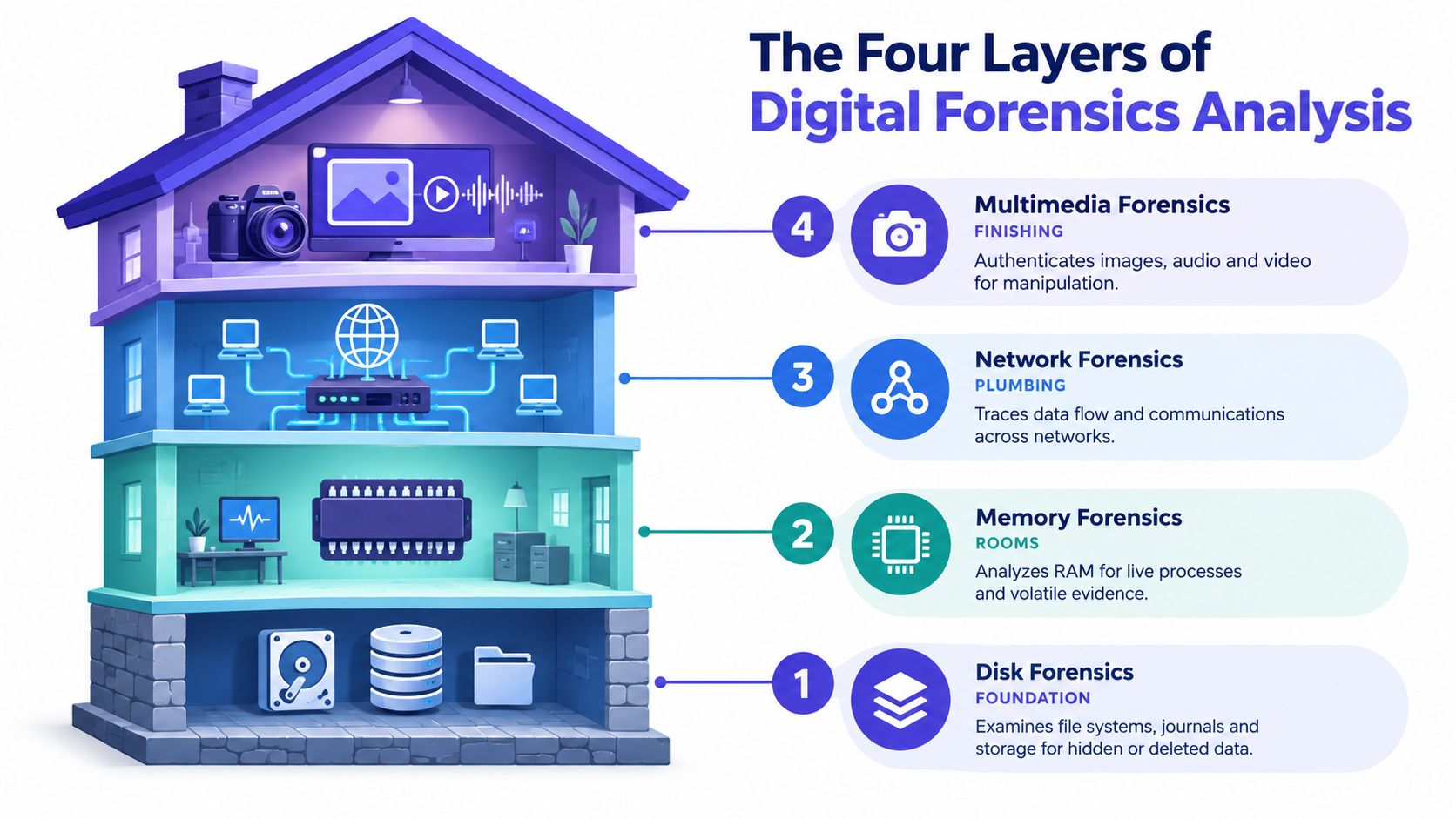
Think of the investigation as a house
Disk forensics is the foundation. It tells you what existed on storage, when it appeared, whether it was deleted, and what traces the operating system kept behind. If you want to know whether a suspect video sat on a laptop before publication or arrived afterward, the disk layer is where you look.
Memory forensics is the activity inside the rooms while the lights are still on. RAM can reveal what processes were running, what code was loaded, and what data only existed while the machine was live. If a synthetic-media tool was open during editing, memory may show traces that the disk never recorded cleanly.
Network forensics is the plumbing. It tracks what moved in and out, what systems talked to each other, and whether a device reached an upload service, cloud workspace, or messaging platform around the relevant time. If the question is how the clip spread or where it was exfiltrated, the network layer carries much of that story.
Multimedia forensics is the exterior finish and windows. It examines the image, audio, timing, encoding, and metadata of the file people saw and shared. It asks whether the visible and audible content matches the technical structure of the media object.
The same workflow, just a newer surface
This is why I resist separating “AI video” from “regular forensics.” A manipulated clip still has a file system history, a device context, and often a network trail. The media analysis is new in emphasis, not separate in discipline.
Recent market reports reinforce how broad the field has become. One projection puts the global digital forensics market at USD 12.94 billion in 2025, rising to USD 22.81 billion by 2030 at a 12.0% CAGR, and identifies North America as the largest regional market with 38.6% share in 2025 according to Mordor Intelligence's digital forensics market overview. Another set of projections places the market at USD 13.69 billion in 2025 and USD 39.94 billion by 2035, with an 11.3% CAGR, reflecting a field that now spans computer, mobile, cloud, and network work rather than only disk imaging, as summarized in Straits Research on the digital forensics market.
That expansion is the point. Multimedia analysis isn't a side topic. It's the newest branch of the same investigative tree. If you want a practical bridge from classic evidence handling to video authentication, this overview of multimedia forensics methods is the right place to map the overlap.
How an Investigation Actually Moves From File to Courtroom
Most weak investigations don't fail because the analyst lacked a fancy tool. They fail because someone handled evidence out of order, changed the original, or left gaps in documentation.
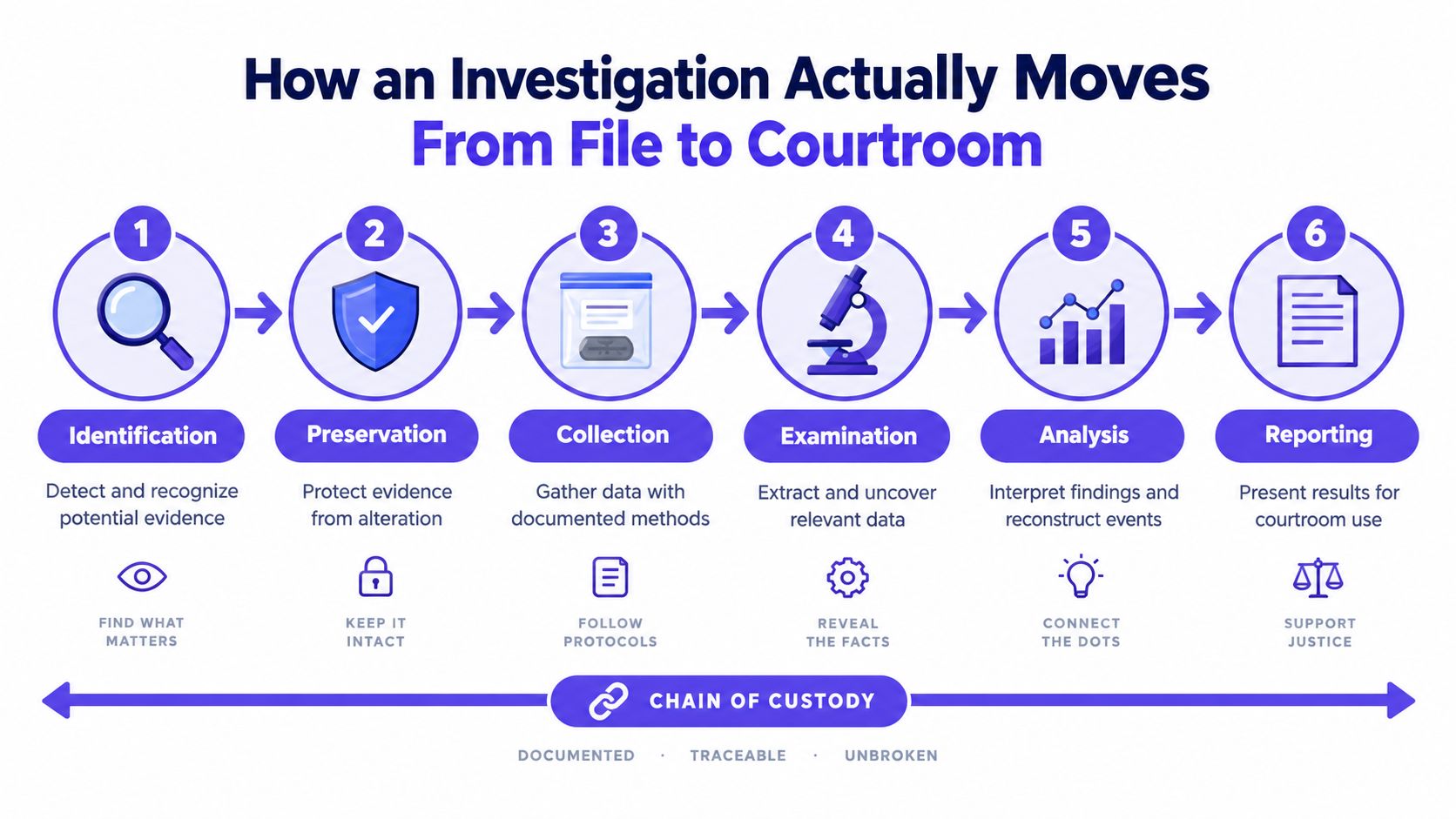
The chain that matters
Identification
Recognize that the file, device, account, or log may be evidence. In the newsroom scenario, that means the moment the clip hits the inbox, someone notes when it arrived, who sent it, and in what format.Preservation
Protect the evidence from alteration. Save the original file as received. Isolate relevant devices from unnecessary network activity if needed. Record file hashes so later you can show the item stayed the same.Collection
Gather data using documented methods. For a computer, that may mean a bit-for-bit forensic image. For a phone, it may mean a supported acquisition method. For a cloud account, it may mean exporting available logs and messages before retention windows close.Examination
Extract data and artifacts. Analysts review metadata, decode file structures, inspect logs, recover deleted material, or parse memory captures.
A useful visual summary helps non-specialists keep the sequence straight:
Analysis
Interpret what the evidence means. This is the stage where an analyst correlates timestamps, process activity, network movement, and media-level signals into a coherent explanation.Reporting
Write findings in a form others can test and understand. That often includes methods, limitations, exhibits, and conclusions stated with care.
What the journalist should have done first
The right first move isn't “forward this to three editors and ask what they think.” It's preserve the attachment, note the sender details, avoid editing or re-exporting the file, and escalate through a documented intake path.
Keep your working copy separate from your original. If you only have one file and everyone opens, renames, and re-saves it, you've turned one evidence problem into five.
If the clip contains speech, a transcript can become part of the evidentiary record, but accuracy matters. Teams that need a readable record for review or court prep often rely on accurate transcriptions from Translators USA so the spoken content can be compared carefully against the media artifact and surrounding evidence.
When the case may end up in litigation, publication review, or a disciplinary process, use a workflow built for authenticating digital evidence, not a casual fact-check thread.
Artifacts and Detection Signals Investigators Look For
Forensic work gets easier when you stop asking for a single smoking gun. Digital evidence usually arrives as a cluster of small traces that either agree with each other or don't.
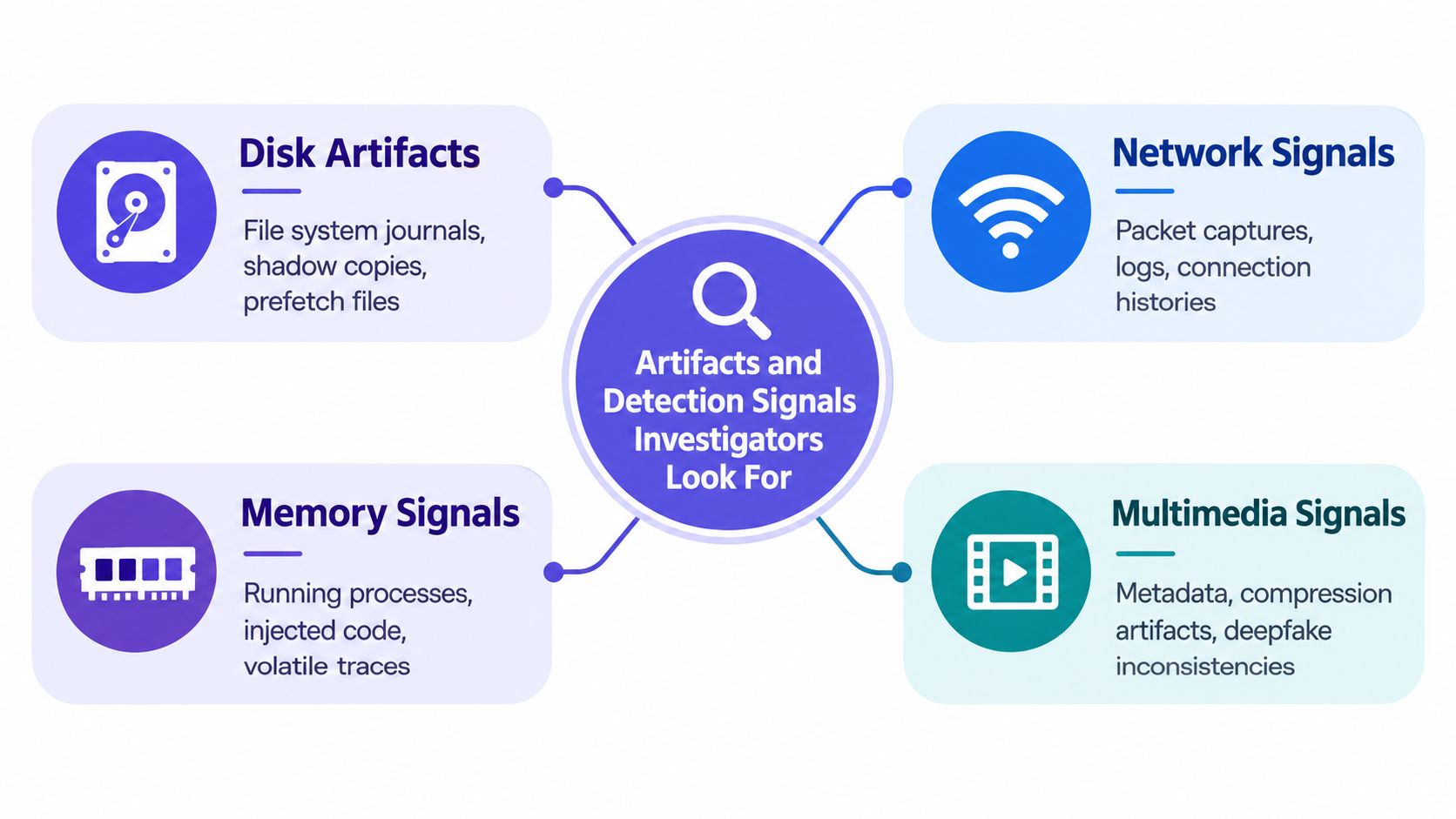
Disk, network, and memory traces
On the disk side, investigators commonly examine file system journals, shadow copies, prefetch files, $MFT entries, registry hives, and email headers. These artifacts help answer mundane but decisive questions: Was the file ever opened on this machine? Did an editor or converter run? Was the attachment saved from mail before it appeared in a shared folder?
On the network side, teams often review packet captures, DNS caches, firewall logs, NetFlow-style records, TLS session metadata, and client fingerprints such as JA3 or JA3S where available. The point isn't to drown in traffic. It's to place the suspicious file inside a communication timeline.
In memory, analysts look for process trees, handles, mutexes, injected code, loaded DLLs, and decrypted strings captured before shutdown. Memory is valuable because it can preserve activity that disappears once a machine powers off.
The four-signal model for video
For video authentication, I like a four-signal model because it keeps the work disciplined.
- Frame signals look at what appears inside individual images. Analysts watch for lighting inconsistencies, blending boundaries, warping around facial edges, or traces associated with generative pipelines.
- Audio signals focus on spectral gaps, voice texture mismatches, abrupt room-tone changes, and lip-sync problems.
- Temporal signals test continuity over time. A manipulated clip may fail not in one frame but in motion between frames.
- Metadata signals ask whether the container, codec tags, dates, frame rate, and structure fit the story of origin.
A strong reason to start with metadata is that it can expose edits a viewer won't notice. In video forensics, analysts often compare file headers, codec and profile tags, tagged creation dates, frame rate, GOP structure, and editing-tool signatures against the underlying data because mismatches can reveal re-encoding or manipulation, as described in the University of Colorado Denver thesis on digital video examination.
Temporal analysis is often where suspicious clips start to unravel. Investigators check frame-to-frame anomalies, timestamp drift, synchronization problems, and compression side effects because those patterns can expose re-recorded, tampered, or synthetic footage, as shown in the Zenodo study on forensic timing and compression analysis.
No single artifact proves a deepfake. The value comes from correlation across layers.
If your team wants a simpler visual primer on media clues, this guide on how to spot fakes and deepfakes is useful for training non-specialists before they hand material to an analyst.
DIY Checks, Professional Tools, and Where AI Video Detector Fits
Not every suspicious file needs a full lab workflow in the first minute. Some need a fast screen. Others need expert handling from the start.
A practical comparison
| Method Tier | Cost & Skill | Evidentiary Weight | Best Use Case |
|---|---|---|---|
| DIY checks | Low cost, low to moderate skill | Low | Initial newsroom screening, moderation queues, quick internal review |
| Professional forensic tools | Higher cost, specialist skill | High when used correctly | Litigation, internal investigations, criminal matters, incident response |
| AI Video Detector | Moderate skill, browser-based workflow | Moderate for triage, not a substitute for full forensic opinion | Rapid authenticity screening of submitted or viral video before escalation |
What belongs in each tier
DIY checks include reverse image search on key frames, metadata inspection in operating system tools or ExifTool, frame-by-frame playback at reduced speed, rough audio waveform comparison, and hash lookups where reference sets exist. These are fast and often useful, but they don't usually answer chain-of-custody questions.
Professional platforms add write blockers, forensic imagers, suites such as EnCase and Autopsy, memory acquisition tools such as FTK Imager, Volatility, or Velociraptor-based workflows, and dedicated media analysis tools. These are built for repeatability, preservation, and reporting.
AI Video Detector sits in the middle as a triage tool. According to the publisher information provided, it analyzes uploaded video using frame-level review, audio forensics, temporal consistency, and metadata inspection, then returns a confidence-based result without storing user videos. That makes it suitable for the first decision point: does this clip look ordinary, suspicious, or urgent enough to escalate?
A transcript can strengthen that triage stage because many disputes turn on what was said, not just what was shown. Teams that need a quick text record before human review may find this AIDictation video transcription guide helpful when pairing spoken content with media analysis.
Use the tiers this way:
- Stay in DIY mode when the stakes are low and you only need a publishing pause or moderation check.
- Move to triage tools when the clip could trigger a legal, reputational, or fraud decision.
- Escalate to forensic specialists when you need defensible findings, cross-device correlation, or expert testimony.
Legal Rules, Chain of Custody, and Ethical Lines
Non-lawyers often hear “chain of custody” and think it's paperwork added after the work. It isn't. It's the discipline that makes the technical work usable.
What courtroom-grade handling looks like
A defensible evidence path usually includes these steps:
- Identification of the item and its claimed relevance.
- Preservation using a method that protects the original and records integrity values such as MD5 or SHA-256.
- Documented transfer so every handoff is logged.
- Controlled analysis on working copies, not on the original source.
- Signed delivery of findings with methods, limitations, and exhibits.
If any one of those breaks, the argument shifts from “what does the evidence show?” to “can anyone trust what you did with it?”
The legal context people trip over
In the United States, authentication rules such as Federal Rules of Evidence 901 and 902 shape how you prove an item is what you claim it is. For privacy-regulated organizations, GDPR-style data minimization affects how much personal data you should collect and retain. Cross-border matters add another layer because one country's lawful request may not map neatly onto another country's disclosure regime.
Cloud evidence is where teams struggle most. Cases increasingly span multiple devices and cloud services, and a 2025 to 2026 industry survey found each case now involves two to five devices on average, while a separate 2026 DFIR report found 76.84% of respondents said their organization had no established evidence preservation and analysis process for AWS, Azure, or GCP data, according to the Cellebrite industry trends survey whitepaper. That's one reason lawyers and investigators lose time arguing over what was preserved, what expired, and which platform logs still exist.
Ethics matter when certainty is limited
A newsroom validating a leaked recording has to protect a source while also testing authenticity. A legal team reviewing user-submitted footage has to avoid over-collecting unrelated personal data. A security team investigating a fraud video has to decide whether to disclose indicators that could help attackers refine the next attempt.
Research also shows a governance gap around AI-assisted forensics. A recent review found standards and workflows still under-address AI and machine learning for evidence triage, explainability, adversarial ML, and synthetic evidence detection, as summarized in the review on AI-assisted gaps in digital forensics practice.
That leads to an ethical baseline I'd put plainly:
If your conclusion is probabilistic, say so. Don't write “authentic” when what you really mean is “no obvious signs of manipulation were detected in this review.”
Putting It Together in Newsrooms, Courtrooms, and Enterprises
The biggest mistake teams make is treating digital forensics analysis as a specialist capability they'll borrow later. By the time “later” arrives, the file has been forwarded, renamed, recompressed, and stripped of context.
Who should own what
In a newsroom, editorial staff should own first-line multimedia and metadata screening before publication. They don't need to become forensic examiners. They do need an intake habit that preserves originals and triggers escalation.
In a legal department, someone should own evidence intake and outside-expert handoff. The work is less about running every tool internally and more about making sure nothing gets spoiled before a qualified analyst sees it.
In an enterprise security team, multimedia review belongs beside fraud response, insider-threat review, and incident handling. If someone reports a suspicious executive video, that report should enter the same discipline used for other high-risk digital evidence.
A 30-day adoption sequence
Name an evidence owner
Pick one role, not a committee, to control intake and preservation.Create a one-page intake form
Record sender, date received, file name, claimed source, and first actions taken.Run a small pilot
Use a few recent clips or internally approved examples to test your process.Train staff on the four-signal model
Teach frame, audio, temporal, and metadata review in plain language.Define escalation rules
Decide when a suspicious clip stays in triage and when it goes to forensic counsel, DFIR staff, or outside experts.
Two measurements worth tracking
You don't need a complicated dashboard at first. Track two operational signs that your process is working:
- Mean time to verify a submitted clip
- Percentage of cases with a documented custody trail
Those measures tell you whether the workflow reduces risk or just adds paperwork.
Digital forensics didn't stay a niche specialty. Market projections from different firms vary in scale, but they consistently describe a fast-growing field with double-digit growth and broad demand across law enforcement, enterprise security, and regulated sectors, including North America as the largest regional market in repeated estimates, as noted earlier in the market references above. That growth makes sense. More evidence lives in files, accounts, devices, and cloud systems than in filing cabinets.
The practical takeaway is simpler than the market data. A deepfake video, a suspicious laptop, a memory capture, and a network trail all belong to the same discipline. Handle them with the same rigor, and your conclusions stand up better under pressure.


