

Video Quality Assessment: Methods, Metrics, and Use Cases

A breaking-news clip lands in the newsroom. It's sharp, it's dramatic, and it claims to show something important that just happened. The editor has minutes, not hours. One question sounds simple but isn't: is this video good enough to trust, publish, archive, or show in court?
That's where video quality assessment stops being a niche engineering topic and becomes a practical decision system. Quality isn't only about whether a clip looks pretty on a large screen. It's also about whether compression has hidden details, whether motion looks natural, whether audio and image belong together, and, increasingly, whether a polished clip might be synthetic.
Most guides treat video quality assessment as a codec topic. In 2026, that's too narrow. The same habits that help a streaming team judge watchability also help journalists, investigators, educators, and developers decide whether a suspicious clip deserves trust. The overlap with AI-generated video detection is no longer optional background knowledge. It's part of the job.
Why Video Quality Assessment Matters in 2026
In practice, teams rarely ask, “What is the quality score?” They ask narrower questions. Can we air this user-submitted clip? Did our transcode damage the interview footage? Is this surveillance export usable as evidence? Could this seemingly clean video be a deepfake that avoids obvious compression artifacts?
Those are all video quality assessment problems, but they point to different kinds of quality. A streaming engineer cares about visible degradation after encoding. A legal team may care more about whether fine details survived a chain of exports. A verification desk may care whether visual smoothness is suspicious rather than reassuring.
Quality now sits between delivery and verification
Classic workflows treated quality control and authenticity checks as separate lanes. That boundary has weakened. A fake video can look technically excellent. A real video can look terrible because it passed through messaging apps, reshares, or low-light capture.
That's why VQA in 2026 sits at the intersection of three jobs:
- Streaming optimization: Teams compare versions of the same asset and try to preserve perceived quality.
- Forensic triage: Analysts inspect distortions, dropped detail, motion inconsistency, and other clues that affect trust.
- AI-generated content review: Moderation and newsroom teams need to tell the difference between ordinary quality loss and synthetic generation artifacts.
A lot of confusion starts when people mix up “high resolution” with “high quality.” A 4K file can still be smeared, overcompressed, or semantically wrong. Even a clean-looking file may raise questions if motion, facial detail, or scene continuity feels off. Technical checks like video test patterns help teams learn what kinds of distortions their pipelines introduce before a real incident forces a rushed judgment.
Practical rule: Video quality assessment gives structure to decisions that people often make by gut feel.
Why this skill has widened
What changed is not just the tooling. It's the cost of being wrong. Publishing degraded footage can mislead viewers. Rejecting a real clip because it looks “too weird” can bury evidence. Accepting a polished fake because it scores well on a narrow metric can do worse.
So the useful way to learn VQA is step by step: start with human judgment, then move to objective metrics, then to modern learned systems, and finally to workflows that survive audit.
Defining Quality as a Human Judgment Problem
People often start with the wrong variables. They ask for bitrate, frame size, or codec name. Those matter, but none of them directly answers the central question: how does the video look to a person?
A simple analogy helps. If you judge a photograph by counting pixels alone, you miss composition, contrast, timing, and mood. Video works the same way. A technically “clean” clip can feel flat, artificial, or harsh. A lower-resolution clip can still feel convincing and usable because motion, structure, and timing survive.
Technical fidelity is not the same as perceived quality
Engineers use the word fidelity to mean closeness to a source. Viewers use quality more loosely. They notice blur, blockiness, flicker, unnatural motion, unstable faces, odd skin texture, and whether details seem to disappear when the camera moves.
That gap is why the field keeps returning to subjective testing. Standards guidance from the ITU treats controlled viewer studies as the basis for measuring visual quality, audio quality, and overall audiovisual quality, and it emphasizes prediction accuracy, monotonicity, and consistency when validating objective models against human judgments (ITU guidance on subjective quality evaluation and metric validation).
What MOS and DMOS actually mean
The usual ground truth is a viewer score. You'll often hear MOS, short for Mean Opinion Score. In plain language, that means many people watch clips under controlled conditions and rate what they saw. The average becomes the target that later metrics try to predict.
A related idea is DMOS, or Difference Mean Opinion Score. Instead of rating a clip in isolation, viewers judge impairment relative to a reference. That's useful when you want to know how much damage a compression step introduced.
Readers often get tripped up here. MOS is not truth in some philosophical sense. It's a structured record of human judgment under specific conditions. Change the display, distance, ambient light, or task, and the ratings can shift.
Human ratings don't remove subjectivity. They organize it.
Why all modern VQA models point back to people
Whether you use a classic metric or a neural model, the model only becomes useful when its output aligns with what viewers notice. That's why objective VQA isn't really “objective” in the everyday sense. It's better described as an attempt to approximate human judgment at scale.
Once you see that, the rest of the field makes more sense. Full-reference metrics compare to a known original. No-reference models try to infer quality without one. Learned systems absorb patterns from large datasets. But all of them are chasing the same thing: a reliable prediction of what people would say if you had time to run a careful viewing study.
Three Algorithmic Families in Video Quality
The cleanest mental model is to group methods into full-reference, reduced-reference, and no-reference families. They solve different problems, and most confusion comes from using the wrong family for the job.
A simple way to think about each family
Full-reference is like grading a student paper against the teacher's master copy. You have the original, so you can compare every detail.
Reduced-reference is closer to checking fingerprints or summary features. You don't keep the whole source, but you retain enough clues to judge whether the delivered copy drifted.
No-reference is what happens in the wild. Someone hands you the final dish, and there's no recipe, no source footage, and no trusted baseline. You judge from what's in front of you.
FR vs RR vs NR Video Quality Assessment at a Glance
| Family | Reference Needed | Typical Use Case | Main Strength | Main Weakness |
|---|---|---|---|---|
| Full-reference | Complete original video | Codec testing, transcode comparison, archive validation | Most direct comparison to source fidelity | Useless when the original is missing |
| Reduced-reference | Partial features from the source | Network monitoring, constrained storage workflows | Lower bandwidth and storage needs than full-reference | Can miss problems outside the retained features |
| No-reference | None | User-generated video, social uploads, live triage, deepfake screening | Works on real-world footage with no source | Hardest to calibrate and easiest to misuse |
Where each family shows up in real work
Use full-reference when you control the media pipeline. A streaming team comparing source and encoded outputs might run SSIM or VMAF to see whether a transcode preserved visible detail.
Use reduced-reference when moving complete source files around is expensive or impractical. Broadcast operations and network environments sometimes prefer summary signals that let them monitor quality drift without carrying the full asset.
Use no-reference when the clip came from outside your system. That includes witness footage, social media reposts, messaging-app exports, and many authenticity reviews. It also includes AI-generated video triage, because there may be no “ground truth original” in the traditional sense.
The trade-off people miss
No-reference sounds more flexible, and it is. But that flexibility comes with a cost. Without a source, the model has to infer whether blur is artistic or accidental, whether skin texture is overprocessed or synthetic, and whether unusual motion is camera shake or generation failure.
That makes no-reference VQA especially relevant to deepfake and AI-video analysis. It's also why teams should be careful not to treat a blind score as a verdict. In blind settings, quality judgment and authenticity judgment start to overlap, but they aren't identical.
Objective Metrics From PSNR to VMAF
A common 2026 workflow looks like this. An encoder engineer says the new transcode is cleaner. A trust and safety analyst says the same clip still feels wrong, with waxy faces or motion that looks slightly fabricated. Both are staring at “video quality,” but they are asking different questions. Objective metrics help with the first question very well. They help with the second only up to a point.
That distinction matters because PSNR, SSIM, and VMAF were built to measure fidelity to a reference. They answer, with different degrees of perceptual sophistication, “How much did this version drift from the source?” They do not directly answer, “Is this video authentic?” In practice, though, those boundaries now blur. The same artifacts that lower perceived quality can also hint that a clip was heavily synthesized, upscaled, or repeatedly re-encoded.
Why PSNR is still around
PSNR is the old lab instrument that engineers still keep on the bench. It compares pixel error between a source and a processed version, then summarizes that error into a single value.
That makes PSNR fast, stable, and useful for tightly controlled codec work. If you are tuning quantization, testing encoder regressions, or comparing two pipeline changes on the same source set, PSNR gives a clean baseline.
Its limitation is simple. Viewers do not experience video one pixel at a time. A small error in a face, subtitle edge, or moving texture can be more annoying than a larger error in a flat background. PSNR treats both as arithmetic differences, so it often misses where perception breaks.
Why SSIM changed the conversation
SSIM moved the field closer to human vision by comparing structure instead of raw error alone. It looks at luminance, contrast, and local pattern consistency, then reports similarity on a 0 to 1 scale.
A good way to read SSIM is as a check on whether the picture still “hangs together.” If two frames have similar structure, they usually feel more alike to viewers than PSNR alone would suggest. In many production workflows, SSIM ≥ 0.95 is treated as a practical sign that structural damage is low (FastPix explanation of SSIM and common VQA thresholds).
That number is a rule of thumb, not a universal pass mark. Animation, film grain, screen content, and low-light footage can all shift what a “good” SSIM means. A high score can still hide visible banding or temporal instability.
Why VMAF became the operational choice
VMAF goes one step further by combining several perceptual features into one score trained against human opinion. In plain terms, it tries to act less like a ruler and more like a trained reviewer who has seen many examples of what people actually notice.
That is why VMAF became popular in streaming and encoding decisions. Teams can compare encodes, bitrate ladders, and preprocessing choices with a metric that usually tracks perceived quality better than pixel-error measures do. Netflix documents VMAF as a fusion model built from elementary quality metrics and calibrated on subjective data (Netflix TechBlog overview of VMAF).
People often treat VMAF above 90 as a strong result and scores in the low-to-mid 90s as visually very close to source for many use cases. That is useful shorthand. It is still shorthand. Grain-heavy cinema, fast sports motion, game footage, and generative video can all produce cases where the score sounds reassuring while the clip still looks odd.
If you are diagnosing what viewers are reacting to, it helps to match the score with visible symptoms such as blocking, ringing, smearing, or banding. A quick review of common video compression artifacts and how they appear on screen makes metric outputs much easier to interpret.
PSNR, SSIM, and VMAF compared
| Metric | What it measures | Output range | How to read it | Best use case |
|---|---|---|---|---|
| PSNR | Pixel-level error relative to a reference | Varies by signal and implementation | Higher usually means closer pixel fidelity, but not necessarily better-looking video | Codec tuning, regression tests, controlled engineering comparisons |
| SSIM | Structural similarity across luminance, contrast, and local patterns | 0 to 1 | Values near 1 suggest the image structure stayed intact | Fast perceptual checks on transcoded or processed video |
| VMAF | A fused perceptual score trained against human ratings | 0 to 100 | Higher often tracks better perceived quality, but content type still affects interpretation | Encoding decisions, streaming QA, quality-of-experience monitoring |
One sentence of caution is worth keeping in mind. A useful metric helps you reject bad decisions quickly. It does not replace looking at the clip.
That caution matters even more with AI-generated and manipulated video. A synthetic clip can earn a respectable fidelity score if it is internally consistent, cleanly compressed, or compared against its own generated reference. Yet the same clip may still show unnatural motion, identity drift, texture inconsistency, or relighting errors that matter for authenticity review. In 2026, objective VQA metrics are still core tools, but they now sit closer to deepfake screening than many older guides admit.
How Subjective Ratings Shaped Modern VQA
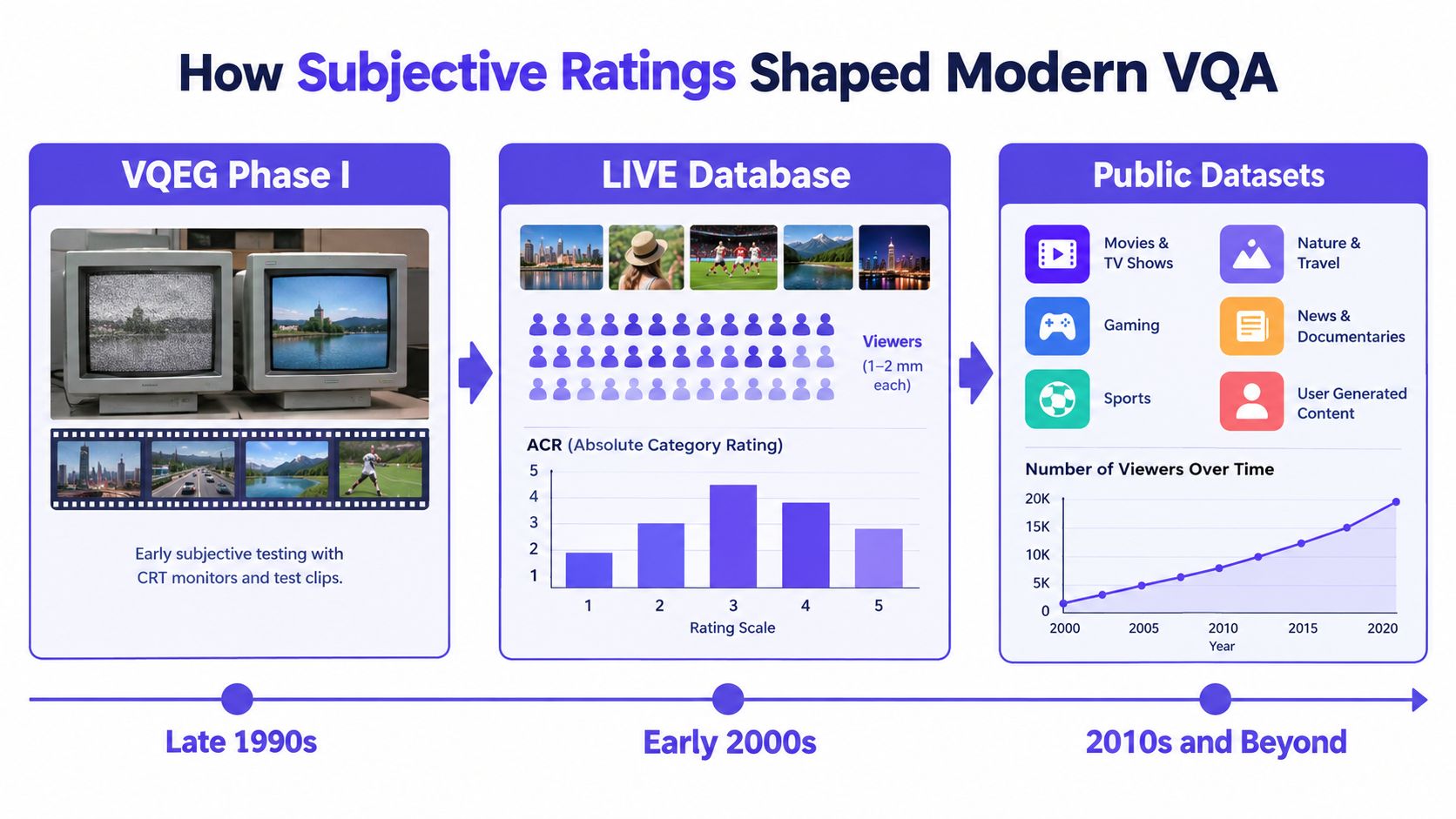
The history of VQA is, in large part, the history of collecting better human judgments. Early work relied on smaller, controlled datasets. Modern work depends on large, messy, in-the-wild benchmarks because that's what actual internet video looks like.
From lab clips to internet reality
A major milestone was the move from small lab-style collections to large user-generated video datasets. Research tracking that shift highlights CVD2014 with 234 videos captured from 78 different devices, followed by much larger benchmarks such as KoNViD-1k with 1,200 videos, LIVE-VQC with 585 videos rated by 4,776 unique participants, and YouTube-UGC with 1,380 20-second clips rated by more than 8,000 human subjects. By 2021, LSVQ had grown to 38,793 videos, showing how VQA became a large-scale machine learning problem rather than a small perceptual lab exercise (dataset history and scaling in VQA research).
Those numbers matter because the field changed its target. Instead of asking whether a metric works on neat, calibrated examples, researchers had to ask whether it still tracks human opinion when video includes shaky handheld capture, lighting errors, motion blur, and mixed upload histories.
Why diversity in datasets matters
A later survey and benchmark summary shows how broad the field has become. It reports benchmark datasets spanning CVD2014 at 480p/720p with 234 videos, LIVE-VQC at 240p–1080p with 585 videos, YouTube-UGC at 360p–4K with 1,149 videos, and LSVQ at 99p–4K with 38,793 videos. The same source notes another benchmark paper listing LSVQ with 38,811 videos covering 5–12 second clips, and it points to evaluation by Spearman Rank Correlation Coefficient (SRCC) against human judgments. One 2024 model reported an SRCC of 0.897 on the LSVQ test set, which indicates strong alignment with human scores (2024 survey and benchmark discussion of VQA datasets and SRCC).
That's the key shift. The field no longer treats “quality” as a simple byproduct of codec settings. It treats quality prediction as a ranking problem grounded in human ratings across diverse content and viewing conditions.
What subjective tests still do better than automation
Subjective studies remain the gold reference for one reason: they reveal where metrics fail. A metric may like a sharpened image that viewers find harsh. It may underweight subtle temporal flicker. It may reward cleanliness in a generated clip that looks coherent frame by frame but wrong over time.
So when someone says a model “predicts quality,” the responsible question is: quality according to which humans, under which conditions, on what kind of content?
Deep Learning and the AI-Generation Gap
A reviewer opens a polished clip from an AI tool. The motion is smooth. Faces are sharp. Compression noise is low. A standard quality model may score it well, even though the subject's hands change shape between frames, lip motion slips out of sync, or a person's identity drifts over a few seconds.
That gap explains why deep learning changed VQA, but did not finish the job.
Earlier learned VQA systems improved on hand-built features by training directly on large sets of rated videos. They learned patterns from frames, motion, and temporal structure, then mapped those patterns to human opinion scores. That works best when the test video fails in familiar ways, such as blur, ringing, dropped detail, or compression artifacts.
Synthetic video introduces a different failure mode. The pixels may look clean while the scene itself is unstable or false.
Why learned VQA meets a new kind of error
Recent multimodal models go beyond a single score. They can inspect video with text prompts and produce judgments, comparisons, or short explanations. Useful, yes, but harder to calibrate. A recent survey notes that large multimodal model approaches often return text or pairwise judgments instead of scalar scores, and it highlights score calibration, fair benchmarking, long-context modeling, and grounded assessment as open problems (2026 survey on LMM-based VQA and calibration challenges).
A simple analogy helps here. Classic VQA often works like a trained inspector checking the finish on a product. Are there scratches, dents, or missing parts? AI-generated video forces the inspector to ask a second question. Is the product itself physically possible, temporally consistent, and semantically coherent?
Those are related judgments, but they are not the same judgment.
The synthetic-video gap
AI-generated clips expose the limit of older quality logic. A video can be crisp, stable, and free of obvious codec damage while still failing at identity consistency, body geometry, object permanence, or causal motion. Viewers often describe this as “it looks good until you keep watching.”
Benchmark work in 2026 makes the same point from another angle. Current evaluation still gives too much weight to technical fidelity and leaves open gaps around perceptual, artistic, and semantic quality, especially for AI-generated video, VR and AR, and multi-view content (CVPR 2026 benchmark discussion of video assessment gaps).
This matters outside the lab. People can now generate short videos with AI fast enough that polished appearance is no longer a useful proxy for authenticity. A high perceptual score may mean “pleasant to watch.” It does not automatically mean “faithful record of an event” or even “internally consistent scene.”
Why VQA and deepfake detection now overlap
In 2026, the border between quality assessment and synthetic-media forensics is thinner than many guides admit. Both fields ask whether a clip matches human expectations over time. VQA asks whether the experience looks degraded, distorted, or unnatural. Deepfake detection asks whether the content shows artifacts of generation, manipulation, or identity synthesis. The signals often overlap: temporal flicker, inconsistent lighting, warped anatomy, unstable facial features, and motion that looks plausible frame by frame but breaks across a sequence.
So the modern question is broader than image cleanliness. Analysts need to separate at least three things: technical fidelity, perceived watchability, and trustworthiness for a specific decision.
A model that merges those into one number may be convenient. It can also hide the reason a clip should be rejected. The frontier in VQA is therefore not just better prediction of human opinion scores. It is calibrated, explainable assessment that can say, with evidence, whether a video looks good, whether it remains coherent over time, and whether apparent quality is masking synthetic failure.
A Practical VQA Workflow You Can Run Today
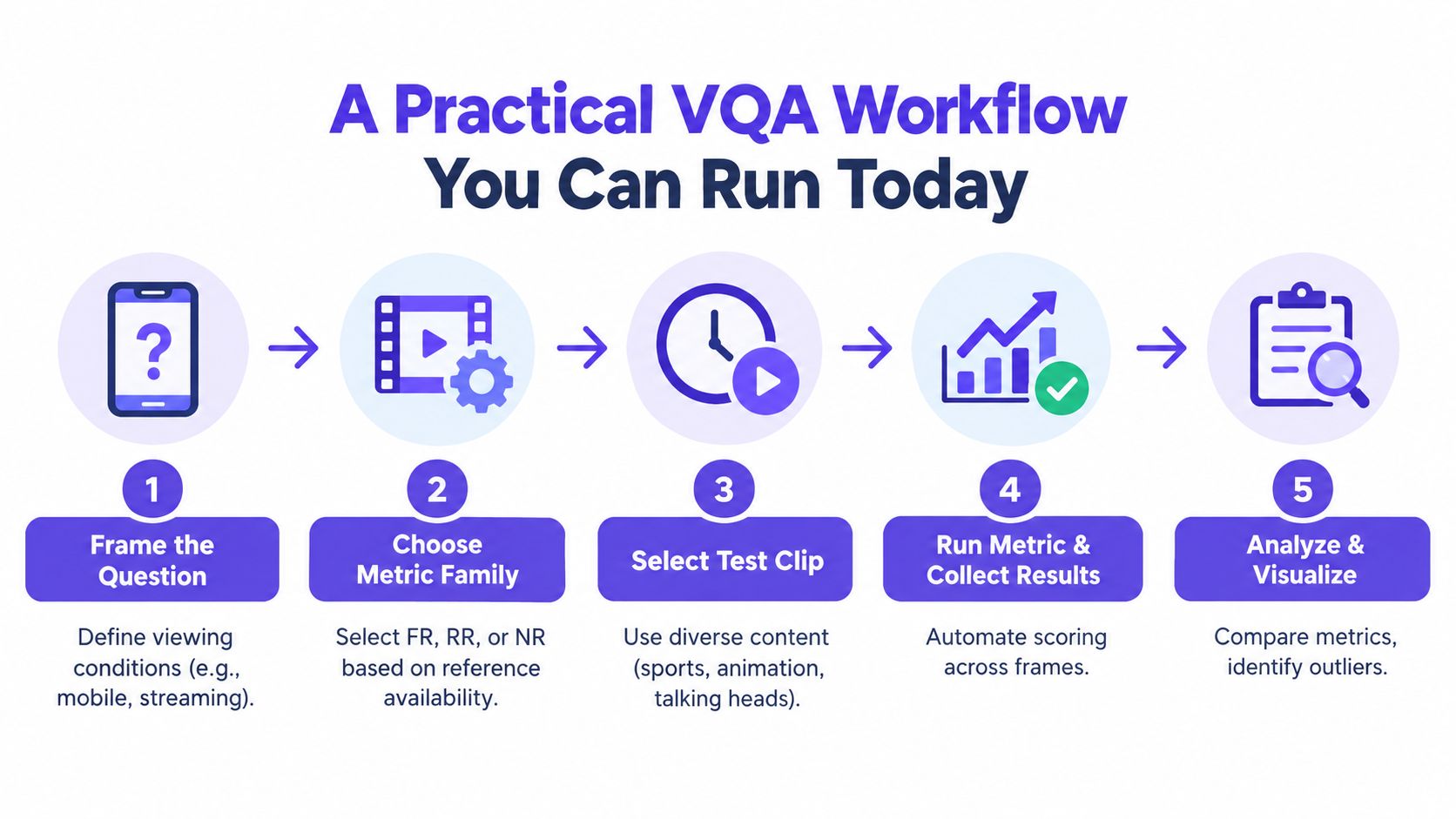
Teams get into trouble when they treat video quality assessment as a single number. It works better as a short, auditable pipeline.
Stage one and stage two
Start by defining the actual decision. “Is this watchable on mobile?” is different from “Can we verify facial detail?” and different again from “Could this be manipulated evidence?”
Then identify what reference material exists.
- If you have an original: Use a full-reference path.
- If you have source summaries only: Reduced-reference may fit.
- If the clip arrived from the wild: Plan for no-reference analysis and manual review.
Stage three and stage four
Choose the metric family that matches the question, not the one that happens to be familiar. For fidelity checks, SSIM and VMAF are practical options when a trusted source exists. For blind review, no-reference methods and forensic inspection become more important.
Run the assessment in a reproducible way. Keep the script, model version, clip boundaries, and timestamps. If your organization is building video feeds or moderation interfaces, good product design matters here. Reviewers need score context, frame-level flags, and fast access to suspect moments rather than a lonely aggregate number.
A technical side note also matters here: if you're comparing outputs across encoders or delivery paths, some grounding in video codec analysis helps separate codec behavior from actual content problems.
Stage five
Verify before acting. Suspicious outputs deserve a second pass, especially when the score conflicts with human impression. For generative-origin questions, one option is AI Video Detector, which analyzes uploaded footage using frame-level analysis, audio forensics, temporal consistency, and metadata inspection, and returns an authenticity-oriented confidence score. That kind of tool answers a different question from classic VQA, but it fits naturally when quality review and authenticity review collide.
Keep a small evidence packet for every high-stakes assessment:
- Raw outputs: Save scores, logs, and per-frame results.
- Tool identity: Record model names and versions.
- Reviewer notes: Capture what a human noticed that the metric may have missed.
- Timing evidence: Keep timestamps for flagged regions.
- Decision context: Note whether the task was publication, moderation, archival, or evidentiary review.
Audit habit: If you can't explain how a score was produced, don't let that score carry the decision alone.
What to Take Away From the Field
Most mistakes in video quality assessment come from three avoidable choices.
First, choose the metric family deliberately. Use full-reference when you possess a trusted original. Use reduced-reference when storage or transport constraints are real. Use no-reference or learned systems when the video comes from uncontrolled environments or when synthetic generation is part of the risk model.
Second, trust human-aligned metrics more than raw pixel agreement. Pixel error still has engineering value, but people don't watch videos as arrays. The more your decision depends on what viewers notice, the more your workflow should favor perceptual measures and human review habits.
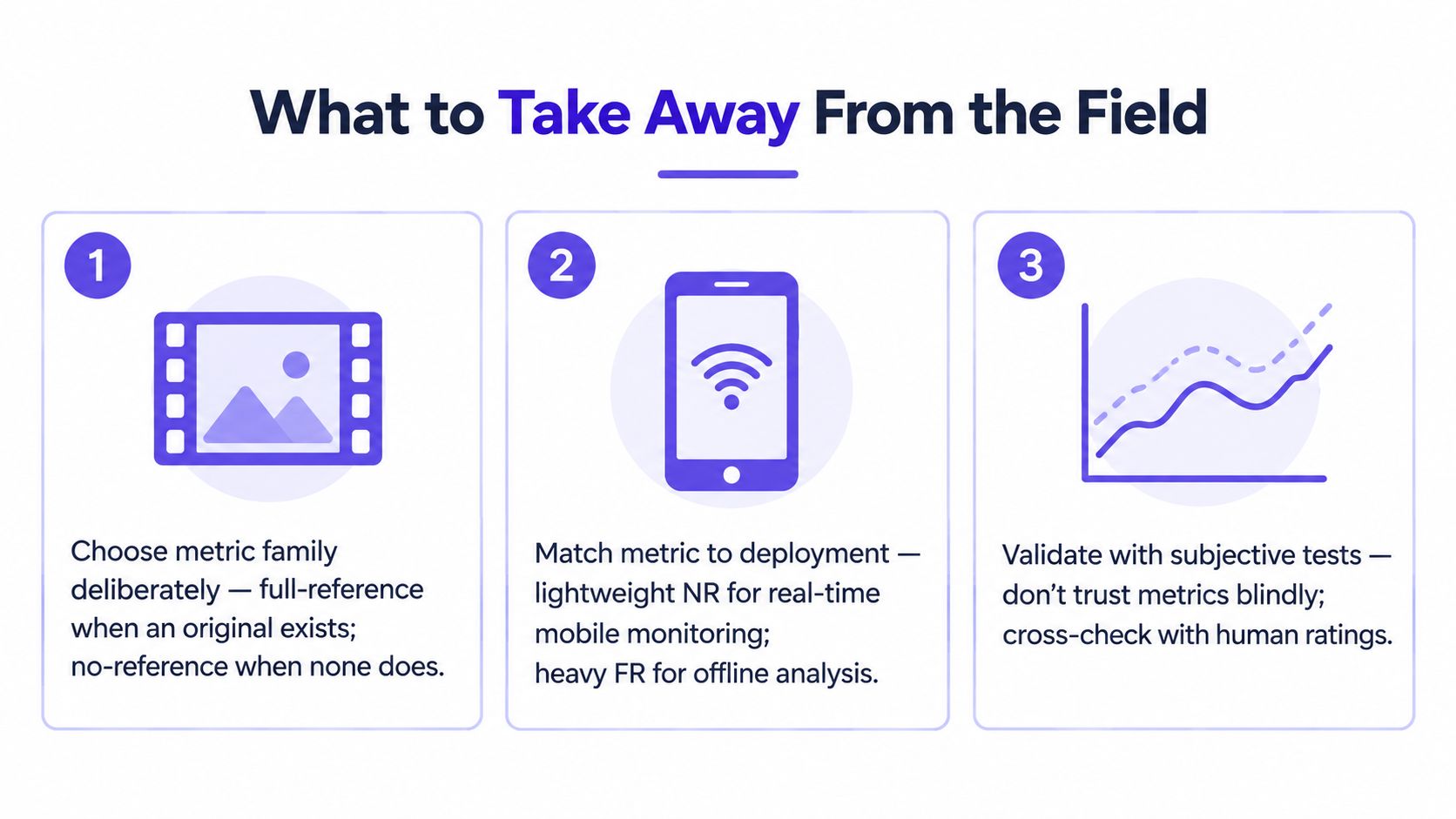
Third, treat VQA as a pipeline, not a score. A number without viewing conditions, model context, clip selection, and reviewer notes can mislead more than it helps. That's especially true in legal review, newsroom verification, and moderation work.
The field has reached an inflection point. Quality assessment used to mean “how much damage did compression do?” Now it also means “does this polished video deserve trust?” As generative media keeps improving, the infrastructure for VQA and the infrastructure for authenticity checks will keep converging. Teams that adopt calibrated, explainable, and auditable video quality assessment now will be much better prepared for the verification workload that's already arriving.


