

Video Privacy Protection: A Practical Guide for 2026

In July 2019, 14,678 deepfake videos were reported online, compared with 7,964 in 2018, and the figure reached 49,081 by June 2020, according to an analysis cited by ISACA. The numbers matter, but the operational lesson matters more: video privacy protection is no longer limited to stopping unauthorized viewers. Teams must also establish whether footage is authentic, identify who appears in it, control how it moves, and decide when it should be deleted.
That work crosses departments. A newsroom needs to protect sources while preserving evidence. A legal team needs a defensible chain of custody. An enterprise security group needs to prevent internal recordings from becoming fraud material. Platforms must triage reports quickly without retaining more sensitive footage than necessary. This guide translates those responsibilities into practical workflows for 2026.
What Video Privacy Protection Really Means
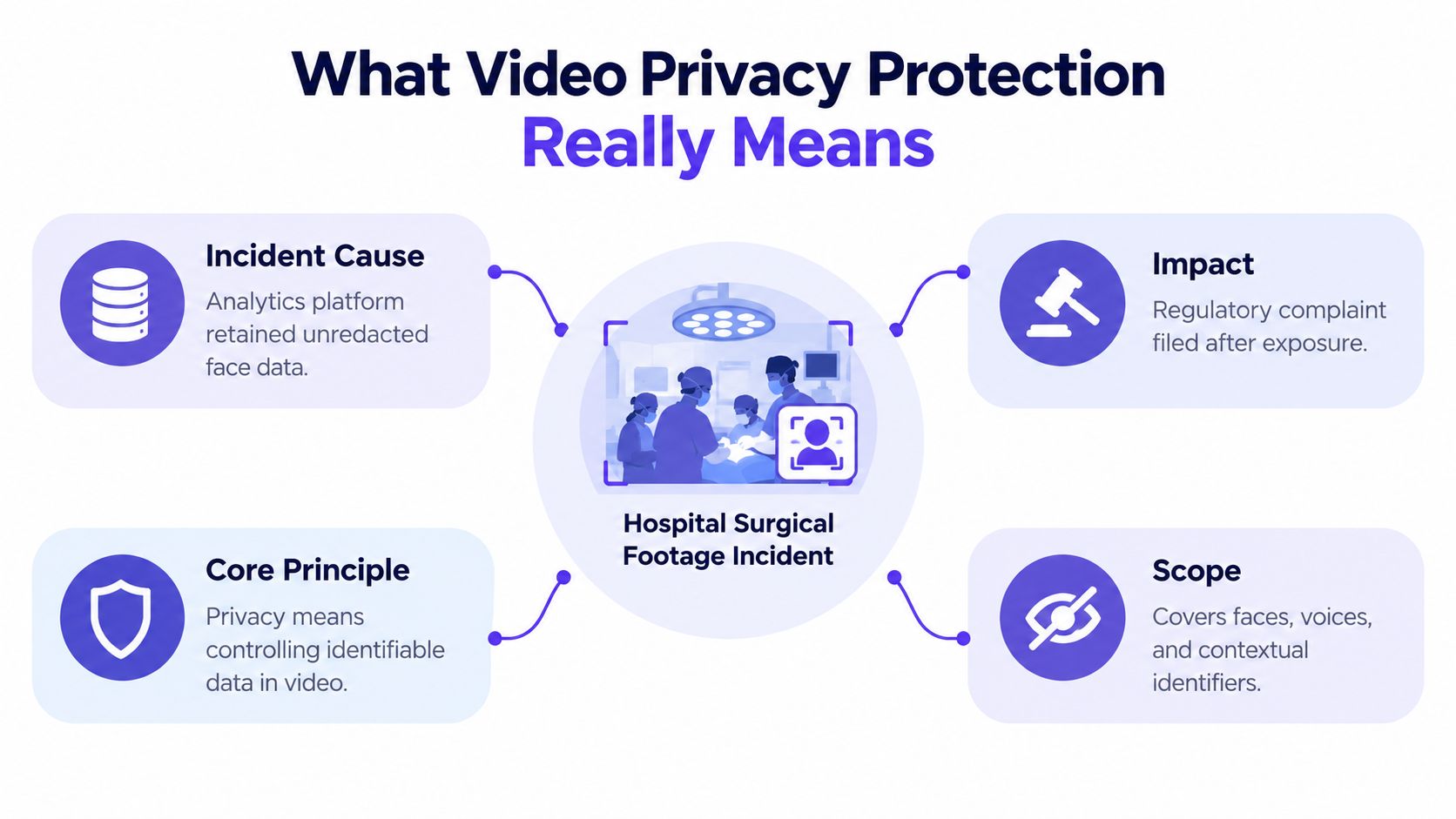
A hospital's surgical training library contains footage that helps clinicians learn, but an analytics service retains unredacted face data from the recordings. Someone later accesses or shares the material, and a patient is recognizable outside the care context. The hospital now faces more than an access-control problem. It must investigate who viewed the footage, determine whether the video was altered, assess re-identification risk, preserve relevant evidence, and show regulators that its handling practices were reasonable.
That scenario illustrates the broader meaning of video privacy protection. It's the full set of controls governing video from collection through retirement. The controls cover capture settings, consent, storage, authentication, metadata, access, editing, publication, monitoring, retention, and deletion.
Three goals must work together
Confidentiality limits who can view or obtain the material. Encryption, role-based access, multifactor authentication, and controlled sharing support that goal. Confidentiality also includes less obvious identifiers, such as voices, uniforms, room layouts, timestamps, and contextual details that can reveal a person even when a face is blurred.
Authenticity answers a different question: can the viewer trust that the footage is genuine and unchanged? A private video can still cause harm if it falsely depicts an employee, public official, patient, or witness. Provenance records, cryptographic hashes, source attestations, and manipulation screening help teams evaluate that risk.
Compliance connects both goals to obligations. Teams may need consent records, retention rules, disclosure decisions, redaction logs, and documented approvals. The European Data Protection Board's guidance on video devices recommends privacy-friendly measures such as masking irrelevant areas and editing out third persons before footage is shared. It also addresses encryption, access control, intrusion detection, and physical protection across the video infrastructure.
Practical rule: Treat every video as a data asset with a lifecycle, not as a file that becomes a privacy concern only when someone uploads it.
A narrow approach asks whether an unauthorized person can open the file. A stronger approach also asks whether the file contains unnecessary identifiers, whether its origin is documented, whether an editor can distinguish authentic footage from synthetic content, and whether downstream copies remain under control. Teams that need a plain-language starting point can review privacy info for video makers, then adapt the principles to their own capture and publication environment.
The Main Threats Targeting Video Content
Video risks tend to cluster into three families, and each one attacks a different point in the pipeline.
Synthetic manipulation compromises trust at the verification and distribution stages. Face swaps can place an individual into a scene they never entered. Voice cloning can make a clip appear to show an executive approving a payment or making a sensitive statement. AI-edited footage can remove context without changing the file's basic appearance. The privacy harm is especially severe when synthetic video impersonates a real person or creates non-consensual intimate imagery. The same ISACA analysis identifies deepfake growth as a major privacy problem involving impersonation, identity misuse, and synthetic pornography.
Metadata leakage begins at capture or export. Files may carry location information, device details, timestamps, software traces, or editing history. Those fields can identify an anonymous source, expose a private filming location, or reveal that internal review occurred before publication. Metadata isn't always visible in a media player, so teams often overlook it. A concise metadata meaning explained resource can help nontechnical staff understand why file properties deserve the same care as visible images.
Unauthorized sharing and re-recording bypasses the original permission model. An insider can download a file, record a restricted display with a phone, capture a video call, or send a copy through an unapproved messaging service. Once another copy exists, the original access list no longer tells the full story. A newsroom may protect its archive but lose control when a reviewer exports a clip to a personal device.
| Threat Family | Pipeline Stage Compromised | Typical Harm | Detection Difficulty |
|---|---|---|---|
| Synthetic manipulation | Verification and distribution | Impersonation, fabricated statements, harassment, or false evidence | High, especially when edits preserve natural movement and sound |
| Metadata leakage | Capture, export, and transit | Source identification, location exposure, or disclosure of internal workflow details | Moderate, when inspection tools are available |
| Unauthorized sharing | Storage, viewing, and distribution | Insider disclosure, screen-recorded copies, and uncontrolled redistribution | High, because the copied file may leave no event in the original system |
Controls should match the failure mode. Encryption helps against unauthorized viewing, but it won't prove that a clip is genuine. A detector may flag manipulation, but it can't stop an editor from sending an authentic sensitive recording to the wrong recipient. Privacy protection works when teams combine controls instead of asking one tool to solve every problem.
Legal and Regulatory Landscape in 2026
Legal requirements differ by jurisdiction and by the organization's role, so teams shouldn't treat one privacy policy as universal clearance. The safest operational model starts with the data involved, the people shown or heard, the purpose of processing, and the audience that may receive the footage.
The U.S. Video Privacy Protection Act was enacted in 1988 after a 1987 incident in which a newspaper published Judge Robert Bork's video rental history, turning video-viewing privacy into a formal legal issue in a major market. The law restricts disclosure of personally identifiable information in video rental records, and summaries note that violations can expose companies to damages of up to $2,500 per affected person. The Video Privacy Protection Act overview provides the historical and statutory background. For modern teams, the practical response is to review whether viewing data, account identifiers, pixels, or linked analytics could reveal what a person watched.
The TAKE IT DOWN Act, passed in 2025, requires covered platforms to provide notice-and-removal procedures for qualifying non-consensual intimate imagery and remove qualifying content within 48 hours, as described by the Congressional Research Service. The compliance deadline for platforms was May 19, 2026. That turns policy language into an operations question: who verifies the report, who handles duplicates, how are reuploads tracked, and how can evidence be preserved without broadly exposing the video?
Regulatory developments around synthetic performers, labeling, and provenance also push organizations toward disclosure before publication rather than removal only after harm occurs. Rules can preserve exceptions for parody, political criticism, or matters of public concern, creating difficult borderline decisions. Multinational teams should route uncertain cases to counsel instead of assuming that a platform label or face blur resolves every obligation.
| Framework | Covered Entity | Primary Obligation | Most Accountable Team |
|---|---|---|---|
| VPPA | Organizations handling covered video-viewing records | Control disclosure of identifiable viewing information and review consent practices | Product, privacy, and legal |
| GDPR data-protection rules | Organizations processing identifiable video involving people in its scope | Establish a lawful basis, minimize collection, restrict access, and document processing decisions | Privacy, security, and compliance |
| TAKE IT DOWN Act | Covered platforms hosting qualifying intimate imagery | Provide notice and removal workflows, meet the removal timeline, and manage repeat uploads | Trust and safety, legal, and engineering |
| State synthetic-media rules | Organizations publishing or distributing covered synthetic content | Apply required disclosure, labeling, or removal procedures | Editorial, product, and legal |
| Synthetic-performer and provenance requirements | Organizations creating or distributing synthetic performances | Document origin and disclose synthetic participation when required | Production, procurement, and compliance |
An audit trail should record the decision, reviewer, source material, transformation, disclosure basis, and retention outcome. Teams can use this audit trail requirements guide as a practical reference, but legal counsel should confirm which rules apply to the specific workflow.
Technical Controls That Actually Work
No single control protects video across every stage. Encryption prevents an unauthorized viewer from reading a file, but it can't detect a fabricated face. An authenticity check may identify manipulation, but it won't prevent a privileged user from exporting the result. Layering matters.
Match each control to its job
Encryption protects stored files and transfers between systems. Use it for archives, review portals, backups, and approved exchanges. It does not solve excessive retention, weak credentials, or a file that was false before encryption.
Access controls determine who can view, edit, download, or approve footage. Role-based permissions should reflect actual duties, while multifactor authentication and audit logging make account misuse easier to investigate. A reviewer who only needs to assess a clip shouldn't automatically receive export rights.
Metadata stripping removes unnecessary EXIF, GPS, device, codec, and editing traces before public release. Preserve a protected original when chain-of-custody evidence requires it, and create a sanitized derivative for wider sharing. A blanket stripping policy can damage legitimate evidence records, so the workflow must distinguish between the evidentiary master and the publication copy. Teams needing a practical inspection reference can consult how to check video metadata.
Anonymization includes face or license-plate blurring, voice masking, cropping, and synthetic re-creation. It reduces exposure for bystanders, children, patients, and confidential sources, but aggressive redaction can remove details needed to understand an event. Review the rendered output, not only the editing timeline, because a mask that shifts during movement can reveal the person it was meant to hide.
AI detection and provenance checks look for manipulation indicators, inconsistent frames, audio anomalies, metadata irregularities, and cryptographic provenance records such as C2PA manifests. These methods support a decision, but they aren't a substitute for human review. A confident result should still be compared with the source context, capture account, timing, and corroborating material.
| Control | Protects Against | Key Limitation |
|---|---|---|
| Encryption | Unauthorized viewing during storage and transfer | Doesn't establish authenticity or reduce unnecessary retention |
| Access control | Excessive internal access and account misuse | Can't control copies made after authorized viewing |
| Metadata stripping | Location, device, and workflow leakage | May remove evidence needed for provenance or investigation |
| Anonymization | Re-identification of faces, voices, and contextual subjects | Can reduce evidentiary clarity and fail when masks are poorly applied |
| AI detection and provenance | Synthetic manipulation and uncertain origin | Results require context, review, and careful handling of false positives |
For organizations that need browser-based screening, AI Video Detector is one option. Its published product information says it analyzes video in the browser without uploading or storing the file on its servers, and it examines frame-level, audio, temporal, and metadata signals. That architecture can reduce transfer exposure, but teams should still verify vendor claims, document their decision threshold, and avoid treating any automated score as conclusive evidence.
Building Video Privacy Into Organizational Workflows
Privacy becomes dependable when a team assigns a control to a specific moment. The trigger might be ingest, editorial review, external disclosure, or archive. Without that trigger, staff tend to improvise under deadline pressure.
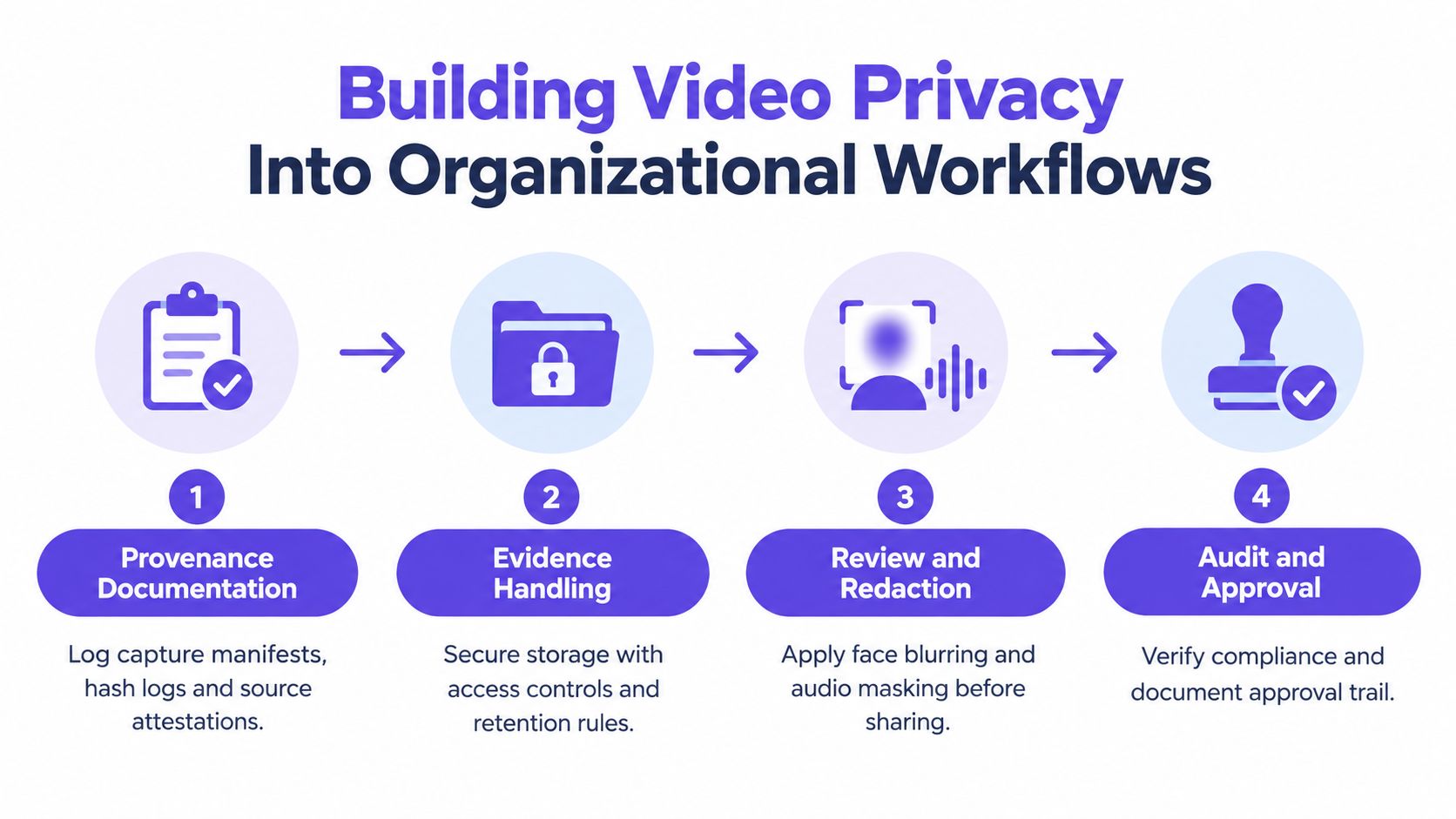
At ingest, record the source, capture context, consent status, original filename, hash, and receiving employee. Store the original in a restricted location and create working copies for analysis. If the source is anonymous, separate identifying contact details from the media file and limit access to the smallest group that needs them.
Make handoffs explicit
Before sharing, the responsible editor or case owner should confirm the audience, purpose, redactions, metadata treatment, and approval record. Legal counsel should decide whether a legal hold overrides ordinary deletion. Security should confirm that the transfer method and recipient permissions match the sensitivity of the material.
Evidence handling needs its own discipline. Use sealed transfer receipts, restricted viewing rooms, access logs, and a clear record of every derivative created. Retention timers should delete routine working files automatically, while approved legal holds preserve only the material covered by the hold.
At publication, keep the public copy separate from the evidentiary master. Monitor for unauthorized reposts where the risk justifies it, and prepare a response path for takedown requests, corrections, and newly discovered manipulation.
This user privacy protection guide offers another reference point for designing handling practices around sensitive uploads and analysis. The most important internal question is simple: can a new employee follow the workflow without relying on an experienced colleague's memory?
A Real-World Workflow Walkthrough
A newsroom receives protest footage from a user who asks not to be identified. The clip may document an event of public interest, but it also includes bystanders, location clues, and a speaker whose identity could create safety concerns. The assigning editor first records the submission details, separates the source's contact information from the media, and restricts the original to the verification team.
The team runs an initial manipulation screen and reviews the result as one signal rather than a verdict. Analysts compare frame continuity, audio behavior, visible lighting, compression changes, and the clip's timeline with independent accounts. A metadata review looks for location and device traces, while a provenance check examines whether the file includes a valid capture manifest or other origin record.
Decisions happen in sequence
If the footage appears credible, the editor creates a working copy. A video specialist blurs uninvolved faces and masks voices that aren't necessary to the public-interest purpose. The original remains sealed, and the redacted derivative receives its own hash and version record.
Legal counsel then assesses publication risks, including consent, privacy, defamation, source protection, and any applicable disclosure or labeling rules. The editor can view the derivative, counsel can view the restricted original when necessary, and neither role automatically receives unrestricted download rights.
If verification fails, the newsroom doesn't delete the suspicious file. It preserves the relevant logs, records why the clip was rejected, limits further access, and contacts the source through the protected channel if clarification is appropriate. If later reporting shows the clip was synthetic or misleading, the incident record supports a correction and helps identify whether copies entered other systems.
Before release, the publication team documents what was altered and why. If synthetic elements remain in a public-interest reconstruction, the team applies the required transparency treatment and labels the content clearly. The workflow protects both the people shown and the newsroom's ability to explain its decision later.
Practical Checklists by Audience
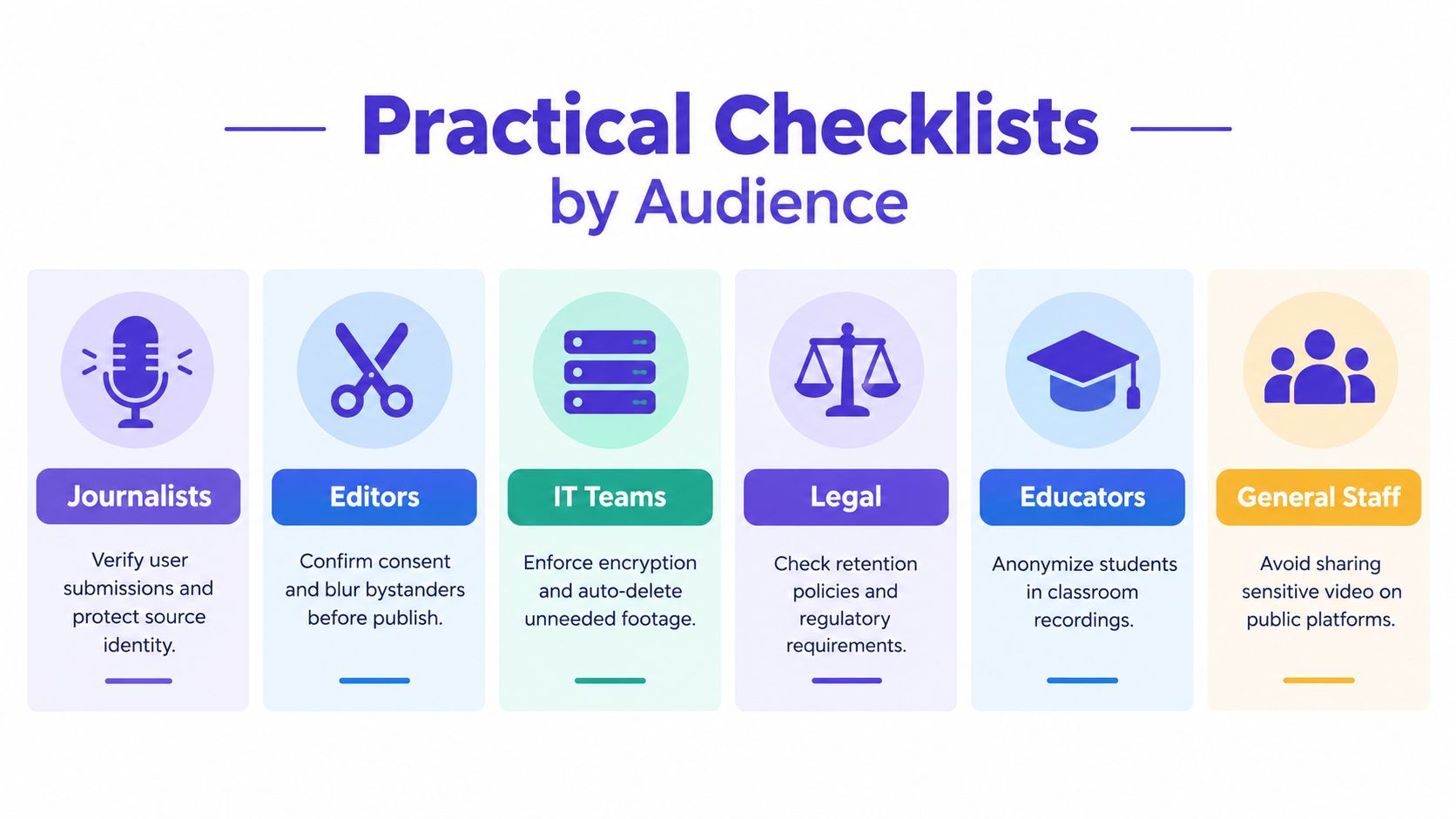
Different teams face different failure modes, but each can use the same pattern: identify the risk, apply a control, document the decision, and escalate uncertainty.
Journalists
- Verify submissions: Compare source accounts, timestamps, surrounding context, and manipulation-screening results.
- Protect identities: Separate contact details, restrict the original, and use face or voice masking where needed.
- Inspect metadata: Remove unnecessary location and device traces from publication copies.
- Preserve provenance: Hash originals and record every derivative.
- Escalate uncertainty: Ask, “Who could be harmed if this clip is wrong or the source is identified?”
Legal and law-enforcement teams
- Authenticate evidence: Combine source attestations, hashes, provenance manifests, and contextual corroboration.
- Control access: Use restricted viewing rooms, multifactor authentication, and export permissions.
- Record custody: Log each transfer, reviewer, copy, transformation, and storage location.
- Apply holds carefully: Preserve relevant originals while allowing routine working copies to expire.
- Escalate uncertainty: Ask, “Can we explain the evidence history to an opposing party or regulator?”
Enterprise security groups
- Inventory recordings: Identify meeting footage, surveillance feeds, training videos, and stored call recordings.
- Assign permissions: Use role-based access, multifactor authentication, and audit logs.
- Encrypt transfers: Keep approved storage and delivery channels separate from personal messaging tools.
- Limit retention: Configure deletion timers and document exceptions.
- Escalate uncertainty: Ask, “Could an insider or compromised account export this without detection?”
Platforms and moderators
- Triage reports: Separate suspected synthetic abuse, intimate imagery, impersonation, and ordinary disputes.
- Preserve evidence: Keep restricted hashes, report records, and decision logs without exposing unnecessary copies.
- Check duplicates: Match reuploads and altered versions against known harmful material.
- Meet deadlines: Route qualifying reports to the notice-and-removal workflow.
- Escalate uncertainty: Ask, “Does this case require legal review because privacy, parody, or public-interest speech overlap?”
Educators
- Capture consent: Record permissions for students, guests, classrooms, and distribution channels.
- Minimize exposure: Frame narrowly, blur uninvolved learners, and avoid unnecessary names or locations.
- Restrict access: Use approved learning systems rather than public links.
- Delete on schedule: Remove working footage when the educational purpose ends unless a documented exception applies.
- Escalate uncertainty: Ask, “Would a student or guardian reasonably expect this recording to be shared this way?”
Developers
- Minimize collection: Capture only the resolution, audio, fields, and identifiers the feature needs.
- Protect processing: Encrypt data in transit and at rest, and isolate temporary files.
- Build redaction: Support face, plate, voice, and metadata controls before export.
- Log decisions: Record access, transformations, confidence results, and deletion events without storing sensitive content unnecessarily.
- Escalate uncertainty: Ask, “Does this feature create a new retention or re-identification risk before launch?”
Putting It All Together
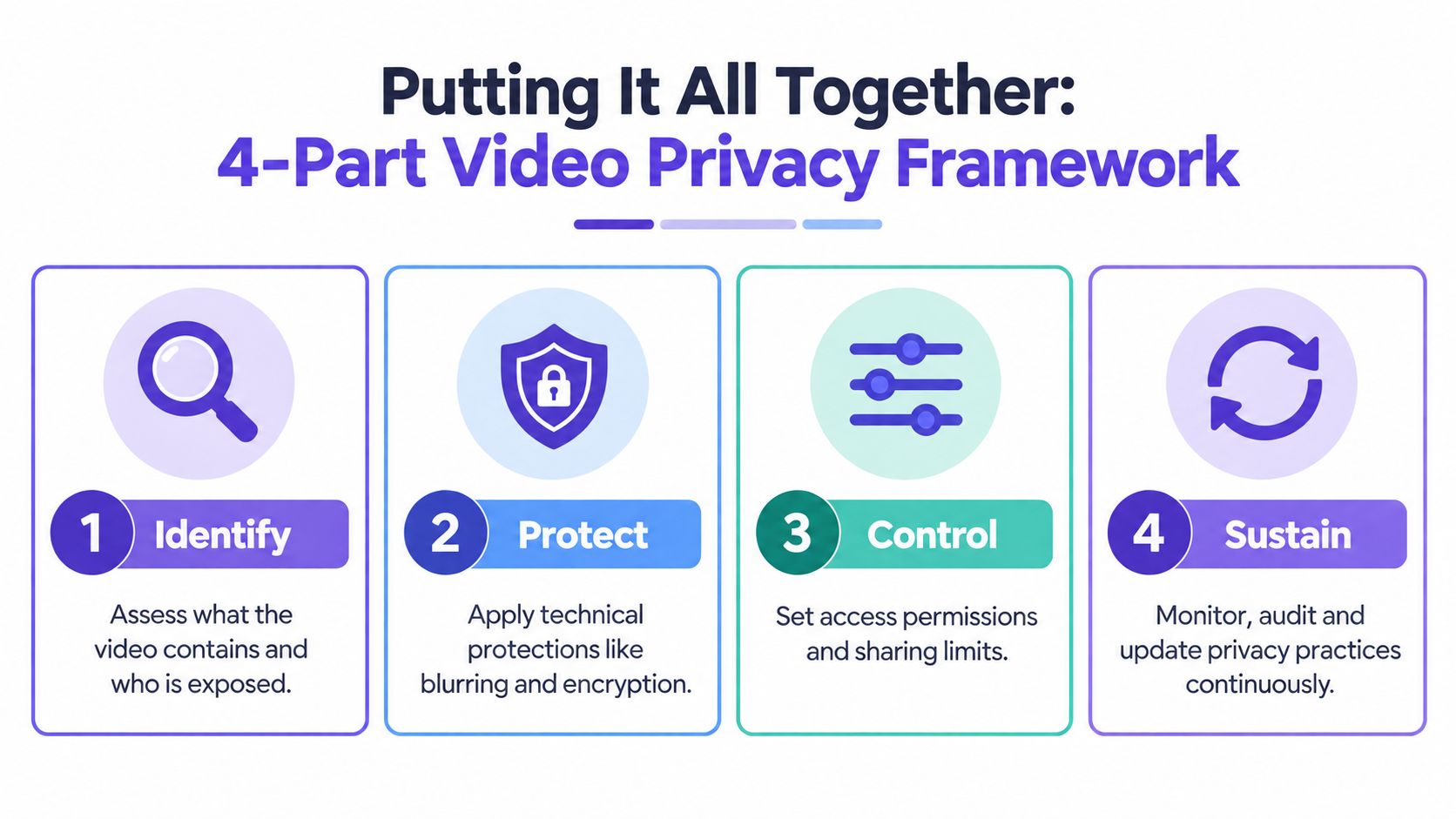
Use four questions for every video asset.
- Identify: What does the video contain, and who could be exposed? Default control, a structured sensitivity review. Failure signal, an unknown face, voice, location, or source.
- Shield: How will the team protect it during capture, storage, and sharing? Default control, encryption plus least-privilege access. Failure signal, an unapproved copy or open link.
- Control: Can the team verify origin, authenticity, and permitted use? Default control, provenance records with human review. Failure signal, unexplained edits, missing context, or conflicting metadata.
- Sustain: Can the organization prove what it did and remove what it no longer needs? Default control, retention timers and audit logs. Failure signal, undocumented exceptions or stale working files.
A reactive team responds after exposure. A defined team has assigned owners and repeatable approvals. A proactive team tests those controls before an incident. Choose one upgrade for the next quarter, such as automatic retention limits, protected provenance logging, or a formal deepfake escalation path, and assign a person responsible for measuring whether it works.
Audit one real video workflow this week. Map where the original enters, who can access it, which identifiers it contains, how authenticity is checked, and when every copy is deleted. Then bring the map to legal, security, editorial, or compliance leadership and approve one concrete control change before the next sensitive video arrives.


