

AI Video Describer: How It Works and Why It Matters

You're probably watching a video right now that should be easy to follow, but isn't. The speaker is moving fast, the screen is full of visual cues, and if you can't see those cues clearly, the whole lesson turns into guesswork. That's the core problem an AI video describer tries to solve, it turns moving images, speech, and timing into a narrative that people can actually use.
A good describer is more than a captioning layer. It has to recognize what's happening, decide what matters, and deliver the description at the right moment, without stepping on the video's own audio. That's why this field sits at the intersection of accessibility, multimodal AI, and trust, especially when the same pipeline is also expected to help detect whether a clip is authentic.
The Rise of the AI Video Describer
A blind student opens a lecture video and hears the instructor say, “as you can see here,” while the screen changes twice in five seconds. The student doesn't need more words in the abstract, they need the right words at the right time. That gap is exactly where an AI video describer becomes useful, because it acts as a semantic bridge between pixels and meaning, not just a text dump of what a model thinks it saw.
Video description didn't begin as an automation problem. In 2013, the Smith-Kettlewell Eye Research Institute launched YouDescribe, a web-based tool for adding audio descriptions to YouTube videos, which made the workflow far more scalable than fully manual production. By 2022, the project's archive reported 12,000+ average annual visitors, about 3,000 volunteer describers, and more than 5,500 audio-described YouTube videos created globally (research summary).
That history matters because it shows the path from community effort to infrastructure. Volunteer describing proved demand, but the volume of modern video makes hand-crafted coverage impossible everywhere. One accessibility briefing notes that 82% of all internet traffic is video, 500 hours of video are uploaded every minute to YouTube, and captioned videos are watched to the end 40% more often than uncaptioned videos, which explains why automated description is now a platform concern, not a niche feature (accessibility briefing).
Practical rule: if your video workflow already depends on search, learning, support, or compliance, description belongs in the pipeline, not as a post-launch nice-to-have.
If you're comparing how video understanding works more broadly, this overview of AI video analysis is a useful companion piece.
Inside the Multimodal Processing Pipeline
A useful way to understand an AI video describer is to think like a film crew. The vision model is the cinematographer, the audio model is the sound mixer, and the temporal model is the script supervisor. Each one sees a different part of the story, and the output only makes sense when the three agree on what happened, in what order, and with what importance.
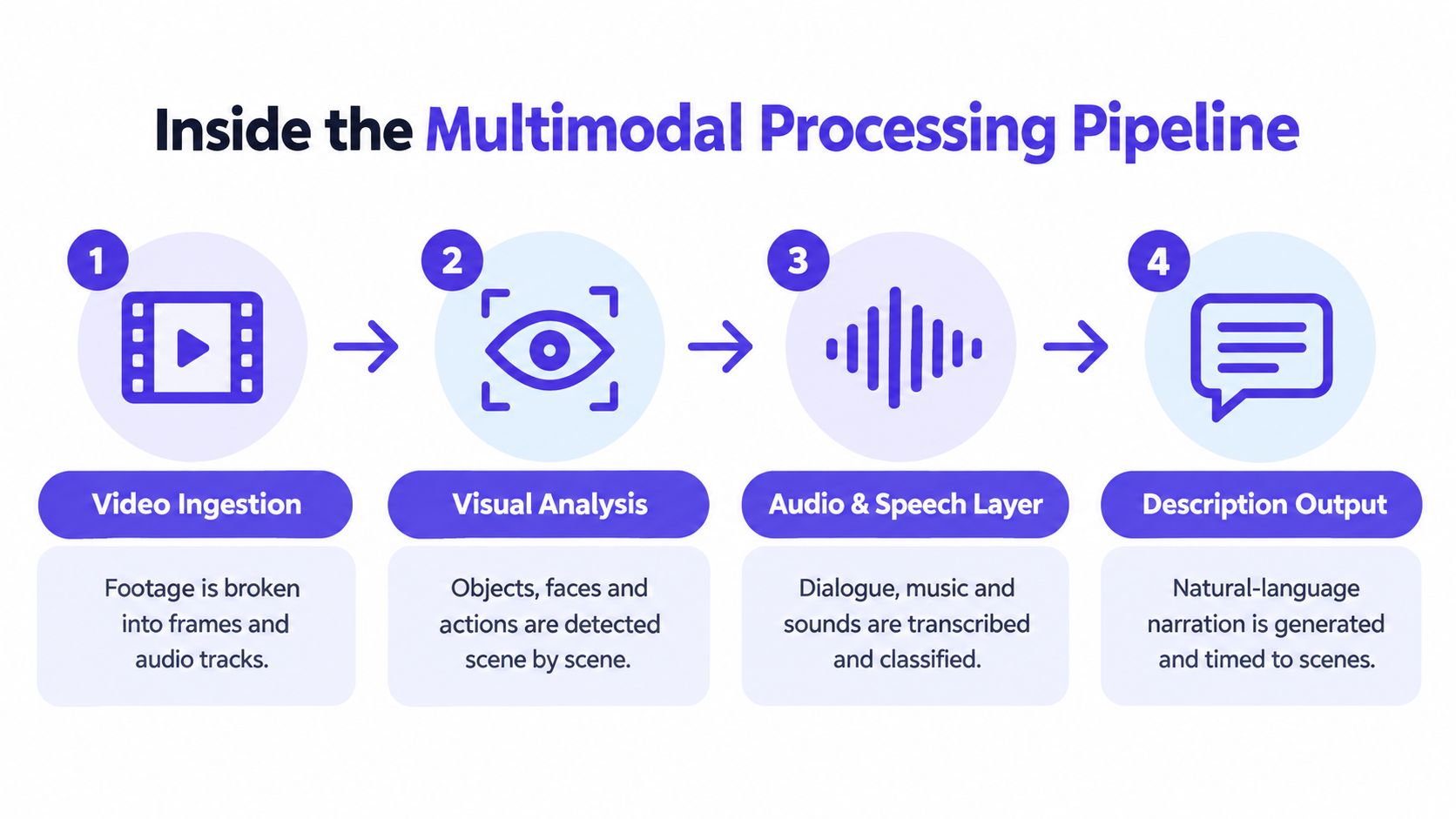
Step 1, video ingestion
The pipeline starts by splitting a file into frames, timestamps, and audio segments. That's the raw material, and it's the part most users never see. If the system can't line up these streams cleanly, every later decision gets shaky.
Step 2, visual analysis
Next, the vision layer tracks people, objects, camera motion, and scene changes. The system then answers questions like who entered the frame, what moved, and which event seems central. If you're exploring practical applications across products and media workflows, these multimodal AI use cases are a helpful reference point for how visual and non-visual signals get combined.
Step 3, audio and speech layer
Audio matters because the clip might be visually ambiguous. A person looking at a box could be unboxing a laptop, opening evidence, or setting up a stage prop. Speech, music, and background sounds give the describer the missing context, which is why multimodal systems are stronger than vision-only ones in messy real-world footage.
Step 4, description output
The final layer converts all that structured signal into natural language, ideally with timing that matches the scene. The best systems don't just say what is visible, they decide when the sentence should land so the listener can follow it without losing the original dialogue.
A recent model, MR-VPC, is a good example of why this matters. It combines video, transcribed speech, and event boundaries, and the authors reported better performance when all modalities were present and also when one modality was missing (MR-VPC paper). That fallback behavior is important in practice because real clips are messy, and the system can't assume every signal will be clean.
Real-World Applications Beyond Basic Accessibility
Accessibility is the starting point, but it isn't the only reason teams adopt an AI video describer. Media archives need metadata, search tools need semantic indexing, and moderation teams need a fast way to understand what a clip contains before a human spends time on it. In each of those cases, the description is not the final product, it's the layer that makes the video useful to other systems and to people.
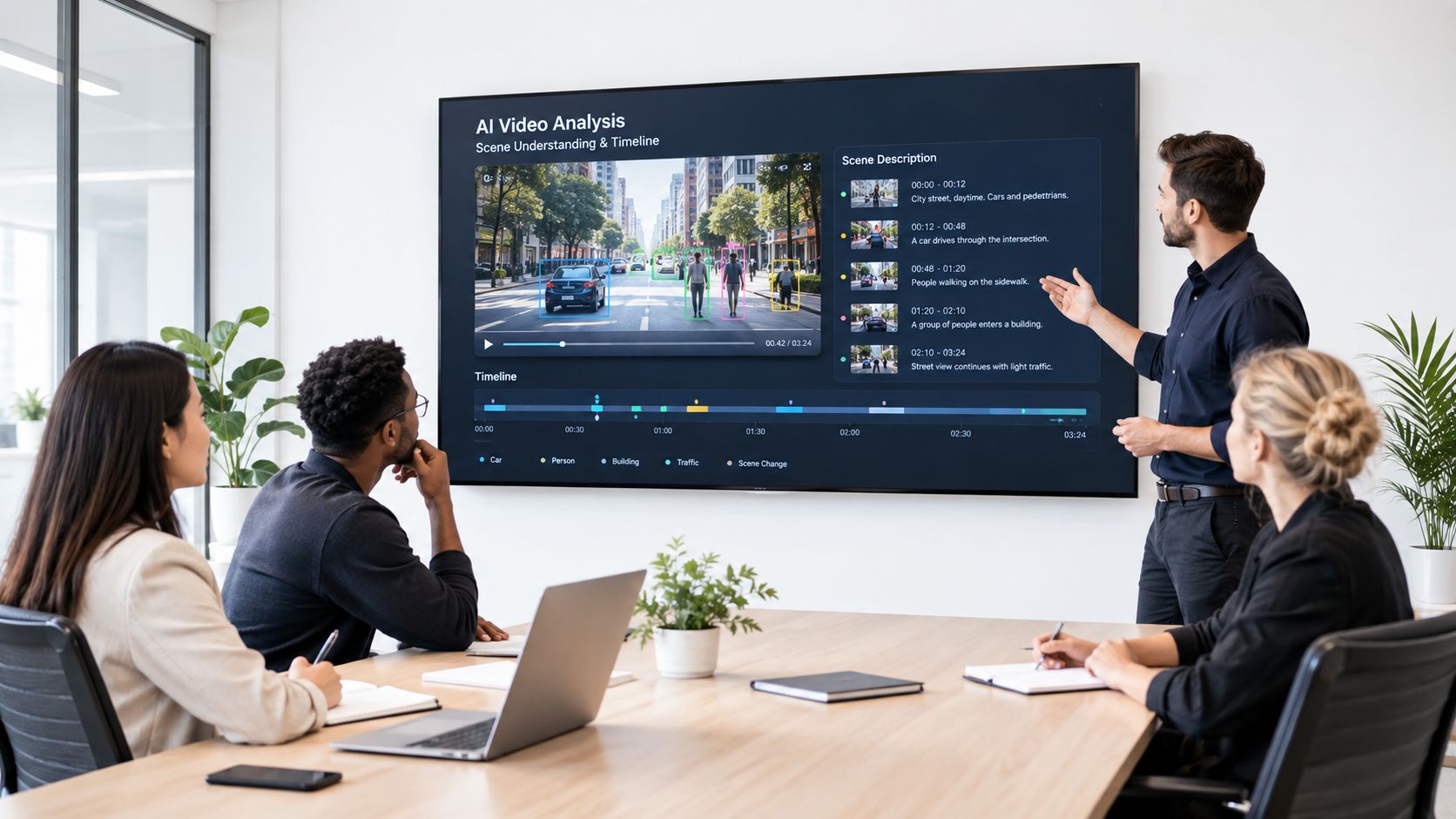
One underappreciated use case is archival cleanup. Large video libraries often contain content that's technically stored, but not meaningfully searchable. Descriptive AI can generate richer tags, scene summaries, and event-level text that help educators, editors, and platform teams find the right clip without watching everything manually. That turns old footage into something usable again.
Description is not the same as trust
In high-stakes settings, description alone is not enough. A newsroom, legal team, or investigator may need to know both what a video appears to show and whether the file itself is trustworthy. That's where descriptive analysis should sit alongside authenticity checks, not replace them.
A privacy-first authenticity workflow can examine frame-level behavior, audio forensics, temporal consistency, and metadata in parallel, which is useful when the question is, “What is this clip, and can we trust it?” The technical point is simple, a sharp description of a fake video is still a problem. If the source is synthetic, the workflow needs a separate verification layer before the content informs decisions.
Description also supports education and moderation in quieter but important ways. Teachers can make recorded lessons easier to review, while moderation teams can prioritize clips that need immediate human review. The value isn't only speed, it's triage, because a structured summary lets people focus on the items that matter.
The Hidden Bottlenecks in Automated Description
The biggest mistake in this field is assuming that better recognition automatically produces better descriptions. It doesn't. A model can identify every object in a room and still miss the one action that matters to the plot, because editorial judgment is not the same thing as object detection.
Recent user-driven audio description research makes that gap clearer. Prior AI systems often didn't adapt well to different blind and low-vision needs, and users wanted control over what gets described and when it's delivered (user-driven audio description paper). That sounds like a small preference issue, but it's a product constraint, because a description can be technically correct and still feel unusable if it's too verbose, too sparse, or arrives too late.
Timing is a hard systems problem
The synchronization bottleneck is easy to underestimate. A description has to fit into natural pauses, avoid overlapping speech, and still arrive before the relevant moment passes. For live or fast-moving content, that becomes a coordination problem between language generation, audio timing, and scene detection.
Descriptions that land late are often worse than no description at all, because they teach the listener to mistrust the system.
This is why timing consistency matters so much in production workflows. If the description lags the scene, the listener hears the wrong thing at the wrong moment, and the experience breaks. If it tries to cover every detail, it crowds out the video's own audio and becomes exhausting to follow. For a deeper look at that issue, see the time consistency problem in video AI.
The other bottleneck is user preference. Some people want concise descriptions that only cover major events. Others want dense narration that captures posture, movement, and subtle changes in the scene. A single default output won't satisfy both groups, which is why adaptive settings matter as much as raw model quality.
Choosing the Right Implementation Architecture
The right architecture depends on your risk profile, your latency target, and how much control you need over data. A cloud API can get teams moving quickly, while on-premise deployment gives security and compliance teams more control over sensitive video. Custom training sits at the far end of the spectrum, where the organization wants domain-specific behavior and can support the maintenance burden.
| Architecture Type | Best For | Privacy Level | Setup Complexity |
|---|---|---|---|
| Cloud-based API | Fast rollout, prototypes, product teams that need integration speed | Moderate, depending on vendor controls | Low |
| Off-the-shelf platform | General accessibility workflows, internal teams with standard video formats | Moderate to high | Low to medium |
| On-premise deployment | Legal, healthcare, and regulated environments | High | High |
| Custom-trained model | Specialized domains, strict editorial needs, unique vocabularies | Variable, often highest when self-managed | High |
The table is only useful if you map it to your actual constraints. If your team handles public training videos, speed and cost may matter most. If you handle confidential evidence, the ability to keep processing inside your own environment probably matters more than convenience.
A practical selection rule
Start with the narrowest solution that meets your privacy and latency needs. Then expand only if you can prove the extra complexity is worth it. Many teams overbuild too early, especially when they assume custom training will fix problems that are caused by poor prompt design, weak review workflows, or missing editorial rules.
A good implementation plan should also separate generation from governance. The description engine can be fast, but the approval path, logging, and escalation rules determine whether the system is trustworthy enough for real use. That's where technical leaders and accessibility advocates usually converge, because both groups care about reliability more than novelty.
Evaluating Performance with Modern Benchmarks
Old evaluation habits fail fast in video description. If you score a system only on coarse caption metrics, you can miss whether it tracked motion, object interaction, and event order accurately. That matters because a one-sentence summary can look fine on paper while still failing the actual listening experience.
Modern benchmarks push in a different direction. A recent benchmark, CaReBench, was built from 1,000 human-annotated video-caption pairs and used detailed captions averaging 227.95 words versus 9.41 words in MSR-VTT, which shows how much denser expert-grade descriptions need to be to capture scene dynamics (CaReBench paper). The point isn't that every output should be long, it's that evaluation must measure whether the model can sustain detail when the clip demands it.
What to test in practice
If you're building or QA'ing a describer, test more than object naming.
- Motion tracking: Does the system follow a person, object, or camera movement across time?
- Event ordering: Does it describe the sequence in the right order, or shuffle causes and effects?
- Scene prioritization: Does it focus on the central action instead of background clutter?
- Fallback behavior: Does it stay useful when one modality is weak or missing?
For a practical benchmark-selection framework, this guide to benchmark datasets is a solid place to pressure-test your evaluation plan.
A useful internal standard is simple, the model should be judged on what a listener needs. If the clip is a lab demo, details about hand motions may matter more than room decor. If it's a live interview, transcript alignment may matter more than visual texture. The benchmark has to reflect the user task, not just the model's comfort zone.
The Future of Video Understanding and Trust
The next phase of video AI is not just about making descriptions more fluent. It's about making them more timed, more adaptive, and more trustworthy in environments where a clip can be both informative and misleading. That means editorial judgment, multimodal fallback, and authenticity verification need to evolve together, not as separate projects.
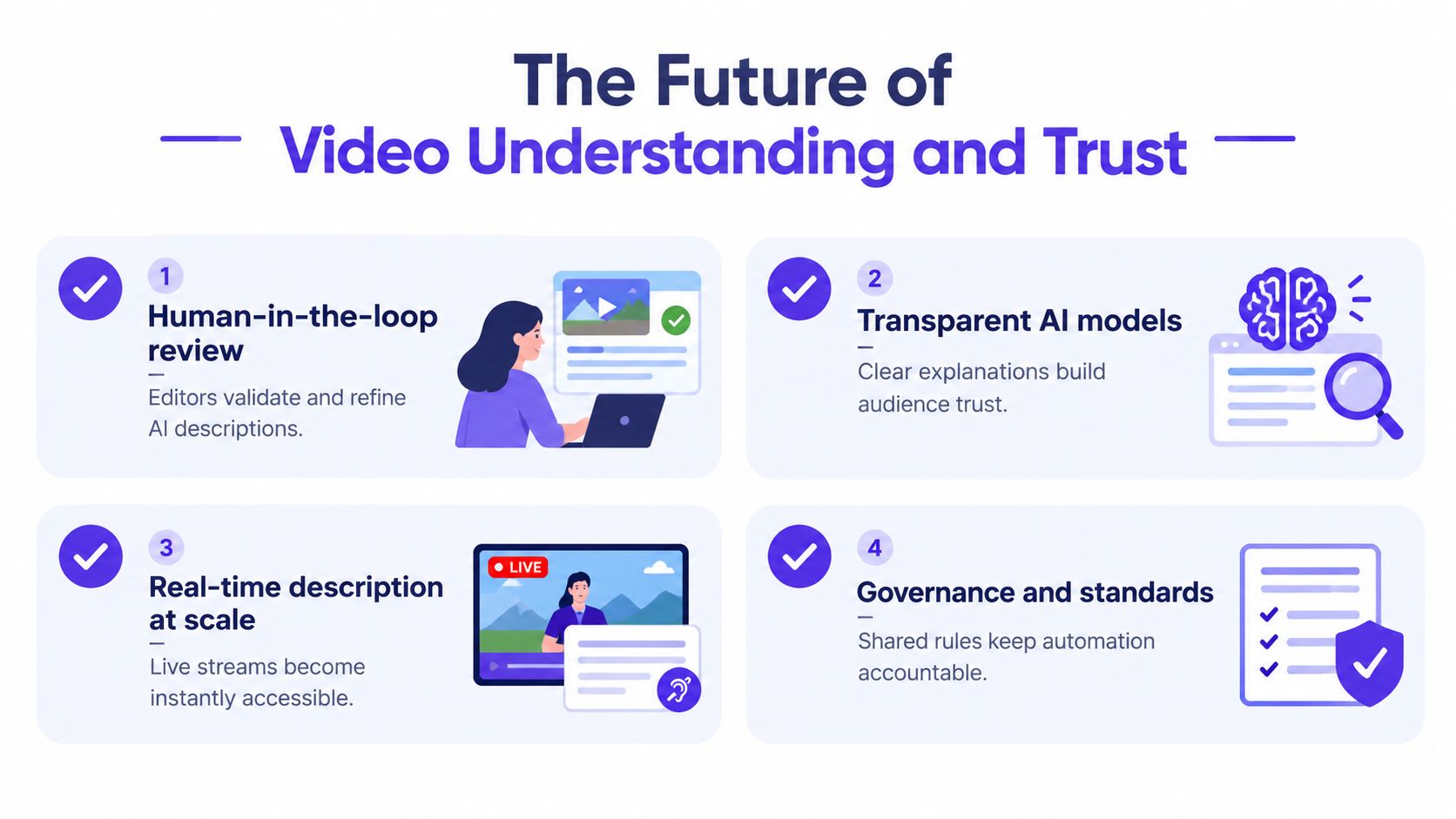
The strongest systems will probably keep humans in the loop where judgment matters most. Editors can validate nuanced descriptions, policy teams can define what should be disclosed, and security teams can verify whether the footage itself is real before it gets summarized or distributed. That split of labor is healthy, because AI is good at scale and humans are still better at deciding what deserves emphasis.
A short audit checklist
- Human-in-the-loop review: Editors validate and refine AI descriptions.
- Transparent AI models: Clear explanations build audience trust.
- Real-time description at scale: Live streams become instantly accessible.
- Governance and standards: Shared rules keep automation accountable.
The long-term opportunity is not just accessibility. It's a video workflow that is searchable, reviewable, and defensible when a clip enters public, legal, or operational use. If your organization handles video at any meaningful volume, audit one workflow this week, accessibility, moderation, training, or evidence review, and decide where AI Video Detector or a similar authenticity check should sit alongside description so your team can trust what it sees before it acts on it.